5
How to Charge your 3Doodler Start+
Comment Charger Votre Stylo Start+
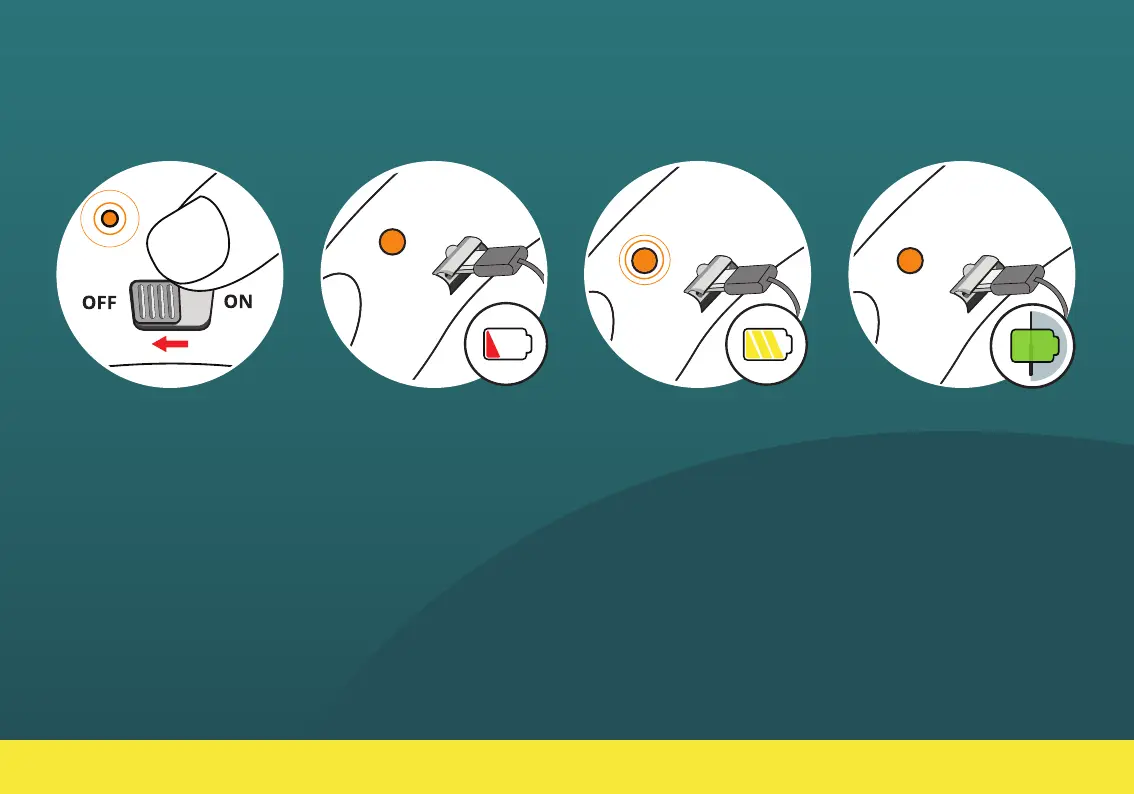
When the pen’s battery is
running low, the LED light will
SLOWLY FLASH ORANGE.
Turn o your 3Doodler Start+
and charge it at your earliest
convenience.
Lorsque la batterie de votre
stylo Start+ est faible la LED
deviendra orange et clignotera
lentement. Glissez le bouton sur
OFF pour éteindre le stylo 3D.
1.
Connect your 3Doodler
Start+ to a power source
using a micro USB cable (as
provided).
Branchez votre stylo Start+ a
une source d’énergie grâce au
câble micro USB fourni.
2.
When your 3Doodler Start+
is fully charged, the LED light
will stop flashing and change
to SOLID ORANGE.
Quand le stylo Start+ sera
complètement chargé, la
LED arrêtera de clignoter et
restera orange.
4.
The LED light will FAST
FLASH ORANGE while
charging.
La LED orange clignotera
rapidement pendant la durée
de chargement.
3.
30 min


 To Next Page