Need help?
Do you have a question about the 3G Audio AK-400 and is the answer not in the manual?
Instructions for selecting the correct voltage input for the amplifier.
List of items included with the karaoke amplifier.
Lists key capabilities and design aspects of the amplifier.
Explains the use of RCA cables for audio input and connection.
Guidance on connecting speaker cords properly.
Illustrates the complete system wiring and setup.
Crucial safety rules to prevent hazards and ensure safe operation.
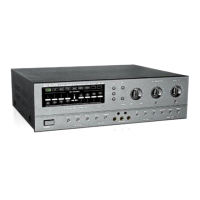
The 3G Audio Karaoke Amplifier, encompassing models AK-200, AK-300, and AK-400, is a sophisticated audio unit designed to enhance your karaoke experience. This manual provides comprehensive instructions for its operation, installation, and maintenance, ensuring you get the most out of your purchase. Before diving into the details, it's crucial to understand the importance of reading this manual thoroughly and saving it for future reference. While the shapes of plugs and jacks might vary across different countries, the fundamental connection methods and operational procedures for this unit remain consistent.
One of the primary considerations before operating the amplifier is to verify the voltage input. The unit features a voltage selector located on the back panel, which is initially set to 220V. It is imperative to check if this setting aligns with your local voltage intensity. If your local voltage is 110V, you can adjust the selector accordingly. Crucially, always ensure the power supply cord is disconnected before making any adjustments to the voltage input. This safety precaution prevents potential electrical hazards and damage to the unit.
Upon unboxing, you will find an owner's manual included in the package. For models AK-300 and AK-400, a remote control unit and two AA cells are also provided, offering convenient wireless operation.
The 3G Audio Karaoke Amplifier boasts a range of features designed to deliver a superior audio experience, particularly for karaoke enthusiasts. A standout feature is its strong whistle inhibition, which helps maintain clear audio output during vocal performances. The amplifier supports multi-mode singing styles, allowing users to adapt the sound to various vocal preferences and genres. Its design is specifically tailored for KTV (Karaoke Television) rooms, emphasizing high reliability and robust performance in such environments.
The amplifier is capable of connecting two groups of speakers simultaneously, providing flexibility in setting up your audio system. A special drive design for human voice ensures that vocals are rendered richly and naturally, enhancing the singing experience. Furthermore, the unit incorporates a strong cooling fan, which is essential for ensuring long-term stable operation, especially during extended use.
Connecting the amplifier involves several steps, starting with the speaker cords. To connect a speaker cord, press down the button as illustrated in the manual, insert the cord into the hole, and then release the button to secure the cord. It is vital to select suitable speaker cords and connect them via the shortest possible path to minimize signal loss. The unit allows for the connection of either one or two groups of speakers. If only one group is used, you can choose to connect it to either group A or group B. A critical aspect of speaker connection is ensuring the correct phase of the speaker cords. Incorrect phasing can lead to unnatural sound and a noticeable absence of low frequencies. When making connections, ensure that the ends of the cords do not touch each other to prevent short circuits.
The front panel of the amplifier offers a comprehensive array of controls for both microphone and music adjustments. For microphone control, there's a microphone output level control to adjust the overall volume of all connected microphones. An echo control allows you to manage the echo effect of the microphone input, while a microphone delay control fine-tunes the delay of the echo. The microphone echo feedback degree control lets you adjust the intensity of the echo feedback. Separate controls for microphone bass and treble allow for precise tone shaping of the vocals. Additionally, there are microphone input jacks (1/2/3) for connecting multiple microphones. For models AK-300/AK-400, additional microphone-related features include an auto vocal follow function, background vocal cancel, and pitch control, which further enhance the karaoke experience by allowing users to adjust the key of the music to match their vocal range.
Music control features include a music volume control for adjusting the overall music level, along with music bass and treble controls for fine-tuning the music's tonal characteristics. A balance control allows you to adjust the balance between the left and right channels, ensuring an even sound distribution. The unit also includes external tone control jacks for connecting external audio processing equipment.
On the back panel, you'll find various input and output terminals. These include an earth clamp for grounding, microphone balance input/output (1/2), and a remote control system/line control input terminal. A cooling fan is prominently featured, underscoring the unit's commitment to stable operation. Speaker outputs are provided for both right and left channels. For audio and video connections, there are effector L/R inputs, video output, audio output, mixing audio connection output jack, and multiple audio inputs for devices such as LD, CD, DVD, VCD, and AUX. The LD priority feature allows the unit to prioritize the audio from an LD source. The back panel also houses the 5A/220V AC power cord and a 5A/220V fuse hold for protection. The 110V/220V voltage input selector and 220V power output jack with switch control are also located here.
Safety regulations are paramount for the proper and safe operation of this amplifier. In case of abnormal phenomena, such as unusual sounds or smells during operation, immediately turn off the power and unplug the unit. This prevents potential damage and ensures user safety. Power cords require careful handling; avoid touching them with wet hands to prevent electric shock, and ensure they are not placed in crowded areas where they could be damaged or cause tripping hazards. It is crucial to keep the unit away from water and other sundry goods to prevent damage and electrical hazards. Under no circumstances should you open the cover of the unit unless you are a qualified electrician or explicitly guided to do so by the manual. This is to prevent exposure to high voltages and internal components. When the unit is not in use, pull out the power cords to avoid fire hazards. Finally, avoid overloading the unit, as this can lead to overheating and potential damage. Adhering to these safety guidelines will ensure a long and safe operational life for your 3G Audio Karaoke Amplifier.
 General
| Channels | 2 |
|---|---|
| Frequency Response | 20Hz - 20kHz |
| Signal-to-Noise Ratio | >90dB |
| Output Impedance | 4-8 Ohms |
| Power Output | 400W (200W per channel) |


 To Next Page