3, ZERO OFFSET
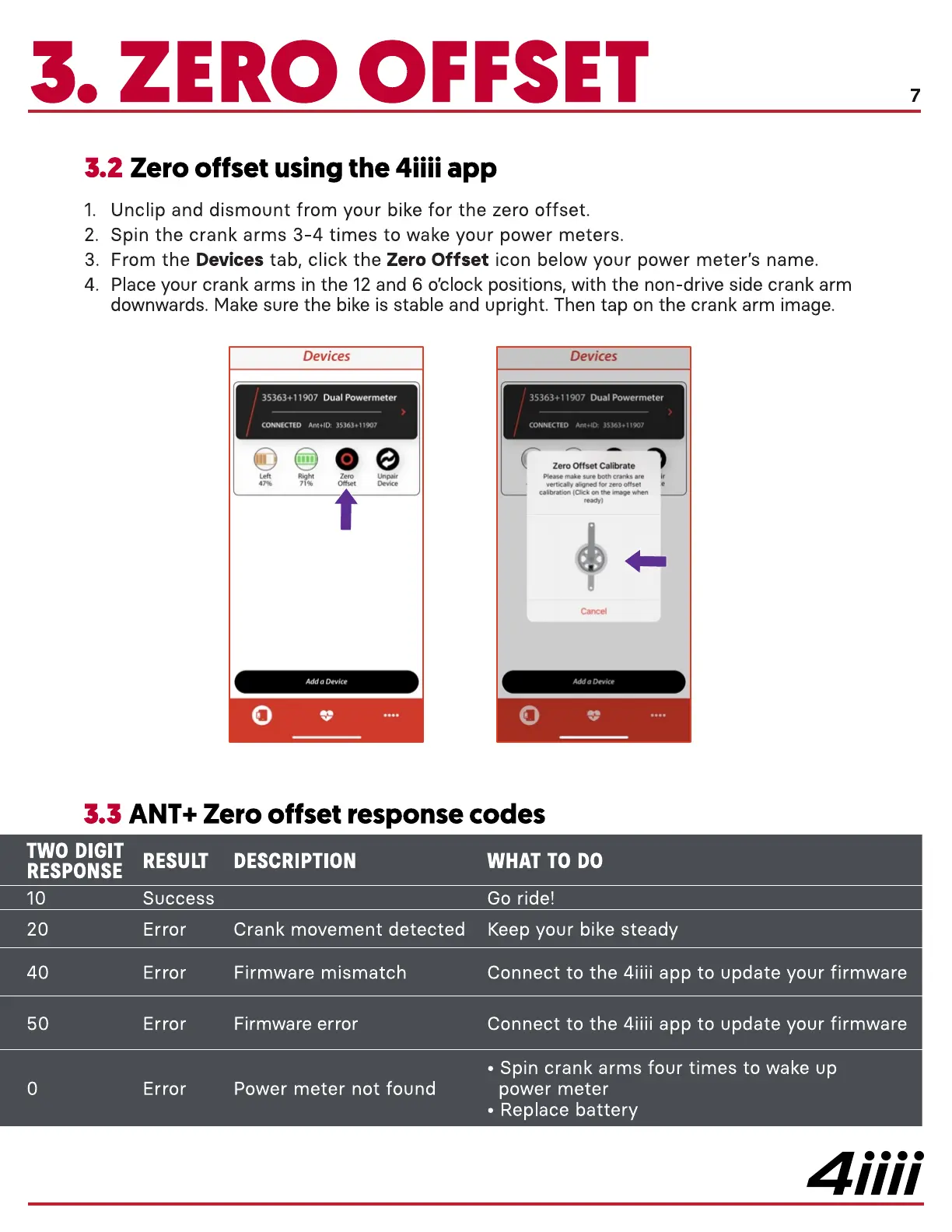
Zero offset using the 4iiii app
Unclip and dismount from your bike for the zero offset.
1.
Spin the crank arms 3-4 times to wake your power meters.
2.
From the Devices tab, click the Zero Offset icon below your power meter's name.
3.
Place your crank arms in the 12 and 6 0'clock positions, with the non-drive side crank arm
4.
downwards. Make sure the bike is stable and upright. Then tap on the crank arm image.
Devices
35363+11907 Dual Powermeter
CONNECTED Ant.1D•.
Right
Devices
35363+11907 Dual Powermeter
CONNECTED Ant.10.
Zero Offset Calibrate
Please make sure bo th cranks are
vertica"v aligned reto offset
(Click
ready)
Cancel
O
ANT+ Zero offset response codes
TWO DIGIT
RESULT DESCRIPTION
RESPONSE
10
20
40
50
Success
Error
Error
Error
Error
Crank movement detected
Firmware mismatch
Firmware error
Power meter not found
WHAT TO DO
Go ride!
Keep your bike steady
Connect to the 4iiii app to update your firmware
Connect to the 4iiii app to update your firmware
• Spin crank arms four times to wake up
power meter
• Replace battery
4iiii


 To Next Page
 Loading...
