4, CONFIGURE
4.1 Update firmware
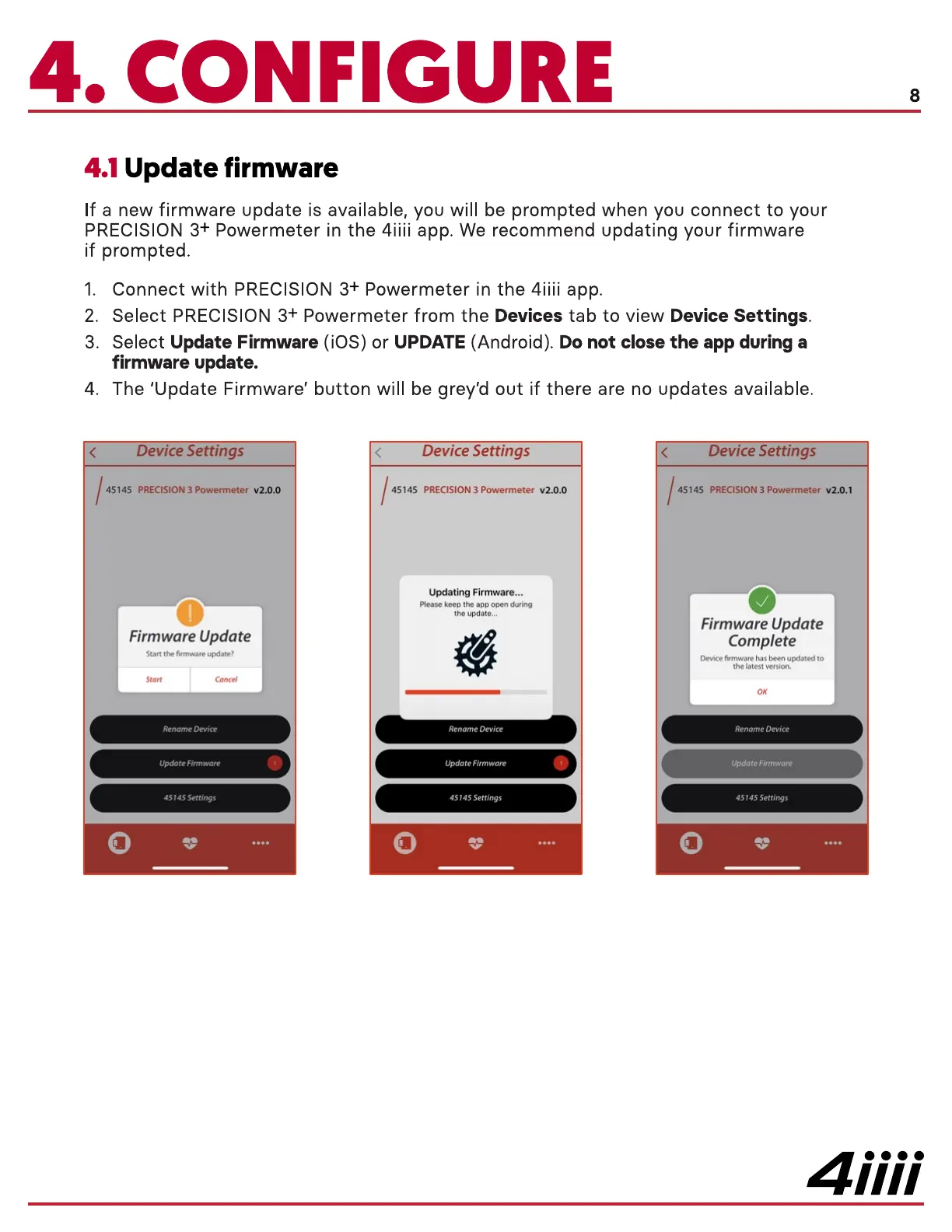
If a new firmware update is available, you will be prompted when you connect to your
PRECISION 3+ Powermeter in the 4iiii app. We recommend updating your firmware
if prompted.
8
1.
2.
3.
4.
Connect with PRECISION 3+ Powermeter in the 4iiii app.
Select PRECISION 3+ Powermeter from the Devices tab to view Device Settings.
Select Update Firmware (iOS) or UPDATE (Android). Do not close the app during a
firmware update.
The 'Update Firmware' button will be grey'd out if there are no updates available.
ewce etttngs
45145 PRECISION 3 Powermeter V2.O.O
Firmware Update
Start the firmware update?
Rename Device
Update Firmware
45145 Settings
45145
Device Settings
PRECISION 3 Powermeter v2.o.o
Updating Firmware...
Please keep the app open during
the update...
Rename Device
update Firmware
45145 Settings
ewce ettmgs
45145 PRECISION 3 Powermeter v2.o.1
Firmware Update
Complete
Device firmware has been updated to
the latest version.
Rename Device
Update Firmware
45 45 Settings
4iiii


 To Next Page
 Loading...
