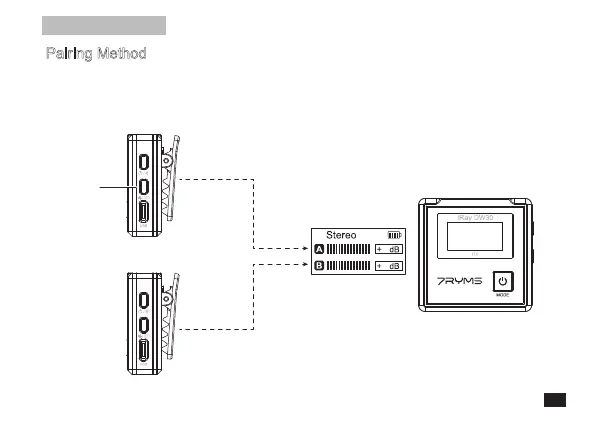
Pair Button
Receiver (RX)
Transmitter (TX)
First Paired
Left
Channel
Right
Channel
The Second Paired
6
6
Firstly, turn on the receiver and transmitter; secondly, long press the A/B pairing button of the receiver
synchronously to make it enter the pairing state; and press the pair buttons of the transmitters for 3
seconds to make them enter the pairing state. The first paired transmitter is channel A (left channel), and
the second one is channel B (right channel)
Pairing Method
(All have been paired by default. If you need to re-pair, please follow the
instruction)
Installation and Usage
11



 To Next Page