The MemCard PRO is a modern reimagining of the original Memory Cards for the PlayStation console, designed and manufactured by 8BitMods. It serves as a mass storage solution for PlayStation 1, PSone, and compatible PlayStation 2 consoles, offering a vast amount of virtual memory cards (VMCs) and enhanced features through FPGA technology and wireless connectivity.
Function Description:
The MemCard PRO replaces traditional physical memory cards, allowing users to store an extraordinary number of game saves on a single microSD card. It utilizes FPGA technology and a dual-core 240MHz microcontroller to provide mass storage via a microSD card interface. Each gigabyte of storage space on the microSD card can accommodate approximately 8,000 VMCs, with each VMC offering 15 blocks of storage. The device also features wireless network connectivity, enabling remote management and additional functionalities through an intuitive Web User Interface (WebUI). A proprietary set of commands allows communication with other devices, such as optical drive emulators (ODEs), for automated card switching and game detection. This eliminates the need for multiple physical memory cards and prevents running out of storage space during critical gaming moments.
Important Technical Specifications:
- Storage Medium: microSD card (Class 4 and above, 1GB to 2TB supported).
- VMC Capacity: Approximately 8,000 VMCs per gigabyte of storage, each with 15 blocks.
- Microcontroller: Dual-core 240MHz.
- Technology: FPGA (Intel Max10 FPGA).
- Connectivity: Local wireless network (Wi-Fi).
- Supported Consoles: PlayStation 1, PSone, PlayStation 2 (for PS1 games only; PS2 Slim consoles require modification for power).
- File System Formats: FAT32 or exFAT with a simple MBR partition scheme.
- VMC Format: Raw Memory Card images (.mcd extension, 131,072 bytes long, no extra headers).
- Operating Temperature: Reaches about 50-55°C in a 22°C ambient temperature, with a Thermal Junction (Tj) of 125°C. Heat is expelled externally from the console.
- Certifications: FCC and Europe's CE certification requirements for wireless and spurious radiation.
- European Directives Compliance: 2014/30/EU (EMC), 2014/45/EU (LVD), 2015/863/EU (RoHS3).
- Standards Conformance: EN 301489-1 V2.2.3 (2019-11), EN 301489-17 V3.2.4 (2020-09), EN 62368-1:2014+A11:2017 (LVD), EN 63000:2018 (RoHS).
Usage Features:
- Initial Setup: Requires formatting a microSD card (1GB to 2TB, Class 4 or above) using the official "SD Card Formatter" software. Firmware (mcu.bin, fpga.bin) and operating system (os folder) files must be extracted to the root of the formatted microSD card.
- Console Compatibility: Plugs into Slot 1 or Slot 2 of PlayStation, PSone, or PlayStation 2 consoles. PS2 Slim consoles require a modification for adequate power.
- VMC Management: Automatically creates "MemoryCard1" on first power-up. Each VMC provides 8 channels, acting as extra memory cards with 15 blocks each.
- Channel Switching:
- Physical Buttons: Press the right physical button on the MemCard PRO for the next channel, and the left physical button for the previous channel.
- Gamepad Combos:
- Next Channel: L1 + R1 + Select + D-Pad Right
- Previous Channel: L1 + R1 + Select + D-Pad Left
- New VMC: L1 + R1 + Select + D-Pad Up (creates "MemoryCard2", "MemoryCard3", etc.)
- WebUI: Channels can also be switched remotely via the WebUI.
- ODE Integration: Supports proprietary protocols for Optical Drive Emulators (ODEs) like XStation, Mode, and PSIO. This allows automatic detection of game IDs and creation/mounting of game-specific VMCs, displaying the full game name on the OLED display. GameID functionality also works with Unirom or FreePSXBoot for auto-switching VMCs even when booting original CD-ROMs.
- OLED Display: Shows the VMC name, current channel, and read/write indicators. In ODE mode, it displays the unique GameID below the card name.
- WebUI Access:
- Initial Connection: Connect to the "MemCardPRO-(serial number)" Wi-Fi access point using the password "mcpadmin".
- Setup Wizard: Navigate to http://192.168.4.1 in a web browser to complete the Wi-Fi setup.
- Remote Access: After setup, find the MemCard PRO's assigned IP address by holding down the left physical button on the device, then access the WebUI via http://[IP_ADDRESS].
- WebUI Features:
- View mounted VMC and channel.
- Force-mount any VMC.
- Remotely browse VMCs, download, and upload files (Card Browser - coming soon).
- Change device settings.
- Perform remote firmware updates.
- WebUI Settings:
- Wi-Fi Switch: Turn off/on the Wi-Fi radio (re-enabling requires a factory reset).
- Load last used card on Reset: Enable/disable automatic loading of the last used VMC on power-up.
- Display Saver Mode: Choose "Dim" or "Turn Off" for the OLED display after 30 seconds of inactivity to prevent burn-in.
- Display Brightness: Adjust OLED display brightness (10 steps for "bright" mode, dimmed mode is always lowest).
- Firmware Version & Update: Displays current version and allows remote updates.
- Card Browser (WebUI):
- Download a "scancache.db" template file to the microSD card root.
- "Scan" button to populate the browser with available VMCs.
- Create, rename, mount, and delete VMCs remotely.
- "Fetch" icon to automatically populate "Not Set" VMC names from the gameID database.
- Renaming VMCs overrides default names but retains GameID association.
Maintenance Features:
- Firmware Updates: Can be performed remotely via the WebUI. Users are advised to let the process complete before removing the MemCard PRO or turning off the console.
- MicroSD Card Replacement: If replacing the microSD card, the initial setup instructions (formatting, copying firmware/OS files) must be repeated for the new card.
- Factory Reset:
- Purpose: To disconnect from a router, "forget" associated Wi-Fi SSIDs, or re-enable Wi-Fi if it was disabled via settings.
- Procedure: Press and hold the left physical button on the MemCard PRO while powering up the console. Keep holding until the factory reset prompt appears on the display, then confirm "Yes". This resets all settings to factory defaults but does not erase saves.
- Troubleshooting:
- OLED Display Issue (Important Warning): Customers who purchased two or more MemCard PROs before July 10, 2021, and use them simultaneously, should contact hello@8bitmods.co.uk for a free replacement due to a potential OLED display issue.
- Gamepad Combos Not Working: Ensure the controller is plugged into the same port as the MemCard PRO. PS2 hardware differences prevent detection of controller key presses, requiring WebUI for channel/card switching.
- WebUI Connection Issues: Verify the remote device is on the same subnet as MemCard PRO. Try moving the console closer to the router. If no IP address is displayed on MemCard PRO when holding the left physical button, the card could not connect to Wi-Fi; a factory reset and re-setup may be needed.
- Heat: The MemCard PRO runs hot due to the Intel Max10 FPGA, but this is normal and safe, as heat is expelled externally and does not adversely affect the console.

 Need help?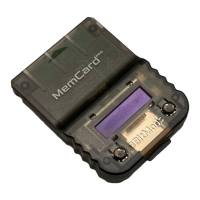

 To Next Page
 General