9page
owner´s manual
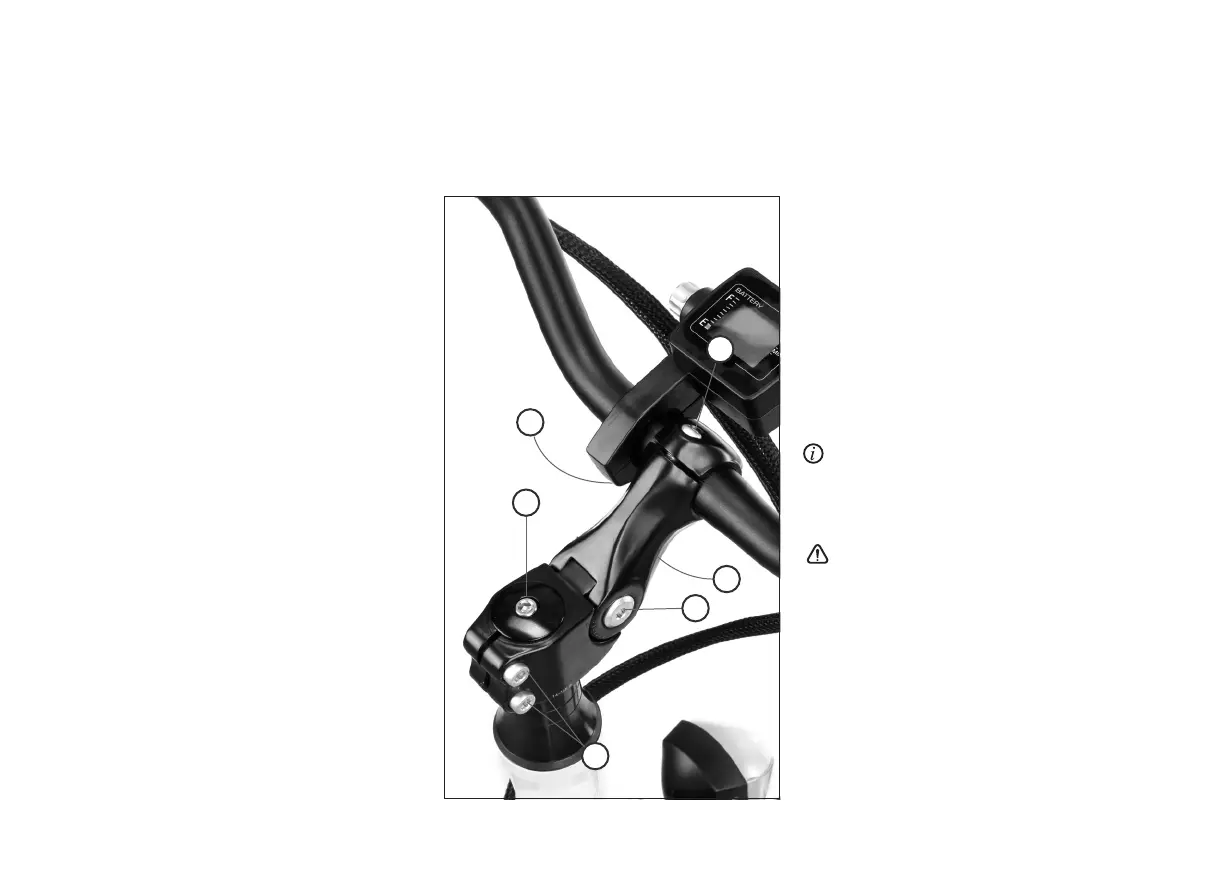
3.4 Handle bar adjustment
1. Loosen the bolts (A) using an appropriate allen
key.
2. Position the handle bar symmetrical to the bar
stem.
3. Turn the handle bar to the desired angle.
Tighten the bolts consistently to 12 Nm.
3.6 Bar stem adjustment
1. Loosen bolt (C) using an appropriate allen key.
2. Once loose, align the stem with the front
wheel.
3. Once aligned, tighten the bolt (C) to 15 Nm.
3.7 Change the angle of the adjustable-
rise stem
1. Loosen bolts (D and F) using an appropriate
5 mm allen key.
2. Position the stem to the desired angle.
3. Tighten bolts to 15 Nm ensuring the stem is
aligned to the front wheel.
Caution: this is an A-head stem, the top bolt (E)
is a pre-load and does not adjust the handlebar
stem.
Caution: this is an A-head stem, the top screw
E is preloaded with 1-2 Nm and does not adjust
the handlebar stem. Trying to tighten bolt E can
damage the head set bearings.
Failure to correctly secure the handle bar
and bar stem can result in serious or fatal injury.
Ensure there is no play in the steering and that the
steering is working smoothly.
Should you need further advice to adjust the
headset, please contact your A2B dealer.
3.5 Display adjustment
1. Loosen the bolts (B) using an appropriate
cross-head screwdriver.
2. Position the display to the desired angle.
3. Tighten the bolts consistently..
C
D
E
A
B
F



 To Next Page