15
6.4 Power Control Module (Display)
The A2B Kuo+ uses the display for controlling the amount of
powered assistance the motor provides.
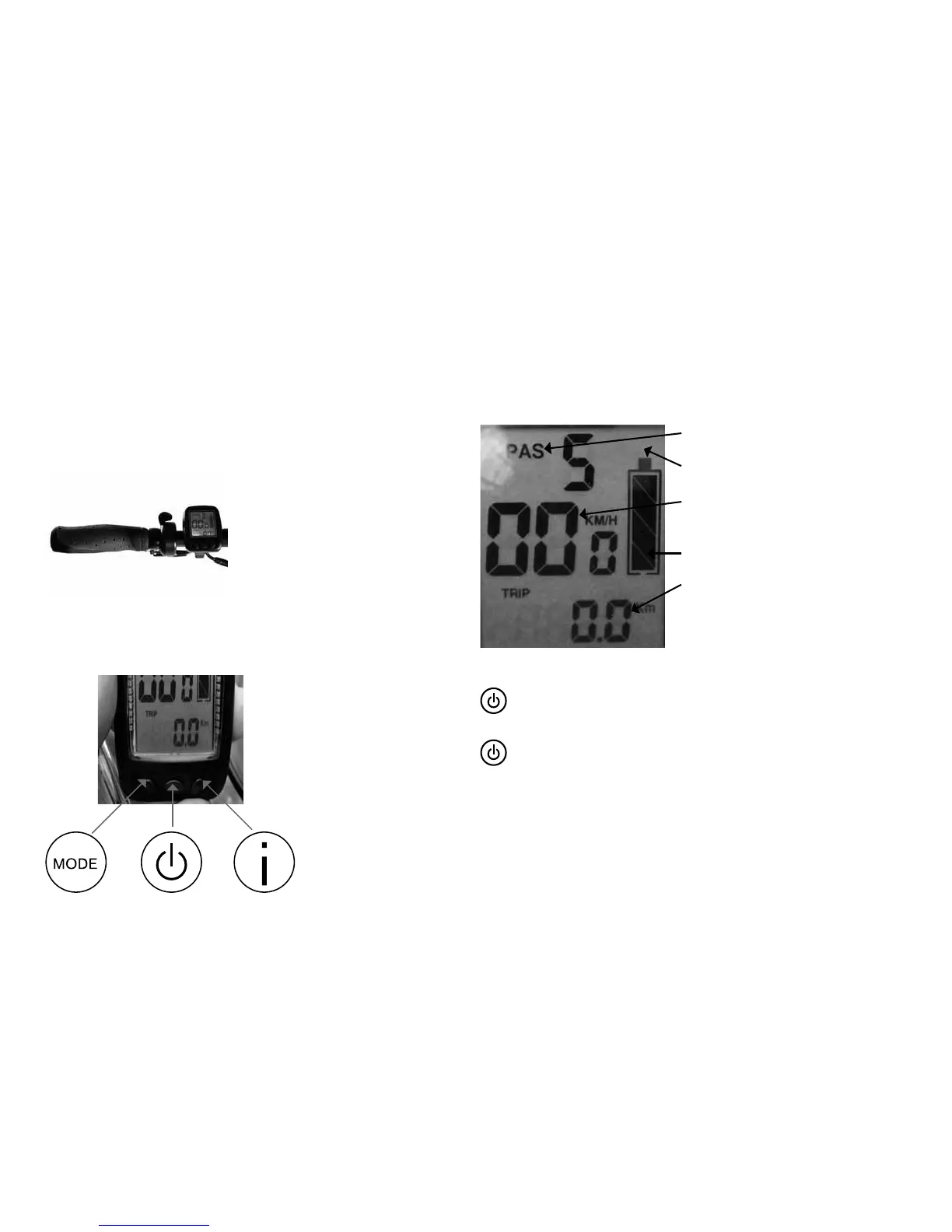
The Display on your A2B Kuo+
is mounted on the left side of the
handlebar.
The Display has three buttons to
operate the assistance system and
to change in between the different
displayed readouts.
6.4.1. Button Definition
6.4.2. Location of displayed information
Assist Mode
State of charge as percentage
Km/h, MPH, Cycles, Voltage, Tem-
perature, Maximal speed limit
State of charge in bars
TRIP : mileage for single trip
ODO: Mileage for total
6.4.3. Switching the bike On and Off
Before switching on the display turn the battery on. To switch
the bike on press the On/Off button briefly (0.5 second).
To turn the bike off hold the On/Off button (minimum 2
seconds) down for two seconds. This will switch off the display.
Please also switch off the battery.


 To Next Page