EasyManua.ls Logo

AAMP Global PAC AmpPRO AP4-FD31 - User Manual

AAMP Global PAC AmpPRO AP4-FD31
10 pages
Print Icon
To Next Page IconTo Next Page
Loading...
© 2021 AAMP Global. All rights reserved. PAC is a Power Brand of AAMP Global.
PAC-audio.com
Pacific Accessory Corporation
Page 1
Rev: 2
Date:020922
Advanced Amplier Interface
for Select Ford Vehicles
AP4-FD31
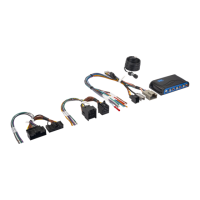
The AP4-FD31 provides a 6-channel pre-amp output for use with aftermarket audio equipment. Using the digital
A2B audio data in conjunction with CAN data, the AP4-FD31 delivers a variable 5v RMS pre-amp output with fading,
balance, equalization, and level control capabilities. The module also retains audio from other vehicle features such
as factory navigation prompts, safety chimes, Bluetooth and voice activation. A data bus controlled remote amplier
turn on wire is also provided by the AP4-FD31. The module also provides a variable 2-channel ber optic digital audio
output (TOSLINK).
Introduction and Features
Important Notes
1. This interface is only compatible in vehicles equipped with an A2B data bus controlled premium sound system. To verify
compatibility, look for a B&O badge on the door speakers or dash speakers.
2. The AP4 interface installs at the factory amplier location. Included T-Harness installs behind radio to access factory
speaker wiring not available at factory amplier.
3. The factory amplier will be disconnected and will no longer power the vehicle speakers. An aftermarket amplier must be
added to power the vehicle's speakers. For example, you cannot only add a subwoofer, as the factory speakers that were
connected to the factory amplier will no longer function.
4. On most Ford models, some of the vehicle speakers will be connected to the radio module in addition to the external
amplier. These speakers will also stop working when the factory amplier is disconnected and will need to be powered by
an aftermarket amplier. See Speaker Connections on Page 3 for vehicle specic speaker information.
5. The chime volume and minimum volume levels are set to 50% by default. If this level is adequate, no additional adjustment
is required. Please refer to the Setup and Conguration section on page 9 for more details.
6. The level control knob must be connected in order to manually adjust the chime volume and minimum volume settings.
7. The remote output is rated at 2A of current. If more current is needed, an external relay must be used.
8. Channels 5 and 6 are non-fading outputs. The output level of channels 5 and 6 can be controlled using the supplied level
control knob.
9. No adjustments can be made manually using the programming button, or the factory SWC, when the module is connected
to a PC.
Module Layout
LED 1
Interface Connector 1
Expansion Port
TOSLINK Output
Programming Button
Feature Select
DIP switches
Front Output
Ch. 1(L) and 2(R)
Non-Fading Level Control
Knob Connection
USB Connection
Rear Output
Ch. 3(L) and 4(R)
SUB (Non-Fading)
Ch. 5 and 6
LED 2
DIP
1 2 3 4
ON
Two Channel Mode 5v / 4v Preout Not Used Vehicle Select
1 2 3 4
Set DIP switches to the ON position to activate the corresponding features.
Set DIP switches to the OFF position for any features that are not desired.
Question and Answer IconNeed help?

Do you have a question about the AAMP Global PAC AmpPRO AP4-FD31 and is the answer not in the manual?

Overview

The PAC AP4-FD31 is an advanced amplifier interface designed for select Ford vehicles, providing a comprehensive solution for integrating aftermarket audio equipment into vehicles equipped with an A2B data bus controlled premium sound system. This interface delivers a 6-channel pre-amp output, allowing for the connection of aftermarket amplifiers to power the vehicle's speakers.

Function Description:

The core function of the AP4-FD31 is to convert the digital A2B audio data and CAN data from the vehicle into a variable 5v RMS pre-amp output. This output includes fading, balance, equalization, and level control capabilities, ensuring that aftermarket audio systems can seamlessly integrate with the vehicle's existing audio controls. A key feature is its ability to retain audio from other vehicle functionalities such as factory navigation prompts, safety chimes, Bluetooth, and voice activation, preserving the full suite of factory features.

In addition to the analog pre-amp outputs, the module also provides a variable 2-channel fiber optic digital audio output (TOSLINK), offering a high-quality digital audio signal for compatible aftermarket processors or amplifiers. A data bus controlled remote amplifier turn-on wire is also included, simplifying the installation of aftermarket amplifiers by providing a reliable turn-on signal.

Important Technical Specifications:

  • Pre-amp Output: 6-channel, variable 5v RMS.
  • Digital Audio Output: Variable 2-channel fiber optic (TOSLINK).
  • Remote Output: Rated at 2A of current. For higher current requirements, an external relay is recommended.
  • Non-Fading Outputs: Channels 5 and 6 are non-fading, with their output level controllable via the supplied level control knob.
  • Compatibility: Exclusively compatible with vehicles featuring an A2B data bus controlled premium sound system, identifiable by a B&O badge on the door or dash speakers.
  • Installation Location: Installs at the factory amplifier location. The included T-Harness connects behind the radio to access factory speaker wiring.

Usage Features:

The AP4-FD31 offers several usage features to enhance the aftermarket audio experience:

  • Factory Amplifier Disconnection: The factory amplifier is disconnected and will no longer power the vehicle speakers. An aftermarket amplifier is required to power all vehicle speakers, including those originally connected to the factory amplifier.
  • Speaker Connections: For many Ford models, some vehicle speakers are connected to the radio module in addition to the external amplifier. These speakers will also cease to function when the factory amplifier is disconnected and will require power from an aftermarket amplifier. The manual provides detailed speaker connection information for various Ford models, including the Ford Bronco (10 Speaker) 2021, Ford Bronco Sport (10 Speaker) 2021, Ford F-150 (8 Speaker) 2018-2020, Ford F-150 (8 Speaker) 2021-2022, Ford F-150 (18 Speaker) 2021-2022, Ford F-250/350/450 (10 Speaker) 2020 & Up, and Ford Mach-E 2021. These charts detail PAC color, position/polarity, and corresponding leads for both the amplifier (DSP) and radio (ACM) connections.
  • Chime Volume Control: The chime volume and minimum volume levels are set to 50% by default. Users can manually adjust these settings using the supplied level control knob, the programming button on the interface, or the factory Steering Wheel Controls (SWC).
  • Minimum Volume Control: If the factory radio's minimum volume (level 1) is too loud, it can be adjusted through the programming button, factory SWC, or the AmpPRO app.
  • DIP Switch Configuration:
    • DIP switch 1: Enables two-channel mode, where all outputs become non-fading, and all chimes are routed through channels 1 & 2 and TOSLINK.
    • DIP switch 2: Set to ON (down) to lower the RCA output voltage to 4v; OFF (up) maintains 5v output.
    • DIP switch 3: Not used and should remain OFF (up).
    • DIP switch 4: Set to ON (down) for Mach-E installations; OFF (up) for all other vehicle models.
  • AmpPRO App Integration: The dedicated AmpPRO app (available for download) allows for advanced configuration, including:
    • Setting minimum volume level.
    • Setting chime volume level.
    • Enabling/disabling the 3-band factory EQ.
    • Adjusting Bass/Mid/Treble boost frequencies and Q factors.
    • Updating product firmware.
    • Reading firmware and hardware versions.
    • The app provides a user-friendly interface to fine-tune audio settings, with available frequencies and Q factors for Bass, Mid, and Treble.

Maintenance Features:

  • Firmware Updates: The AmpPRO app facilitates firmware updates, ensuring the interface remains current with the latest features and bug fixes. Users can connect the interface to a PC, select "Firmware," then "Update Firmware," and browse for the relevant .pufx file.
  • Restoring Factory Settings: The interface can be reset to its factory default settings by pressing and holding the programming button until the status LEDs blink red. This reset restores chime volume, minimum volume, factory EQ settings (enable/disable, frequency, and Q factor) to their original defaults.
  • Troubleshooting: The manual includes a troubleshooting section to address common issues:
    • No audio: Check if LED 1 is illuminated; if not, cycle the ignition.
    • Hiss at high amp gain: Adjust DIP switch 2 to 4v output or lower amp gains.
    • Low volume setting on radio is too loud: Adjust minimum volume via manual process or AmpPRO app.
  • LED Legend: A clear LED legend helps diagnose the module's status:
    • LED 1 Solid Red: Module Active.
    • LED 1 Solid Amber: Minimum Volume Adjustment Mode.
    • LED 2 Rapid Blink Any Color: DSP Activity.
    • LED 2 Blinking Amber: USB Connection Detected.
    • Both LEDs Alternate Blinking Red: Performing Memory Reset.

Installation Notes:

  • Ensure a very solid ground for the aftermarket amplifier. For aluminum-framed vehicles, direct grounding to the battery is recommended.
  • Connect amplifier power/ground before connecting RCAs or Remote Turn On to the AP4-FD31.
  • After installation, close all doors, lock the car with the keyfob, and let the vehicle sit for 10 minutes out of keyfob range to allow the data-bus to sleep and the AmpPRO to initialize correctly.
  • Set amp gains using an oscilloscope and test tones, referring to MECP Advanced study guides if unfamiliar.

AAMP Global PAC AmpPRO AP4-FD31 Specifications

General IconGeneral
BrandAAMP Global
ModelPAC AmpPRO AP4-FD31
CategoryAutomobile Accessories
LanguageEnglish

Related product manuals