The ABANTERA ROM10H20CAT is an advanced reverse osmosis purification system designed as a multi-functional dispenser for cold water, hot water, natural water, American coffee (ground or capsules), and tea. It is engineered to eliminate 99.99% of viruses and bacteria, providing high-purity water.
Function Description:
The ROM10H20CAT unit can be connected directly to a potable water supply or operate using its rear-mounted water tank. It features a three-stage filtration system:
- High-tech composite microfilter (PP+GAP): Removes sediment, rust, large impurities, odor, and organic compounds.
- RO 2.0 membrane filter: Efficiently removes bacteria, viruses, heavy metals, antibiotics, pesticide residues, and other harmful substances.
- Composite activated carbon filter (CARBON T33+PP): Eliminates chlorine, humus, toner, organic compounds, reduces heavy metals, and disinfects.
Additionally, the system incorporates a latest-generation ultraviolet (UV) lamp to ensure 99.99% osmotic water free of viruses and bacteria.
Important Technical Specifications:
The device is designed to operate within a temperature range of 5 to 32°C (climatic class N). It is guaranteed against manufacturing defects in materials and workmanship for a period of 2 years from the time of purchase. The warranty requires the use of original ABANTERA accessories and professional installation/replacement of parts. The unit complies with EU directives 2011/65/EU and 2015/863/EU regarding hazardous substances in electrical and electronic equipment, and with Italian Ministerial Decrees D.M. 174 of 04/06/2004 and D.M. 25 of 07/02/2012 for materials in contact with water.
Usage Features:
The control panel offers various functions for water and beverage dispensing:
- Water Dispensing:
- Room Temperature Water: Dispensed by pressing the "Temp" button to adjust temperature.
- Hot Water: Dispenses water between 93-95°C. Temperature can be adjusted using the "TEMP" button.
- Warm Water for Baby Bottles: Dispenses water between 50-55°C. Temperature can be adjusted using the "Temp" button.
- Hot Water for Coffee/Tea: Dispenses water between 80-85°C. Temperature can be adjusted using the "Temp" button.
- Cold Water: Initiates cooling (5-8°C) by pressing the "Cool" button. A blue light indicates readiness. The cooling function can be turned off by pressing and holding the "Cold water" button for 3 seconds.
- Water Volume Selection: The "Water volume" button allows selection of full glass (~0.55 L), intermediate glass (~0.3 L), or small glass (~0.15 L). The unit intelligently adjusts the volume to the selected glass size.
- Child Lock: Activated by default for safety. To unlock hot water dispensing, press and hold "Temp/Child lock" for 3 seconds. Pressing it again for 3 seconds re-locks the device. When the child lock is active, only room and cold water can be selected.
- TDS Display: Shows the Total Dissolved Solids (TDS) value of both un-osmotic and osmotic water.
- UV Sterilization: Indicates when the UV sterilization function is in process.
- Filter Replacement Alert: Notifies the user when osmosis filters need replacement.
- Internal Cleaning Reminder: The " " icon flashes to remind users to clean the internal pipes using cleaning filters.
- Network Connection Mode: To switch from external tank mode to general water network mode, press and hold "Water volume" and "Temp / Child lock" simultaneously for 3 seconds. An icon " " on the control panel confirms the change.
- Coffee/Tea Brewing:
- Ground Coffee/Tea: Fill the reusable steel filter with ground coffee or tea leaves, press it with the steel presser (not exceeding 90% level), and insert it into the dispenser. The intensity of flavor depends on how much it's pressed.
- American Capsules: Place the capsule in the capsule container, press until pierced by the needle, screw on the upper ring, and insert into the dispenser.
- Beverage Volume Selection: Choose Short (strong), Medium (medium), or Long (light) according to personal taste.
Maintenance Features:
- Water Drainage: Recommended to drain the unit if inactive for 3 days or more, or when moving it. This involves unscrewing the drain cap at the back, removing the rubber plug, and tilting the unit.
- Water Tank Pre-filter Cleaning: The pre-filter in the external water tank should be cleaned every 4-6 months, depending on water quality. It involves removing the pre-filter, washing it under tap water, and scrubbing with a soft brush.
- Automatic Cleaning and Disinfection:
- Initial Cleaning: Before first use, or after prolonged inactivity, filter a minimum of 12 liters (3 water tanks) to ensure proper cleaning. Press and hold the "Get water" button for 3 seconds to clean external and internal pipes and tanks.
- Filter Replacement Cleaning: After replacing filters, turn on the unit, press and hold "Get Water" and "Temp/Child Lock" for 5 seconds. The cleaning light will turn on, and water change/circulation lights will flash, indicating automatic cleaning (1-2 hours).
- External Tank Cleaning (Enhanced): For more effective cleaning, fill the external tank with 2 liters of edible white vinegar during the automatic cleaning process.
- Filter Replacement:
- Filters 1 and 2 (PP+GAP and RO 2.0 membrane) should be replaced every 6-12 months.
- Filter 3 (CARBON T33+PP) should be replaced every 12-24 months.
- Replacement frequency depends on usage and water quality.
- To replace, turn off the unit, drain all water, gently turn the filter left while holding the clamping head, slide it down, then insert the new filter by sliding up and turning right.
- The control panel will automatically notify when filters need replacement.
- Reset Filter Replacement Indicator: Press and hold the filter reset button for 5 seconds to reset the filter usage period to its initial state.
- Troubleshooting: The manual provides a quick troubleshooting guide for common error codes (E1-E8) and their solutions, typically involving contacting technical service or performing simple resets.
Optional Filters:
- Medicinal Stones Filter: Increases mineral content, improves taste, and regulates pH.
- Hydrogenation Filter: Produces alkaline hydrogen-rich water, acting as a cellular antioxidant.

 Need help?
 General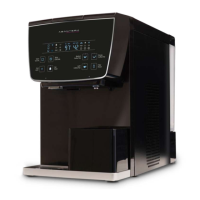

 To Next Page