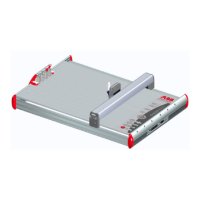
AMS 500
ABSOLUTE MARKING SYSTEM
11
GLOSSARY OF TERMS:
Template: Plate that holds the markers.
Fixture : Same as template.
Segment: A dedicated location on the template where to insert the element.
Elements: One marker card.
Tags: Refers to markers.
Marker card: Refers to one card with a number of markers or tags.
Marker Tab: Marker card field for user data, i.e. P.O. number, customer name, etc.
Leader Marker: Refers to the marker you must double-click on in order to access the
editor. You find the marker leader by bringing your cursor over the marker card, click
and hold the left button of the mouse. A pop-up window appears and shows the “Labeling
direction” example: “Labeling direction: Upper Left =>Upper Right” This indicates
that the leader is the upper left marker. For other cards you may see “Labeling
Direction: Lower Left =>Lower Right”
Labeling: Marking.
“X” and “Y” Coordinates: The direction of the plotter arm; up-down being “Y”, left-
right being “X”.
Computer port: Communication port of the computer also called parallel; most printer
are connected to LPT1, and we recommend using a parallel port.
Interface: Refers to communication port of the computer.
Plot: Action of marking or executing the data sent from the computer with a plotter.


 To Next Page
 Loading...