4 | P a g e
WIRING GUIDE
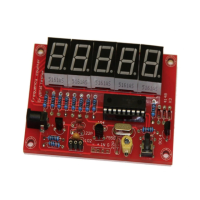
1. First, either plug in an adapter in the Female DC Barrel Jack or connect the power wire
(red wire) of a battery holder (preferably 9V Battery Holder) to the positive sign on the
board and the ground wire (black wire) of the battery holder to the negative sign on the
board.
Note: It is suggested to use the adapter for the lights on the 7-Segment LED Displays to be
brighter.
2. Then, insert the leads of the crystal you want to test the frequency for in the first two
leftmost pins of the 3 Pin Headers starting from the “100K” resistor side and you will get
the value of your frequency on the 7-Segments.
FEATURES GUIDE
These are the features that you can access by using the switch on the PCB. If you only press
once on the switch, you will enter the programming mode and you will be able to toggle through
these features by pressing on the switch again. When you find the desired feature, keep the switch
pressed for more than a second and that feature will be applied.
1. “Quit”: Leave programming mode without modifications.
2. “Add”: Save the previously measured frequency so you can add it to another frequency
later. If you insert a crystal in the header place and hold your hand on the switch while in
the “Add” mode, the crystal’s frequency will be saved and it will be added to the frequency
value of the next crystal you measure.
3. “Sub”: Save the previously measured frequency so you can subtract it from another
frequency later. The same procedure as in “Add” mode applies here.
4. “Zero”: Frequency offset will be set to zero so that the next time you measure your
frequency; no offset will be added to or subtracted from the value you wish to measure.
5. “Table”: This feature will allow you to choose a predefined offset value from a list (“455.0
kHz”, “4.1943 MHz”, “4.4336 MHz”, “10.700 MHz” and “3.9990 MHz”). Holding your
hand on the switch for more than a second and then releasing while on “Table” mode will
bring up the list. You will then be able to browse through this list, choose your desired
offset frequency and then hold your hand on the switch again for a second and release.
Now, you will be brought in the previous menu where you can choose to “Add” this offset
value to the next crystal frequency measured of “Subtract” it from the latter. Afterwards,
when you insert the crystal in the headers, the prechosen offset value will either be added
to or subtracted from the frequency of the crystal.
If the frequency of the crystal you are testing for is in kHz, the decimal point on the 7-
segment will flash and if it is in MHz, the decimal point will be steady.
Finally, please remember to not connect the battery holder to the positive and the negative
sign while having an adapter connected to the Female DC Barrel Jack. Use only one of
them.


 To Next Page
 Loading...