Part number 20079, Rev 0
13
Programming
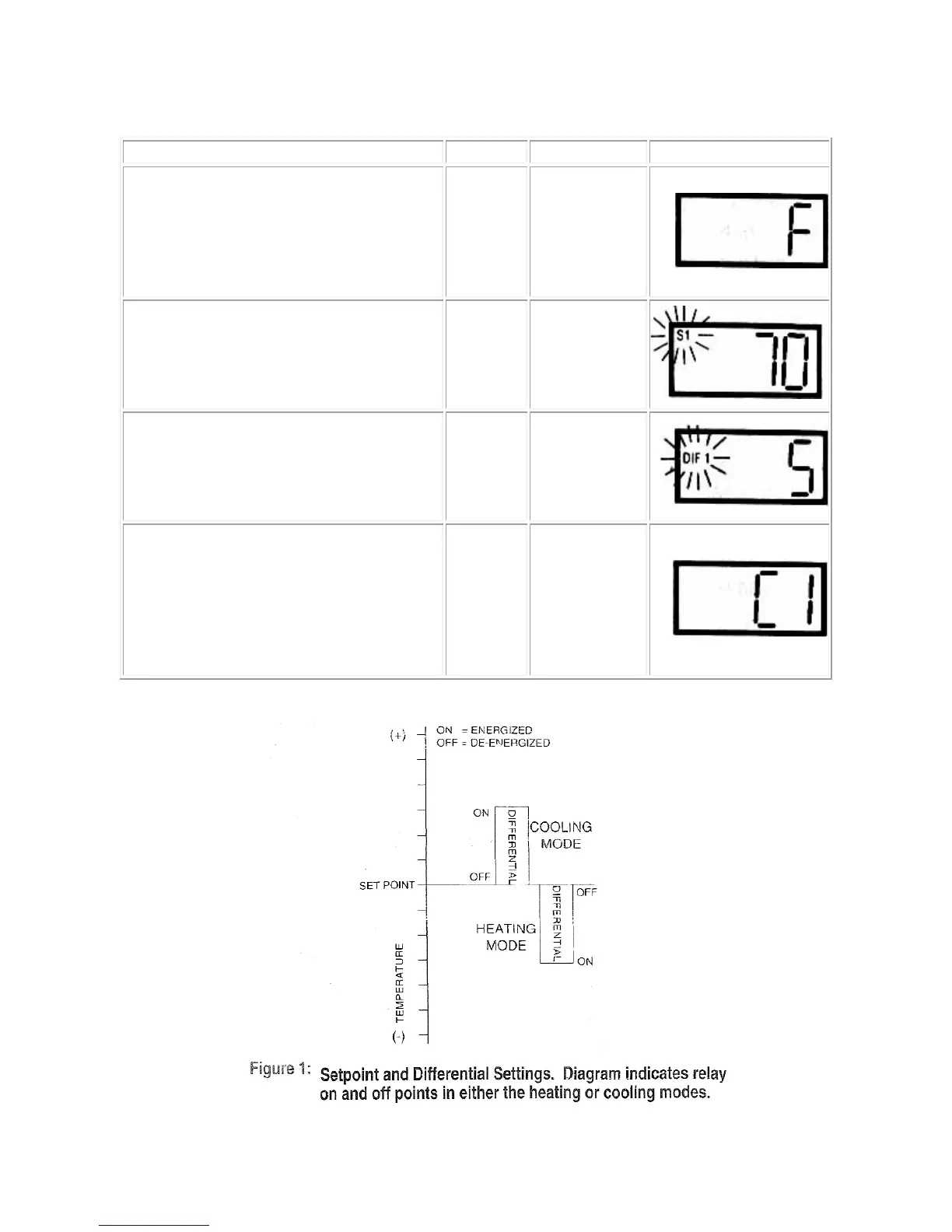
To start programming, press the SET
key once to access the Fahrenheit /
Celsius mode. The display shows the
current status,
F for Fahrenheit or C
for Celsius. Press up or down arrow to
toggle between the F or C.
F or C
Fahrenheit or
Celsius Scale
Press SET key again to access the
set point mode. The LCD will display
the current set point and S1 will be
blinking. Press the up and down keys
to adjust to the desired setting.
S1
(blinking)
Set point
Temperature
Press SET key again to access the
differential mode. The LCD will display
the current differential and
DIF1 will
be blinking. Press the up and down
keys to adjust to the desired setting.
DIF 1
(blinking)
Differential
Temperature
Press SET key again to access the
cooling or heating mode. The LCD
displays the current mode,
C1 for
H1 for heating. Press up or
down key to toggle between
C1 and
. Press the SET key again to exit
C1 / H1
Cooling or
Heating
mode



 To Next Page