EasyManua.ls Logo

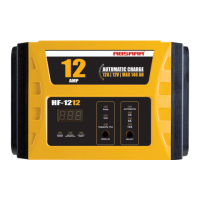
Absaar HF-1212 - User Manual

Absaar HF-1212
54 pages
Go to English
Print Icon
To Next Page IconTo Next Page
Loading...
12
BATTERY CHARGER MANUAL
Bedienungsanleitung
Directions of Use
Instructions d’utilisation
Istruzioni d’uso
Bruksanvisning
Gebruiksaanwijzing
Käyttöohjeet
Retningslinjer for bruk
Brugsanvisning
Batterieladegerät mit Kunststoffgehäuse, vollautomatisch
Battery charger in plastic casing, fully automatic
Chargeur de batterie en boîtier plastique, tout automatique
Caricabatterie in plastica, interamente automatico
Batteriladdare i plast, helautomatisk
Kunststof acculader, volautomatisch
Täysautomaattinen, muovipäällysteinen akkulaturi
Batterilader i plastinnfatning, helautomatisk
Batterioplader i plastikhus, fuldautom
Wichtig: Vor jeder Benutzung unbedingt durchlesen. Anleitung und Ratschläge befolgen.
Important: Read these instructions before using the charger.
Important : Veuillez lire attentivement ce manuel avant toute utilisation. Respectez les instructions et
les conseils qui s’y trouvent.
Importante: Leggere attentamente le presenti istruzioni e av vertenze prima di ogni utilizzo del vostro
apparecchio.
Viktigt: Läs noga igenom bruksanvisningen innan laddaren tas i bruk.
Belangrijk: Wij verzoeken u nadrukkelijk deze gebruiksvoorschriften en aanwijzingen te lezen
voordat u het apparaat gebruikt.
Tärkeää: Tutustu näihin ohjeisiin ennen laturin käyttöä.
Viktig: Les disse instruksjonene før du bruker laderen.
Vigtigt: Læs disse anvisninger, før opladeren bruges.

Questions and Answers

  • A
    Alexandra BryanAug 1, 2025
    How to troubleshoot green LED indicator not working on Absaar HF-1212?
    • L
      laurenhayesAug 2, 2025
      If the green LED indicator doesn't flash or light up when you connect the charging clamps to the battery with your Absaar Battery Charger, here are a few things to check: * If the battery voltage is too low, attempt to recondition the battery. If that doesn't work, replace it and dispose of the old battery properly. * Ensure the connection to the battery terminals is secure by reconnecting them. * Check the connection to make sure everything is properly connected.
  • T
    Thomas SantiagoAug 12, 2025
    What to do if the red LED is on on my Absaar HF-1212 Battery Charger?
    • E
      Emily EnglishAug 12, 2025
      If the red LED indicator lights up on your Absaar Battery Charger, it means there's reverse polarity. To fix this, check that the clamps are connected correctly to the battery terminals.
  • D
    dgeorgeAug 22, 2025
    Why does my Absaar HF-1212 Battery Charger show a charging error?
    • L
      Lisa CamposAug 22, 2025
      If your Absaar Battery Charger shows a charging error, here are a few possible causes and solutions: * **Faulty battery:** Replace the battery and dispose of the old one properly. * **Overheating:** Clean any dirty ventilation openings, remove any objects covering the charger, or move the unit to a cooler location. * **Charging time elapsed:** Try selecting a higher charging current. * **Damaged battery cell:** Replace the battery and dispose of it correctly. * **Overvoltage shutoff:** Check the battery voltage to ensure it is 12V DC.

Summary

Introduction

Important Safety Information

Features

Display Panel

Explains the function of the display panel and its indicators for voltage, current, and fault codes.

Troubleshooting

Troubleshooting Table

Lists common conditions, their causes, and recommended solutions for charger issues.

Indicator Lights and Buttons

Explains the function of various LED indicators and control buttons on the charger.

Operation Instructions

Specifications

Absaar HF-1212 Specifications

General IconGeneral
Input Voltage220-240V AC
Output Voltage12V DC
Output Current12A
Charging ModeAutomatic
Protection FeaturesShort Circuit, Reverse Polarity
Compatible Battery TypesLead-Acid

Related product manuals