EasyManua.ls Logo

Abus FUMO50025 - Page 12

Abus FUMO50025
Print Icon
To Next Page IconTo Next Page
To Previous Page IconTo Previous Page
Loading...
8
1
3
7
9
2
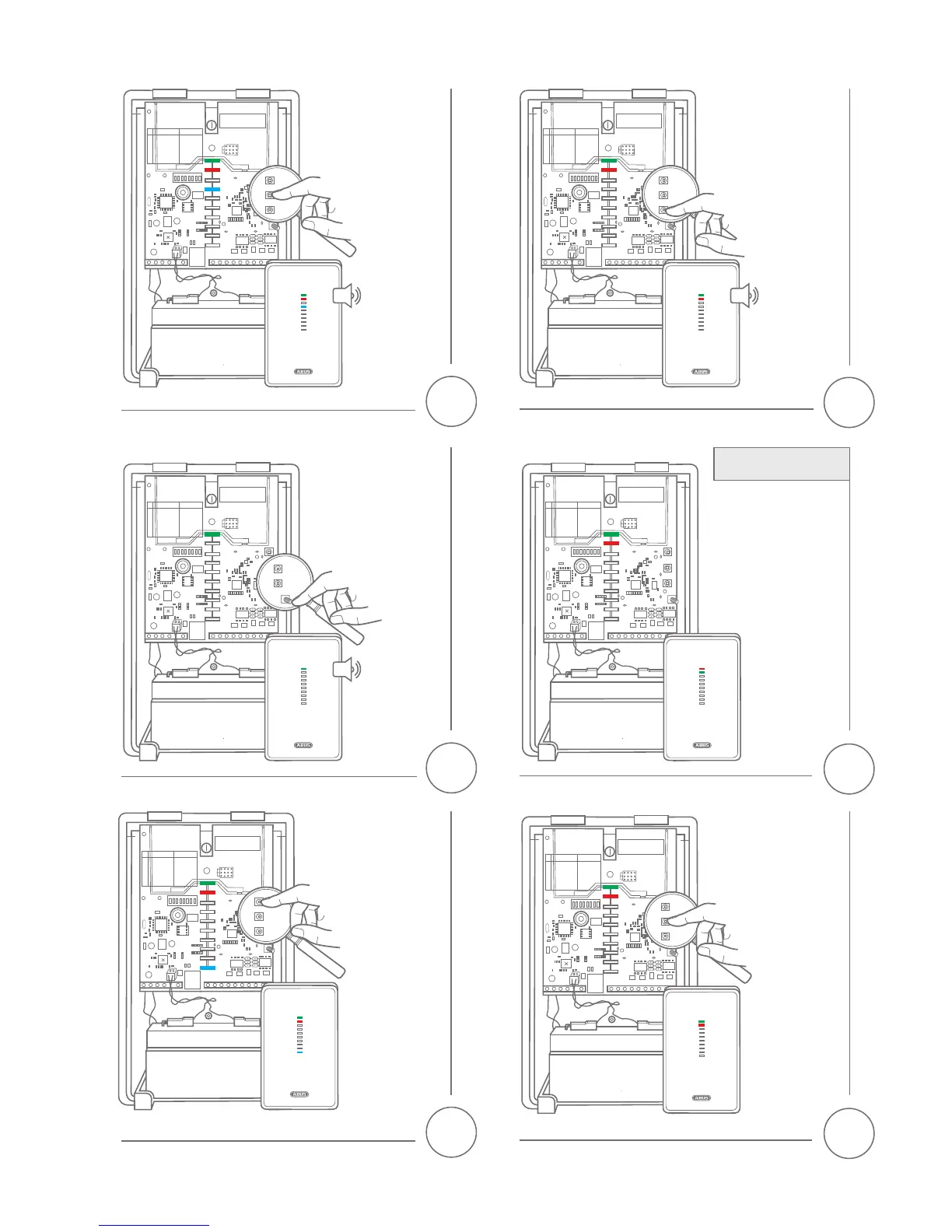
Press the 'SET'
button – two
beeps will be
heard and the 7th
LED from below
lights up.
Press the 'ESC/DEL'
button – the universal
module will beep at
short intervals.
Hold the tamper
contact down for
about ten seconds
– two beeps will
be heard and the
red and green LED
go out.
Press the 'SELECT'
button until the
rst LED from
below lights up
Open the housing cover
or stop holding down
the tamper contact. The
red and green LEDs will
light up.
Press the 'SET'
button. If a wireless
detector has yet to
be taught-in, none
of the LEDs will
light up.
If wireless detectors
have already been
taught-in, this will
be indicated by
the ashing of the
LED corresponding
to the relevant
channel (1–8).
Teaching-in the wireless
detector on the repeater
BEEP!
BEEP!
2x
BEEP!
BEEP!
2x
BEEP!
BEEP!
1x
1x
1x
BEEP!
BEEP!
10s