25
Programmierung und Bedienung
Programming and operation
Programmation et utilisation
Programmering en bediening
Programmazione e uso
Programación y funcionamiento
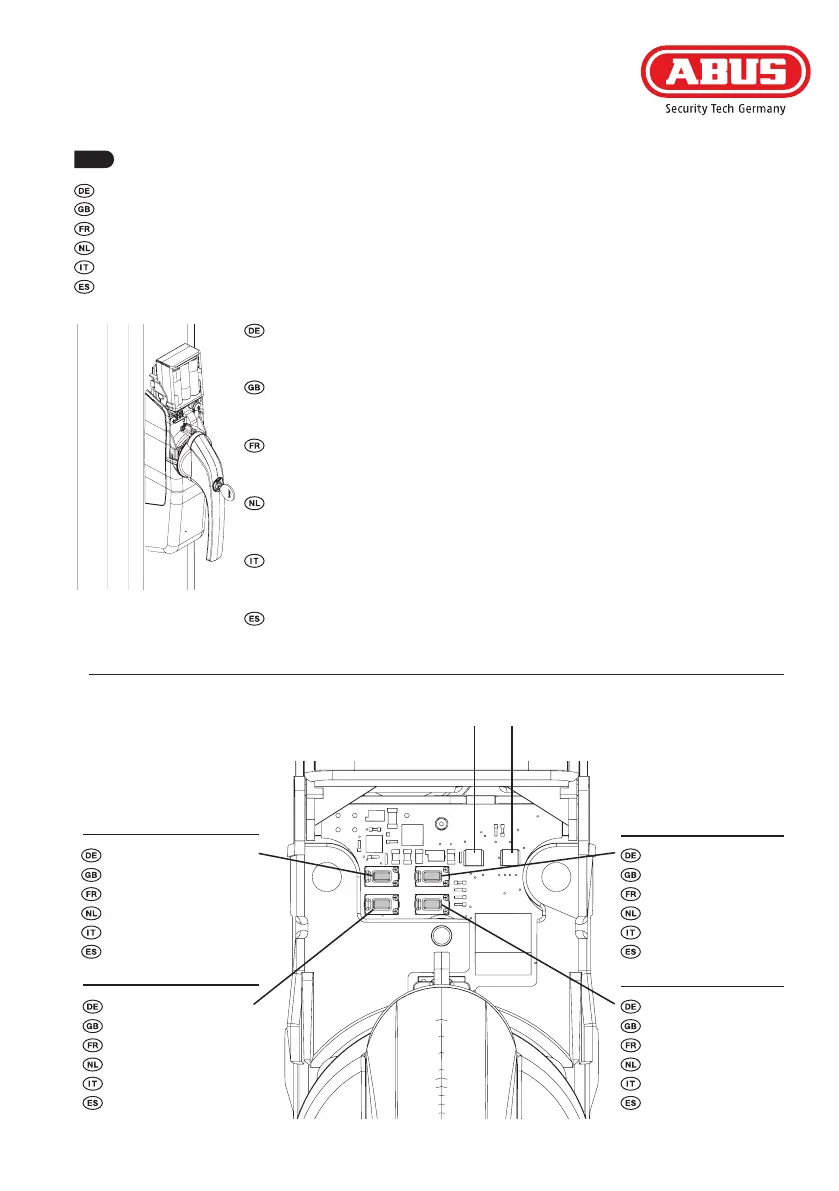
Die folgende Abbildung zeigt die Anordnung der Tasten und LEDs am An-
trieb bei abgenommener Abdeckkappe. Die Programmiermöglichkeiten
ndenSieaufdenSeiten26-28.
ThefollowingillustrationshowsthecongurationofthekeysandLEDson
the drive with the cover removed. The programming options can be found
on pages 29-31.
L‘illustration suivante montre l‘ordre des touches et LED au niveau de
l‘entraînement lorsque le couvercle est retiré. Les possibilités de program-
mation sont disponibles aux pages 32-34.
Onderstaandeaeeldingtoontdepositievandeknoppenenled‘sopde
aandrijving wanneer het afdekklepje verwijderd is. De programmeermoge-
lijkheden vindt u op pagina‘s 35-37.
L‘immagine seguente mostra la disposizione dei tasti e dei LED sull‘attua-
tore con coperchio rimosso. Le programmazioni possibili si trovano alle
pagine 38-40.
LasiguienteguramuestraladisposicióndelasteclasyLEDenelacciona-
miento con la tapa de cubierta retirada. En las páginas 41-43 encontrará
las posibilidades de programación.
LED 1 LED 2
Taste 1 (Navigation)
Button 1 (Navigation)
Touche 1 (Navigation)
Toets 1 (Navigatie)
Pulsante 1 (Navigare)
Tecla 1 (Navigation)
Taste 3 (Verlassen)
Button 3 (Exit)
Touche 3 (Quitter)
Toets 3 (Verlaten)
Pulsante 3 (Uscita)
Tecla 3 (Abandonar)
Taste 4 (Bestätigen)
Button4(Conrm)
Touche4(Conrmer)
Toets 4 (Bevestigen)
Pulsante 4 (Conferma)
Tecla4(Conrmar)
Taste 2 (Navigation)
Button 2 (Navigation)
Touche 2 (Navigation)
Toets 2 (Navigatie)
Pulsante 2 (Navigare)
Tecla 2 (Navigation)
6.



 To Next Page