45
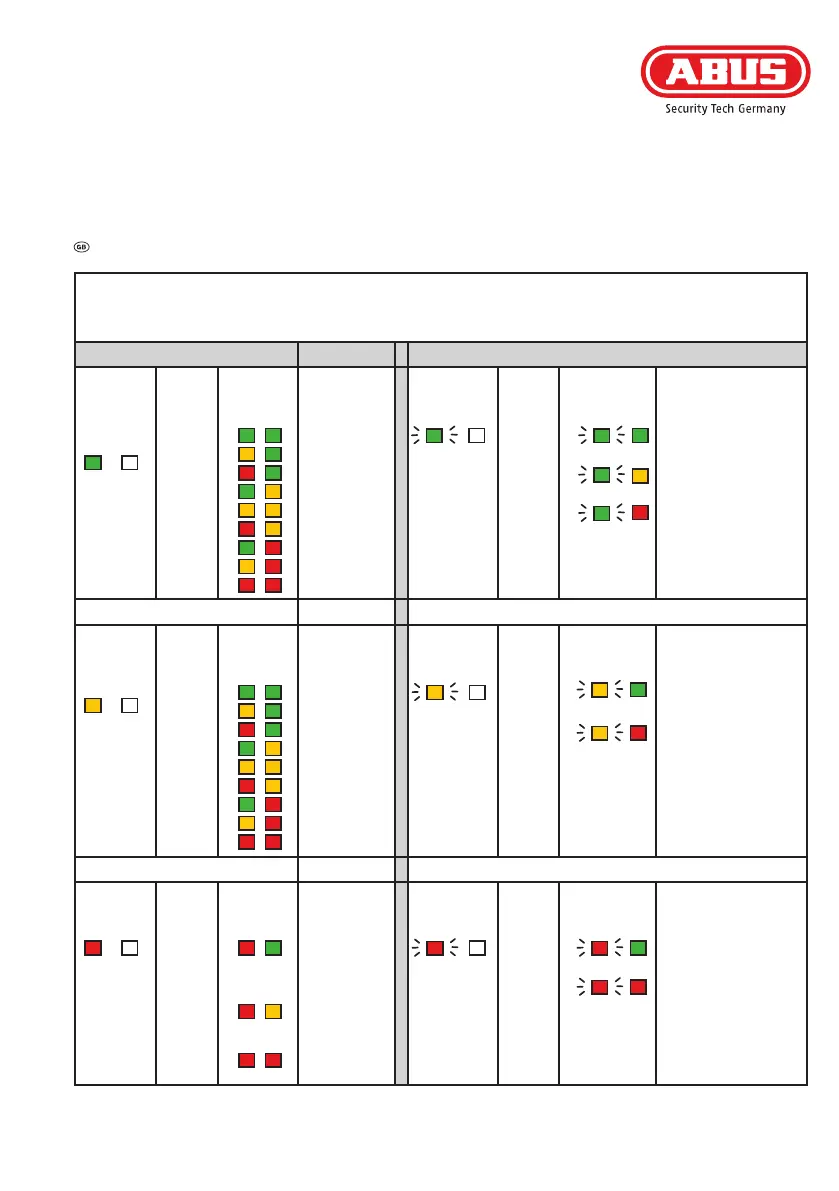
- Open menu level 1 by pressing and holding keys 1 and 2 simultaneously for approx. 2 seconds
- Scroll through the menu levels by pressing key 1 or 2
- Select a menu item by pressing key 4, exit the menu item by pressing key 3
- Open advanced menu by pressing keys 1 and 2 simultaneously from menu level 1 (LED1 turns green)
Level 1 Level 2 (advanced menu)
Program-
ming
handheld
transmitters
LED 1 LED 2
>
Selection
key 4
<
Back
key 3
Memory
locations
LED 1 LED 2
1
2
3
4
5
6
7
8
9
Setting
signal tones
LED 1 LED 2
>
Selection
key 4
<
Back
key 3
Information
LED 1 LED 2
1
2
3
Signal tones
- in all end positions
- on motorised locking
- no signal tones
(alarm tones such as
low battery level or
drive overloaded and
key tones for the drive
arenotturnedo)
Key 1 or 2 Key 1 or 2
Clearing
handheld
transmitters
LED 1 LED 2
>
Selection
key 4
<
Back
key 3
Memory
locations
LED 1 LED 2
1
2
3
4
5
6
7
8
9
Setting
Torque
LED 1 LED 2
>
Selection
Taste 4
<
Back
key 3
Information
LED 1 LED 2
1
3
Torque
-
restriction on
(ca. 6 Nm)
- maximum (ca. 8 Nm)
Key 1 or 2 Key 1 or 2
Factory
settings
LED 1 LED 2
>
Selection
key 4
<
Back
key 3
Information
LED 1 LED 2
Clearing the
programming
& any other
settings
Clearing all
saved trans-
mitters
Complete
factory reset
Setting
tilt function
LED 1 LED 2
>
Selection
key 4
<
Back
key 3
Information
LED 1 LED 2
1
3
tilt function
- inactive
- active
<
<
<
<
<
<
<
<



 To Next Page