Add Device
Gerät einlernen
(Inclusion)
1.2
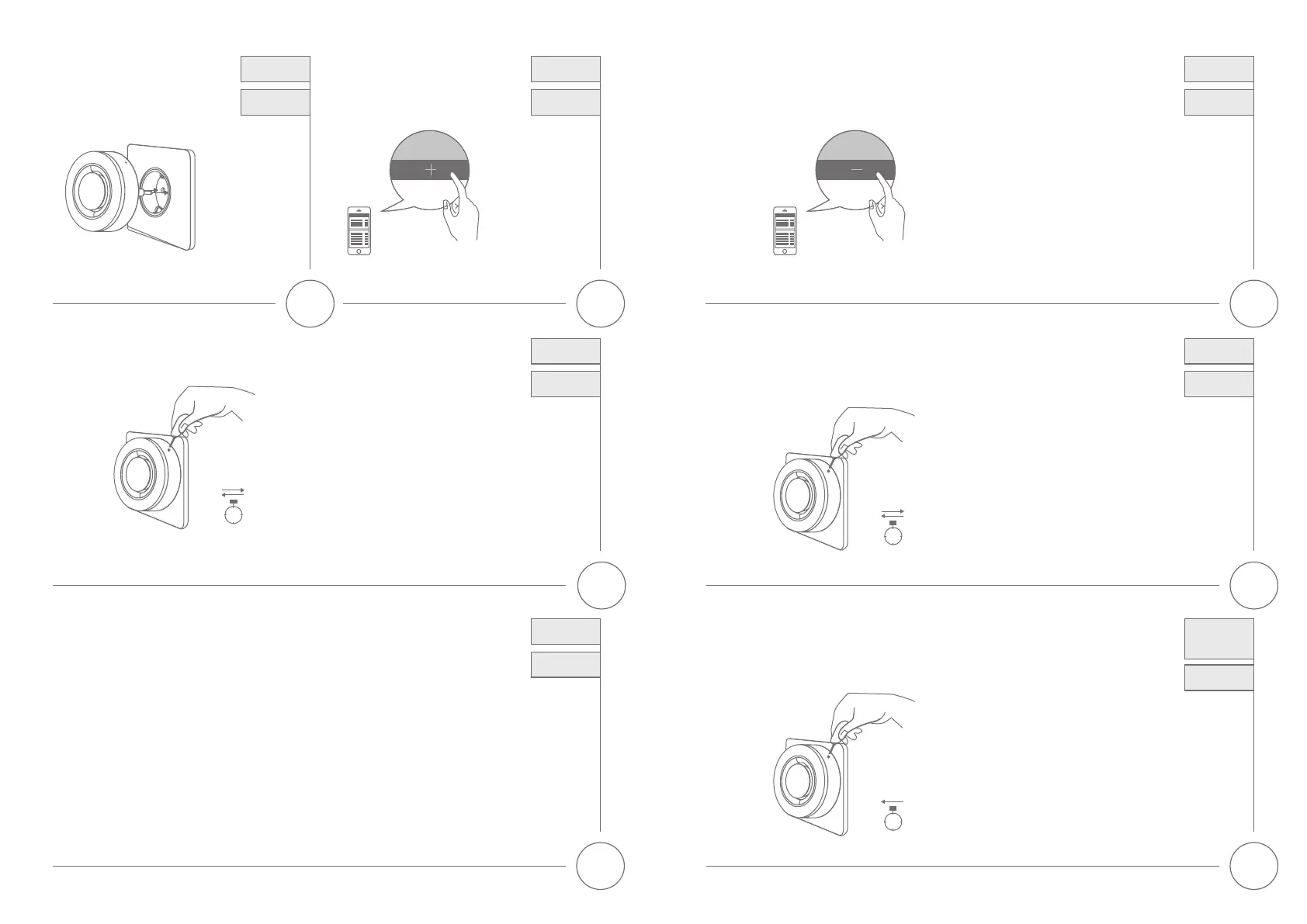
• Drücken Sie in
ihrer Z-Wave App
auf die + (Add)
Taste und folgen
den Anweisungen.
• Click the + (Add)
button in your
Z-Wave App and
follow the further
instructions.
1.1
• Stecken Sie das
Gerät in eine
Steckdose.
• Plug the device
into a socket.
Add Device
Gerät einlernen
(Inclusion)
2
• Wenn das Gerät in ein Z-Wave Gateway eingelernt wurde, kann dieses die Alarmierung am Gerät auslösen
und beenden. Im Alarmfall ertönt ein lautes Alarmgeräusch (95 dB) und das Blitzlicht leuchtet auf.
• Bei unterbrochener Stromversorgung gewährleistet der integrierte Backup-Akku im Alarmfall bis zu
5 Minuten Sirenenbetrieb (bzw. bis zu 4 Stunden Standby Betrieb).
• Once the device is added to a Z-Wave gateway, the alarm can be released and terminated In Event
of an Alarm the high-volume siren (95dB) will sound and LED strobe lights up.
• In Event of main power loss, the Siren can even operate up to 5 minutes in Alarm-case by the
integrated backup-battery. (or 4 hours standby operation)
Operating the
device
Gerätebetrieb
3.1
• Drücken Sie in ihrer Z-Wave App
auf die - (Remove) Taste und folgen
den Anweisungen.
• Click the – (Remove) button in your
Z-Wave App and follow the
further instructions.
Remove Device
(Exclusion)
Gerät
auslernen
1.3
• Drücken Sie innerhalb von 1.5 Sekunden
3mal die Netzwerk-Taste. Darauin
leuchtet die Status-LED 3mal auf.
• Bei erfolgreichem Einlerne-Vorgang
erlischt die LED.
• Press the Network-button 3 times within 1.5
seconds and the Status-LED will ash 3 times.
• If the Add device process is successful, the
Status-LED will turn o.
Add Device
Gerät einlernen
(Inclusion)
1.5
sec
3x
3.2
• Drücken Sie innerhalb von 1.5 Sekunden
3mal die Netzwerktaste.
• Bei erfolgreichem Auslernprozess leuchtet
die Status-LED 6mal auf und erlischt danach.
• Press the Network-button 3 times within 1.5 seconds.
• If the Remove Device process is successful,
the Status-LED is ashing 6 times and turns o.
Remove Device
(Exclusion)
Gerät
auslernen
1.5
sec
3x
4
• Halten Sie die Netzwerk-Taste 10 Sekunden
lang gedrückt um das Gerät auf
Werkseinstellungen zurückzusetzen.
• Press the Network-button for 10 seconds
to factory reset the device.
5
sec
Factory Reset
Werksein-
stellungen
zurücksetzen



 To Previous Page