Need help?
Do you have a question about the AC Infinity IONBEAM GREEN and is the answer not in the manual?
Spectrum maintains dark period integrity, not impacting plant growth cycle.
Supports existing blue and red LED grow lights to improve lighting quality.
Optional diffuser evens light distribution and increases coverage area.
Cold-rolled steel bar with matte black coating provides sturdy base.
Four light intensity levels provide increased versatility.
Smart programming includes automatic shut-off and UIS compatibility.
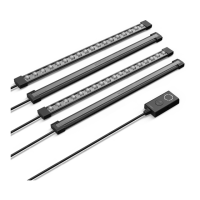
Connect the light bar's female port to the controller's male connector.
Methods for mounting the light bar: pole, canvas, and wall.
Detailed steps for marking, drilling, and securing the mounting bar.
Plug the power adapter into a wall outlet.
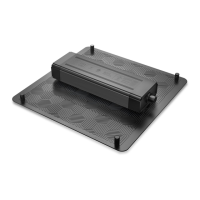
Magnetically mount the light controller onto any steel surface.
Secure the controller to the wall using the mounting hole and anchors.
Place light bar at the top of grow space for even coverage.
Start at 25% light intensity and increase as needed.
Use the included UIS M-M extension cord to connect light bar to controller.
Press light button to increase intensity; hold to shut off.
Press clock button to set timer in 5-minute increments.
Refer to UIS controller programming section for instructions.
The IONBEAM GREEN is a plant night cycle work light designed by AC Infinity to provide illumination during a plant's dark period without disrupting its grow cycle. This device offers a plant-gentle spectrum, ensuring that the light emitted does not negatively impact the plant's natural growth. It also features an enhanced spectrum that supports existing blue and red LED grow lights, aiming to improve overall lighting quality in a grow environment.
One of the key features of the IONBEAM GREEN is its greater flexibility in light distribution. It comes with an optional diffuser that helps to even out light distribution and increase the coverage area. This diffuser can be easily detached if supplemental lighting is desired, offering versatility in how the light is used.
The light bar itself is built with versatile mounting in mind. It features a cold-rolled steel bar with a matte black powder coating, providing a sturdy base for placement in various grow tents. The light bar can be magnetically mounted directly onto a grow tent's steel pole. For added security and to adjust the lighting angle, hook and loop cable ties are included to secure the light bar and mounting bar. For canvas mounting, the light bar can be magnetically attached to the wall or ceiling of a grow tent by placing the included mounting bar on the outer side of the tent and the light bar on the inner side at the exact spots. Once mounted, the connection can be moved along the grow tent surface as needed, and users are advised to test the magnetic connection for security before use. For wall mounting, users are instructed to first ensure the mounting area is free from obstruction, then use a mounting bar to mark drilling holes with the logo facing the wall. After drilling the holes, if mounting onto anything other than wood, four wall anchors should be inserted and secured, possibly with a hammer. Finally, the mounting bar holes should be aligned with the wall anchors, ensuring the logo faces the wall, and wood screws should be used to secure the mounting bar. The light bar magnets then attach to the mounting bar.
The IONBEAM GREEN also includes an adjustable dimming feature, offering four light intensity levels. This allows for increased versatility, supporting work in both grow tents and larger grow rooms by providing appropriate light levels. An auto-off functionality is another smart programming feature, which includes automatic shut-off. The device is also UIS compatible, allowing access to more automations when integrated into the AC Infinity UIS™ platform.
The light bar chain assembly involves connecting the light bar's female port to the light controller's male connector, and then connecting the light controller to the power adapter. To extend the chain, included bar extension cords can be connected between any link in the light bar chain, with all connections secured using twist-on pieces. The diffuser can be snapped on for a softer and more even light distribution.
For powering the light, the power adapter simply plugs into a wall outlet.
The IONBEAM GREEN is part of the AC Infinity UIS™ platform, which enables connection of a single central controller with several grow devices simultaneously. This integrated system allows for powering and programming all devices together or separately for optimized grow tent management. The grow system can be regulated using a controller hub or remotely via the AC Infinity app (with compatible controllers), providing access to automation programming and climate data. The IONBEAM LED grow lights can connect with select smart controllers as part of an integrated system using the included UIS extension cord. To connect to UIS controllers, the included UIS M-M extension cord is used to connect the light bar(s) to the selected UIS controller via the light controller's side port. When connected in this manner, the selected UIS controller will override all of the light controller's onboard settings.
The light controller itself can be mounted magnetically onto any steel surface. For wall mounting, a spot free of obstruction should be located, an anchor secured into the wall, and a wood screw twisted into the anchor. The mounting hole on the back of the controller is then used for wall mount.
Regarding programming, the light controller has dedicated buttons for lighting and a timer. Pressing the light button increases the light intensity level in 25% increments (25% - 100%), indicated by white LED indicators. Reaching 100% intensity cycles back to 0%. Holding any button will shut off the light bar and the timer. Pressing any button when the light bar is off will turn the light and timer back on at their previous settings. Setting light intensity without a timer will keep the light on indefinitely. The clock button sets the timer in 5-minute increments (5MIN. - 20MIN.), displayed with orange LED indicators. The lighting will be active for the set time and then deactivate. Pressing any button when the light bar is off will turn the light and timer back on at their previous settings. Pressing the clock button at the 20MIN. setting deactivates the timer. For UIS connection programming, users are directed to refer to the programming section of their selected UIS controller.
Maintenance features are not explicitly detailed in the provided text, but the general product warning advises against blocking or tampering with the product, operating it with a damaged cord, or if it malfunctions. It also recommends unplugging the power cord before installing, servicing, or moving the product. These points imply standard care and safety practices rather than specific maintenance routines.
 General
| Lifespan | 50, 000 hours |
|---|---|
| Coverage Area | 2x2 ft |
| Voltage | 100-240V AC |
| Color | Green |
| Light Spectrum | Green |
| Dimensions | 12 x 1.5 x 1 in. |
| PPFD | 200 μmol/m²/s |


 To Next Page