EasyManua.ls Logo

acaia Orbit - Parts Identification

acaia Orbit
15 pages
Print Icon
To Next Page IconTo Next Page
To Previous Page IconTo Previous Page
Loading...
Orbit Button
*
The Orbit will auto standby
when not in use.
*
Only in grind-by-weight mode
Power on
Start / Stop / Pause*
Pulse
Purge
Toggle preset
Standby*
(10 seconds)
(2 seconds)
Light Indicators
White
Blue
Cyan
Magenta
Red
Green
Yellow
Orange
Preset A (600 RPM)
Preset B (1000 RPM)
Preset C (1500 RPM)
Manual Mode
Warning / Firmware update
Reset to factory default
Purge / Cleaning in progress
Connecting in progress
Click
Double Click
Triple Click
Press and Hold
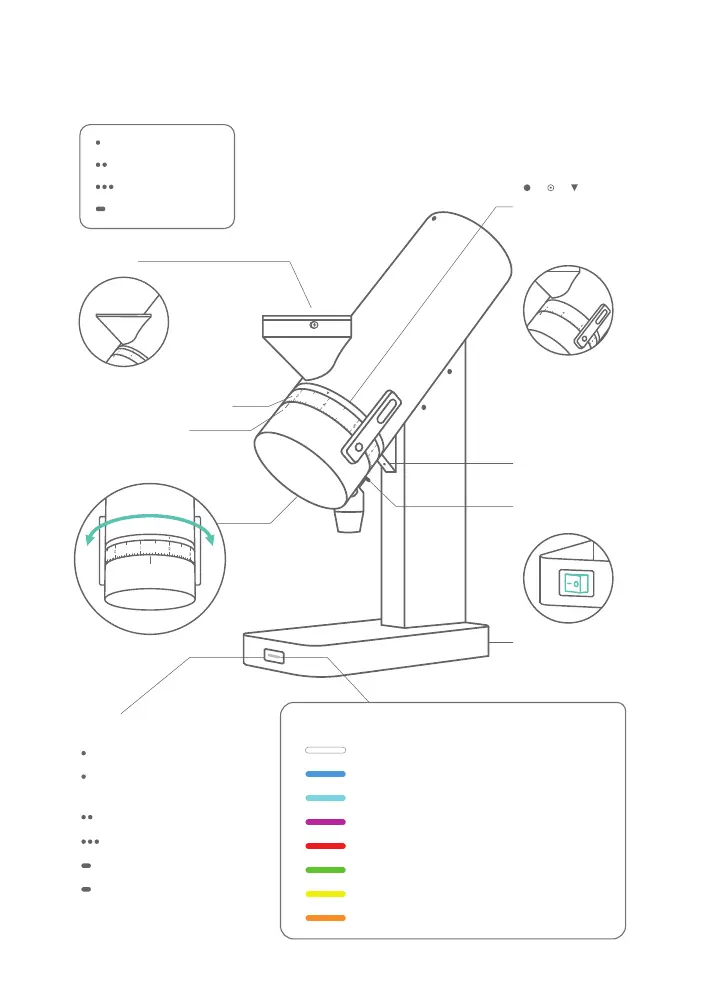
Orbit Overview
Hopper
Spotlight
Knocker
Grind Adjustment Ring
FineCoarse
Detent Ring
You can adjust the
detent ring to suit
your needs.
*Model AOT007 /
AOT008 / AOT009 /
AOT010 comes with a
wide adjustment ring.
*Optional
Reference Mark
Main Power Switch
4

Other manuals for acaia Orbit