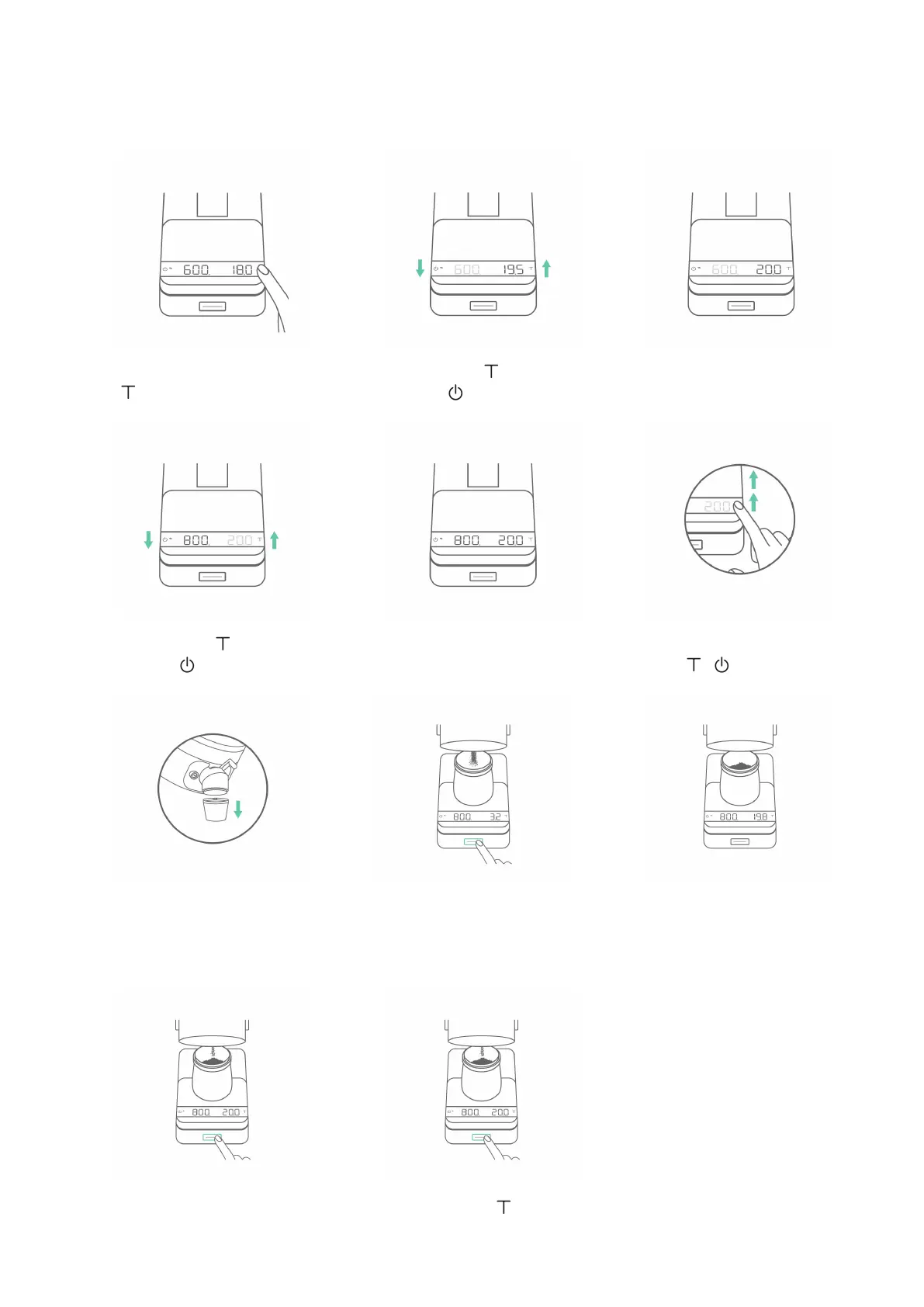
Make sure to remove the
spout extender from the
Orbit spout and place the
dosing cup on the Lunar.
At the end of each
session, you can click the
Orbit button to pulse a
small amount of coffee if
needed.
Remove the dosing cup
or double tap to reset
the current grind-by-
weight session.
To begin the grinding
session, click the Orbit
button. The Orbit will start
grinding until the target
weight is reached.
When the target weight
is reached, the Orbit will
automatically stop the
motor.
Adjusting Weight and RPM in Grind-by-weight Mode
23
To adjust the target weight
and RPM, press and hold
until the weight starts
blinking.
When you reach the
desired target weight, wait
5 seconds to move on to
the RPM adjustment.
When the weight starts
blinking, tap to increase
and tap to decrease.
When adjusting target
weight and RPM, press and
hold / to speed up
the adjustment.
When the RPM starts
blinking, tap to increase
and tap to decrease.
When you reach the
desired RPM, wait 5
seconds to save.
1
4
7
10 11
2
5
8
3
6
9


 To Next Page