©2009 Johnson Level & Tool 9
7. Using the Product
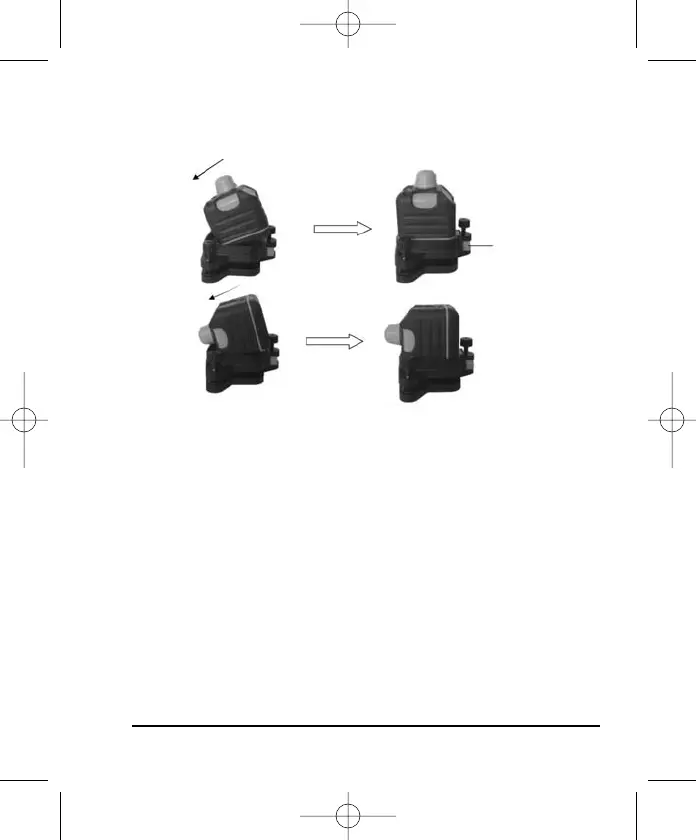
Connecting the Laser to its Base
Position the two slots on the laser into the base, tighten the locking
knob to secure the base to the laser
. The laser can now be
secured to a tripod.
Battery Installation
1. Disconnect the laser from the base as shown in the figure on the
next pa
ge (rotate the base unlock/lock knob counterclockwise to
unlock the laser from the base).
2. Remove battery cover (rotate the battery compartment knob coun-
terclockwise to the open position).
3. Put in 4 “AA” alkaline batteries following the polarity specified in
the battery compartment.
Base
Unlock/Lock
Knob
Horizontal
Vertical
2260H 6/4/09 11:42 AM Page 9


 To Next Page