88
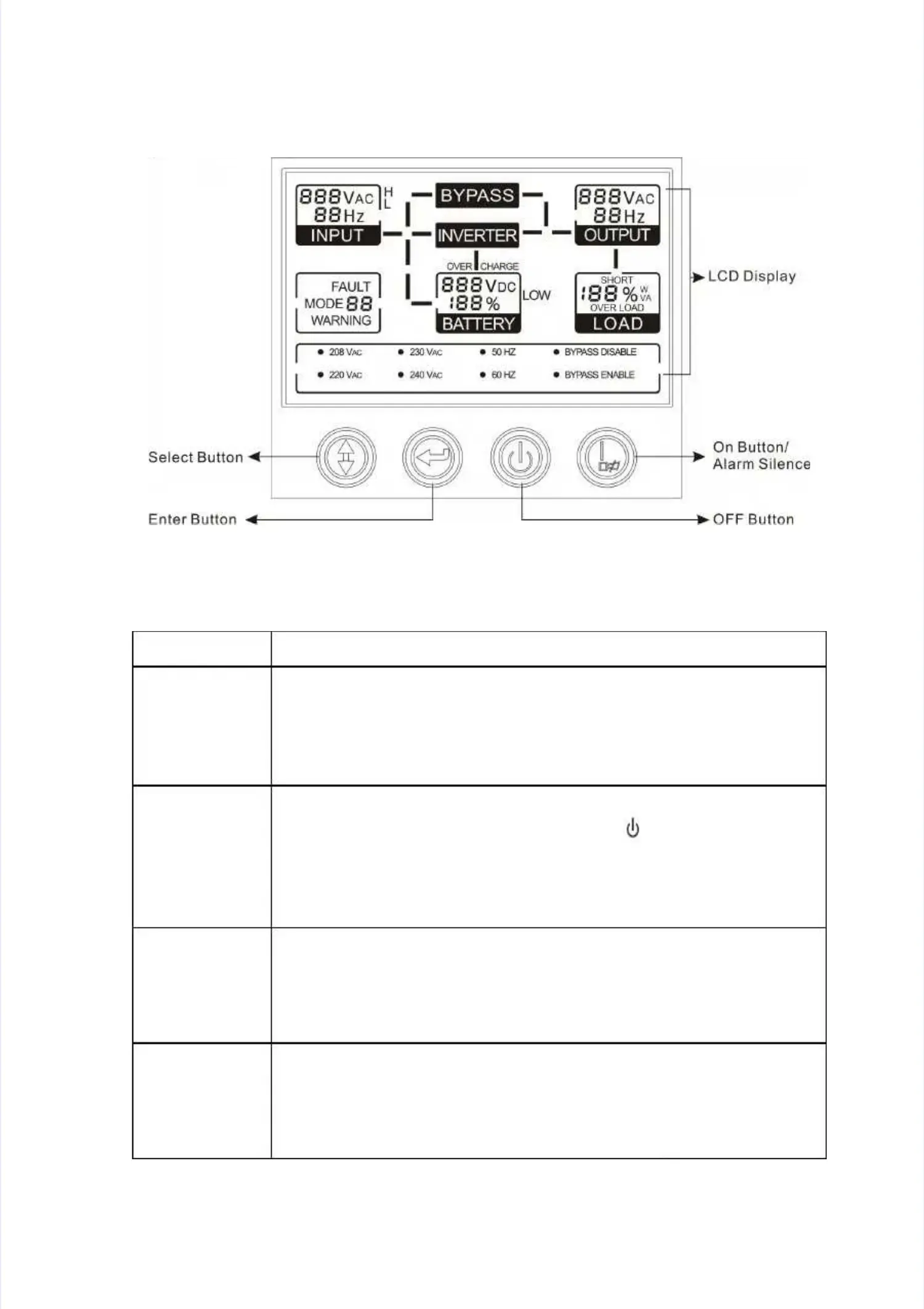
4. Display Panel4. Display Panel
Button FunctionButton Function
ON ButtonON Button
Turn on UPS system: By pressing the ON button “I” the UPSTurn on UPS system: By pressing the ON button “I” the UPS
system is turned on.system is turned on.
Deactivate acoustic alarm: By pressing this button anDeactivate acoustic alarm: By pressing this button an
acoustic alarm can be deactivated.acoustic alarm can be deactivated.
OFF ButtonOFF Button
When mains power is normal, the UPS system switches toWhen mains power is normal, the UPS system switches to
Bypass Bypass mode bmode by prey pressing OFssing OFF buttF button “on “ “, and “, and the inthe inverter verter isis
off. At this moment, if Bypass is enabled, then the outputoff. At this moment, if Bypass is enabled, then the output
terminals are supplied with voltage via the bypass if theterminals are supplied with voltage via the bypass if the
mains power is available.mains power is available.
Select ButtonSelect Button
If the UPS system is Bypass mode, the output voltage range,If the UPS system is Bypass mode, the output voltage range,
frequency range and Bypass disable/enable could befrequency range and Bypass disable/enable could be
selected by pressing Select button, and confirmed byselected by pressing Select button, and confirmed by
pressing Enter button.pressing Enter button.
Enter ButtonEnter Button
If the UPS system is Bypass mode, the output voltage range,If the UPS system is Bypass mode, the output voltage range,
frequency range and Bypass disable/enable could befrequency range and Bypass disable/enable could be
selected by pressing Select button, and confirmed byselected by pressing Select button, and confirmed by
pressing Enter button.pressing Enter button.
Display PanelDisplay Panel


 To Next Page
 Loading...