The SmartDrop™ L Nano Spectrophotometer (NS1000) is a sophisticated instrument designed for precise measurement of nucleic acids, proteins, and OD600 samples. It offers high accuracy and reproducibility, employing surface tension to position samples for measurement. The system is equipped with a cuvette slot for OD600 readings and a built-in printer for convenient printing of results.
Function Description
The SmartDrop™ L measures 1.0µL – 2.0µL samples, making it suitable for applications requiring small sample volumes. It provides multifunctional software for Nucleic Acids, Protein A280, and OD600 measurements. The device supports dsDNA detection ranging from 10ng/µL – 2500ng/µL and delivers fast and accurate measurements in less than 6 seconds. The system includes 2 cuvettes (optical glass) for OD600 measurements.
Key Features:
- User-Friendly Interface: Features a touch screen for programming and operation, which can also be connected to a mouse.
- Multifunctional Software: Dedicated software for Nucleic Acids, Protein A280, and OD600 measurements.
- dsDNA Detection: Range from 10ng/µL – 2500ng/µL.
- Fast & Accurate Measurements: Completes measurements in less than 6 seconds.
- Cuvette Slot: Includes two optical glass cuvettes for OD600 measurements.
- Built-in Printer: Allows for direct printing of results.
Important Technical Specifications
| Model |
SmartDrop™ L (NS1000) |
| Minimum Sample Size |
1.0µL – 2.0µL |
| Path Length |
0.5mm |
| Light Source / Life |
UV LED / 8000h |
| Detector Type |
UV Silicon Photocell |
| Wavelength Range |
260, 280, 600nm |
| Wavelength Accuracy |
± 1 nm |
| Absorbance Precision |
0.005Abs |
| Conc. Accuracy |
±5ng [10,500], ±2% [500,2000], ±3% [2000,2500] |
| Absorbance Range |
0.2-50 (10mm equivalent) |
| Detection Concentration Range |
10ng/µL dsDNA ~ 2,500ng/µL dsDNA |
| Detection Time |
< 6 seconds |
| Abs range |
0~4.000 Abs |
| Abs stability |
[0,3] ≤0.5% [3,4] ≤2% |
| Abs repeatability |
[0,3] ≤0.5%, [3,4] ≤2% |
| Abs Precision |
[0,2] ≤0.005A, [2,3] ≤1%, [3,4] ≤2% |
| Voltage Input |
DC 24V, 2A |
| Power |
25W |
| Dimensions (W×D×H) |
20.8cm × 28.0cm ×18.6cm / 8.2in x 11.0in x 7.3in |
| Weight |
3.6 kg / 7.9 lbs |
Environmental Requirements:
- Temperature: 5°C~35°C
- Relative Humidity: ≤ 70%
- Input Voltage: DC 24V, 2A (Adapter CSA, UL, CE marked)
Usage Features
The SmartDrop™ L is designed for ease of use, with a clear and intuitive interface.
Instrument Structure:
- Front: Features an upper pedestal, built-in printer, cuvette slot, lower pedestal, and a display.
- Back: Includes a switch, power socket, and USB ports.
Sample Size Requirements:
Surface tension is critical for sample column formation. The device ensures precise and accurate measurements, requiring a complete liquid column between the upper and lower pedestals. A precision pipettor (0-2µL) is recommended for dispensing samples.
Dispensing Samples onto The Lower Pedestal:
Lift the upper pedestal and pipette the sample (1.0µL – 2.0µL) onto the lower pedestal. Ensure the cuvette is loaded with the correct orientation. To prevent sample carryover, use a soft laboratory wipe and deionized water to clean both pedestals between sample measurements.
OD600 Measurement:
The SmartDrop™ L includes a cuvette slot for OD600 measurements. Lift the upper pedestal to expose the cuvette slot. Select the OD600 interface on the touch screen. Set a "blank" as required for the experiment (blank = air, empty cuvette, or buffer in cuvette). Then add 2-3mL of sample into the cuvette. Place the cuvette into the slot and start the measurement. The direction of the light path is shown by a red arrow in the figure above.
Programming & Operation:
- Start-up Interface: Upon powering on, the instrument performs a self-check, and the start-up screen will be displayed.
- Main Menu Interface: After start-up, the main menu interface will be displayed, offering four options: Nucleic Acids, Protein A280, OD600, & System Settings.
- Nucleic Acids Interface:
- Beer-Lambert's Law for DNA/RNA quantitation: The device uses the Beer-Lambert equation to calculate the concentration of nucleic acids.
- C = (A * ε) / b
- C = Sample DNA concentration, unit: ng/µL
- A = Sample absorbance, unit: A
- ε = Extinction coefficient, unit: ng-cm/µL
- b = Path Length, unit: cm
- Standard DNA/RNA extinction coefficients: dsDNA: 50ng-cm/µL, ssDNA: 33ng-cm/µL, RNA: 40ng-cm/µL.
- Sample Measurement: When the sample column is used, highly concentrated nucleic acid samples can be measured without dilution using a 0.5mm path length. The SmartDrop™ L will measure and display sample absorbance values of the 10mm pathlength equivalent of up to 50 A. The SmartDrop™ L will accurately measure dsDNA samples up to 2500ng/µL without dilution.
- Nucleic Acids Interface Tabs: The interface has three tabs: Nucleic Acids, Report, and Help.
- ID: The sample ID has a default value of the current date and time. Users can rename the sample ID.
- DNA-50: Select the sample type: DNA-50 for dsDNA, RNA-40 for RNA, ssDNA-33 for ssDNA.
- Blank: Perform a blank reading. Absorbance values are typically in the range of 0.004-0.03 Abs and are valid for up to 30 minutes.
- Baseline: Spectrum normalization. The baseline is automatically set to the absorbance of the sample at 365nm and can be modified.
- Operation Steps:
Set the Sample ID.
Clean the upper and lower pedestals with a lint-free wipe, add 2µL buffer solution to perform a blank reading.
Clean the buffer solution on the pedestals with a wipe.
Measure a 2µL sample volume and click "Measure" to detect the sample.
Clean and dry the pedestal between measurements.
- Sample Concentration & Absorbance Ratios: The sample concentration and absorbance ratios are displayed on the left side of the interface.
- Conc.: Calculated nucleic acid concentration.
- A260: The sample absorbance at 260nm (10mm pathlength equivalent).
- A280: The sample absorbance at 280nm (10mm pathlength equivalent).
- A260/A280: The ratio of corrected absorbance values at 260nm to corrected absorbance values at 280nm. An A260/A280 ratio of ~1.8 is generally accepted as pure for DNA (~2.0 for RNA).
- Nucleic Acid Report Interface: Select the "Report" tab to view previously saved results.
- Print: Print the selected data from the built-in printer.
- Export Data: Export the result to a USB flash drive.
- Delete Data: Delete the selected results.
- Delete file: Delete the selected files.
- Protein A280 Interface:
- Introduction: The Protein A280 interface is used to quantify purified proteins that contain amino acids such as tryptophan, tyrosine, or cys-cys disulfide bonds. These amino acids exhibit peak absorbance at 280nm. The following sample types can be selected: "A280", "BSA", "IgG", "Lysozyme", & "Others". This interface does not require the generation of a standard curve. Sample absorbance values (260nm & 280nm) and A260/A280 ratios can be measured and displayed. A baseline correction can be used for normalization.
- Protein A280 Interface Options: There are three options at the top of the screen: Protein A280, Report, and Help.
- ID: The sample ID has a default value of the current date and time. Users can rename the sample ID.
- A280: Select the sample type: A280, BSA, IgG, Lysozyme. Select "others" and type in the extinction coefficient.
- Blank: Perform a blank reading. Absorbance values are typically in the range of 0.004-0.03 Abs and are valid for up to 30 minutes.
- Operation Steps:
- Set the Sample ID.
- Clean the upper and lower pedestals with a wipe, add 2µL buffer solution to perform a blank reading.
- Clean the buffer solution on the pedestals with a wipe.
- Measure a 2µL sample volume and click "Measure" to detect the sample.
- Clean and dry the pedestal between measurements.
- Protein Sample Results: The sample concentration and absorbance ratios will display on the left side of the interface.
- Conc.: Calculated protein concentration.
- A260: The sample absorbance under 260nm (10mm pathlength equivalent).
- A280: The sample absorbance under 280nm (10mm pathlength equivalent).
- A260/A280: The ratio of corrected absorbance values at 260nm to the corrected absorbance values at 280nm. This ratio can be used as a secondary measure of nucleic acid purity. An A260/A280 ratio within the range of ~1.8 – 2.2 as pure for nucleic acids. Lower ratio values indicate the presence of contaminants that absorb strongly at or near 280nm.
- Protein A280 Report Interface: This interface is similar to the Nucleic Acids detection interface.
- OD600 Interface:
- Introduction: The OD600 function allows for measuring absorbance values at 600nm. It is commonly used for measuring the growth rate of bacterial cell cultures by measuring absorbance of the culture in growth media at 600nm. The Beer-Lambert equation is used to calculate the concentration.
- Operation:
- Set the Sample ID.
- Clean the upper and lower pedestals; add 2µL buffer solution to perform a blank reading.
- Clean the buffer solution on the pedestals.
- Measure a 2µL sample volume and click "Measure" to detect the sample.
- Clean and dry the pedestal between measurements.
- OD600 Report Interface: This interface is similar to the Nucleic Acids detection interface.
- System Settings Interface: Click "System" on the main interface to enter the System Settings Interface.
- Date & Time Settings Interface: Click the "Time" icon to enter the date and time settings interface.
- Print Settings Interface: Click the "Print" icon to set the print mode.
- Brightness Settings Interface: Click the "Brightness" icon to enter the Brightness Settings Interface. Use the slider to adjust the brightness of the display.
Maintenance Features
Regular maintenance ensures the longevity and optimal performance of the SmartDrop™ L.
Cleaning:
- The pedestal should be cleaned regularly using a soft cloth dampened with deionized water.
- The instrument housing should be cleaned regularly using a soft cloth dampened with a small amount of alcohol.
Safety Warnings and Guidelines:
- Important Information for Safe Use: Users should understand how to use this instrument before operating. Read the manual carefully prior to operation.
- General Safety: Any improper operation may cause injury. Read this manual carefully and operate safely according to the guidelines.
- Operation and Maintenance: The operation and maintenance of the instrument should comply with the basic guidelines and warnings below. Incorrect operation or maintenance will have detrimental effects on the life, performance, and safety features of the instrument.
- Instrument Classification: The instrument is a normal indoor instrument which conforms to class 1 of the GB 4793.1 standard.
- Laboratory Use: This instrument is designed for use in a laboratory environment. The device must be operated by skilled laboratory personnel with appropriate training.
- Warranty: To prevent injury or voiding the warranty, the operator should not attempt to repair the instrument without explicit guidance from Accuris Instruments.
- Electrical Requirements: Before powering on, confirm that the voltage used meets the electrical requirements of the instrument as stated on the rating plate. If the electric cord is damaged, replace it with the same type of cord. Hold the socket firmly before pulling the plug from an outlet. Do not pull the electric cord.
- Environmental Conditions: The instrument should be installed in an environment of standard room temperature, low dust, low humidity, and away from direct sunlight, electromagnetic interference, and heat sources. Do not block the vents on the instrument.
- Power Off: Always power off the instrument when you are finished using it. Unplug the power cord and cover the instrument with a cloth or plastic sheet to prevent excessive dust from entering the housing.
- Connector Plug: Pull the connector plug from the electrical outlet immediately and contact the vendor in the event of:
- Liquid entering the housing.
- Abnormal operation: such as any abnormal sound or smell.
- The instrument is dropped or there is any damage to the housing.
- Any malfunction.
Troubleshooting:
The manual provides a detailed troubleshooting guide for common issues such as:
- Instrument does not power on.
- Measurement results not precise.
- OD600 module failure.
- Insufficient light intensity error.
- Touch screen error.
- Communication timeout.
For any issues, the recommended action is to contact Accuris Instruments.

 Need help?
 General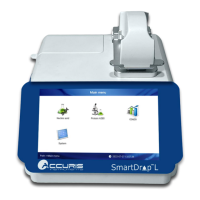

 To Next Page