EasyManua.ls Logo

AccuTemp Vision Touch - Page 10

AccuTemp Vision Touch
34 pages
Print Icon
To Next Page IconTo Next Page
To Previous Page IconTo Previous Page
Loading...
10
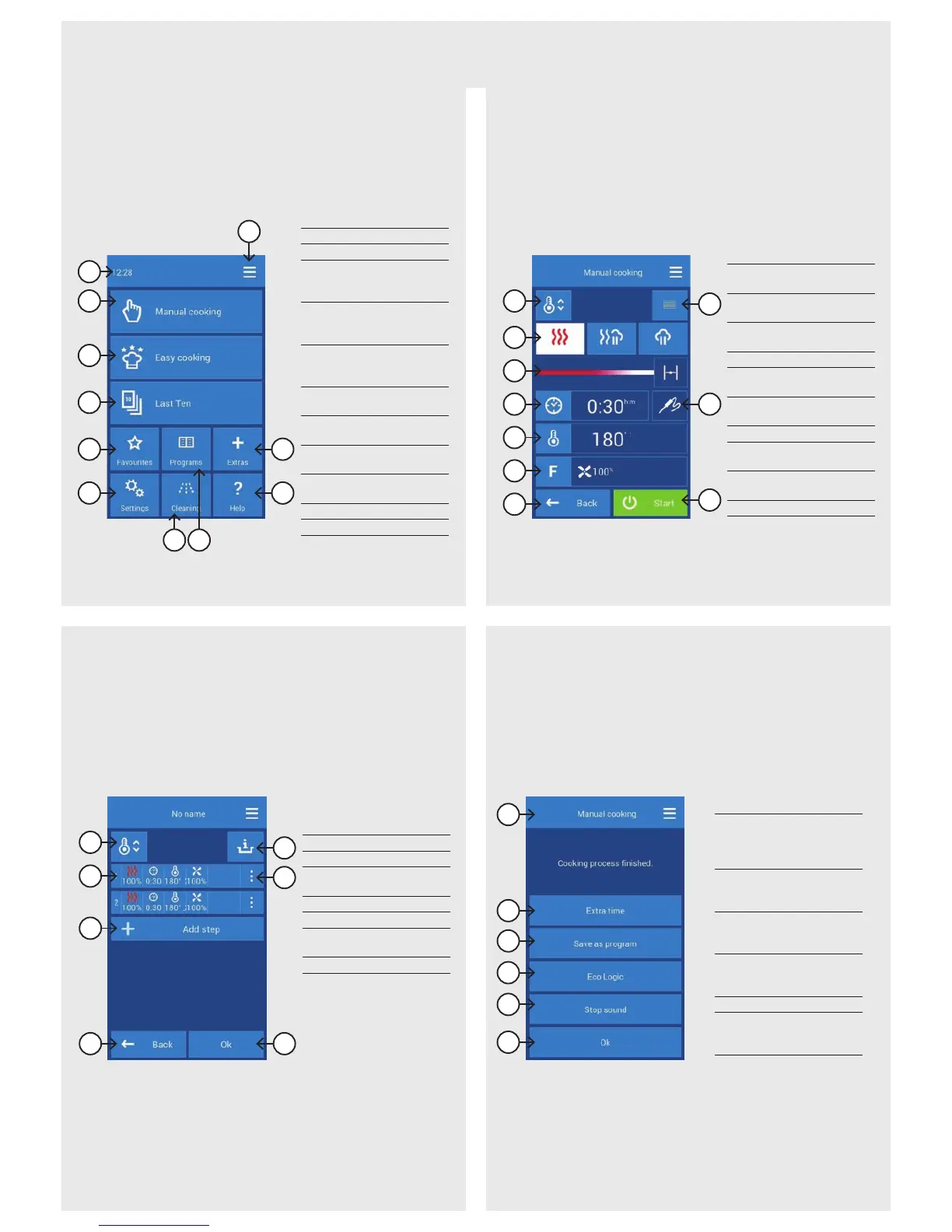
D END OF COOKINGC PROGRAM DETAIL
A9
B1 Cooking chamber
preheating
B2 Cooking mode
selection
B3 Exhaust valve
selection
B4 Setting the time
B5 Setting the
temperature
B6 Settings for other
functions
B7 Go back
B9 Overview of program
steps
B10 Temperature probe
settings
B11 Start cooking
D1 Information about
the selected mode/
program for the
cooking process
D2 Option to immediately
extend the last
cooking step
D3 Save the completed
cooking process as a
program
D4 Display power
consumption during
the cooking process
D5 Stop the sound signal
D6 Return to the last
screen before pressing
the START button
A1 Current time
A2 Manual cooking setup
A3 Cooking with the
assistance of Easy
cooking
A4 Previously used
programs/cooking
process selection
A5 Selection from
programs marked as
Favorites
A6 User and service
settings
A7 Active Cleaning
automatic washing
A8 Selection from saved
programs
A9 Main screen setup
(User profiles)
A10 Special functions
A11 Help/instructions
C1 Preheat/Cool down
C2 Step parameters
C3 Enter another
program step
C4 Go back
C6 Chef's tips
C7 Enter/delete
aprogram step
C8 Start cooking
B1
B2
B3
B4
B5
B6
B7
B11
B10
B9
D2
D3
D4
D5
D6
D1
A2
A1
A3
A4
A5
A7 A8
A10
A11
A6
C1
C2
C3
C4 C8
C7
C6
DESCRIPTION OF THE MOST COMMON SCREENS
A MAIN SCREEN B MANUAL COOKING

Related product manuals