14
4.2 PROGRAMS
The Program mode enables the combi oven to be utilized to its maximum
potential. Sofisticated controls ensure that the final products are
consistently of the highest quality,
User’s manual | Vision™ Touch Combi Steamers | 04 COOKING | 4.2 PROGRAMS
4.2.1 Cooking according to a program
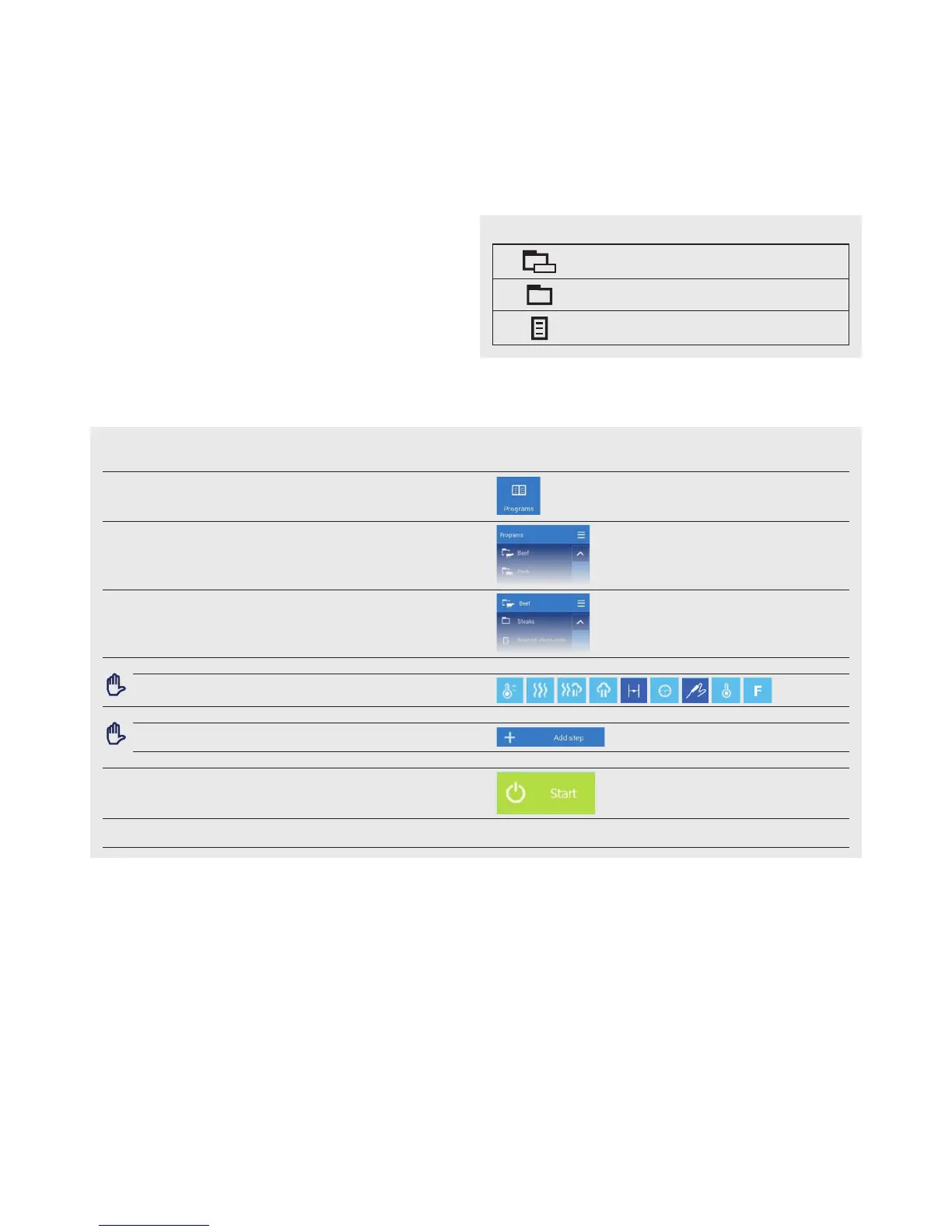
1 ENTER PROGRAMS option A8
2 SELECT A PROGRAM CATEGORY
3 SELECT EDIT FOOD TYPE (PROGRAM)
3.1
OPTION: EDIT PARAMETERS
Select and edit the parameters B1 to B10 as required
3.2
OPTION: ADD A STEP
Press
To add another step, repeat the procedure from point 3.1
4 START THE COOKING PROCESS BY PRESSING
5 AT THE END OF THE COOKING PROCESS, SELECT AN ACTION
WITH WHICH TO CONTINUE (screen D)
PROGRAM MODE SYMBOL SYSTEM
symbol
Main category according to food type.
Subcategories with more programs
Program


 To Next Page