15
User’s manual | Vision™ Touch Combi Steamers | 04 COOKING | 4.2 PROGRAMS
4.2.2 Creating a new program
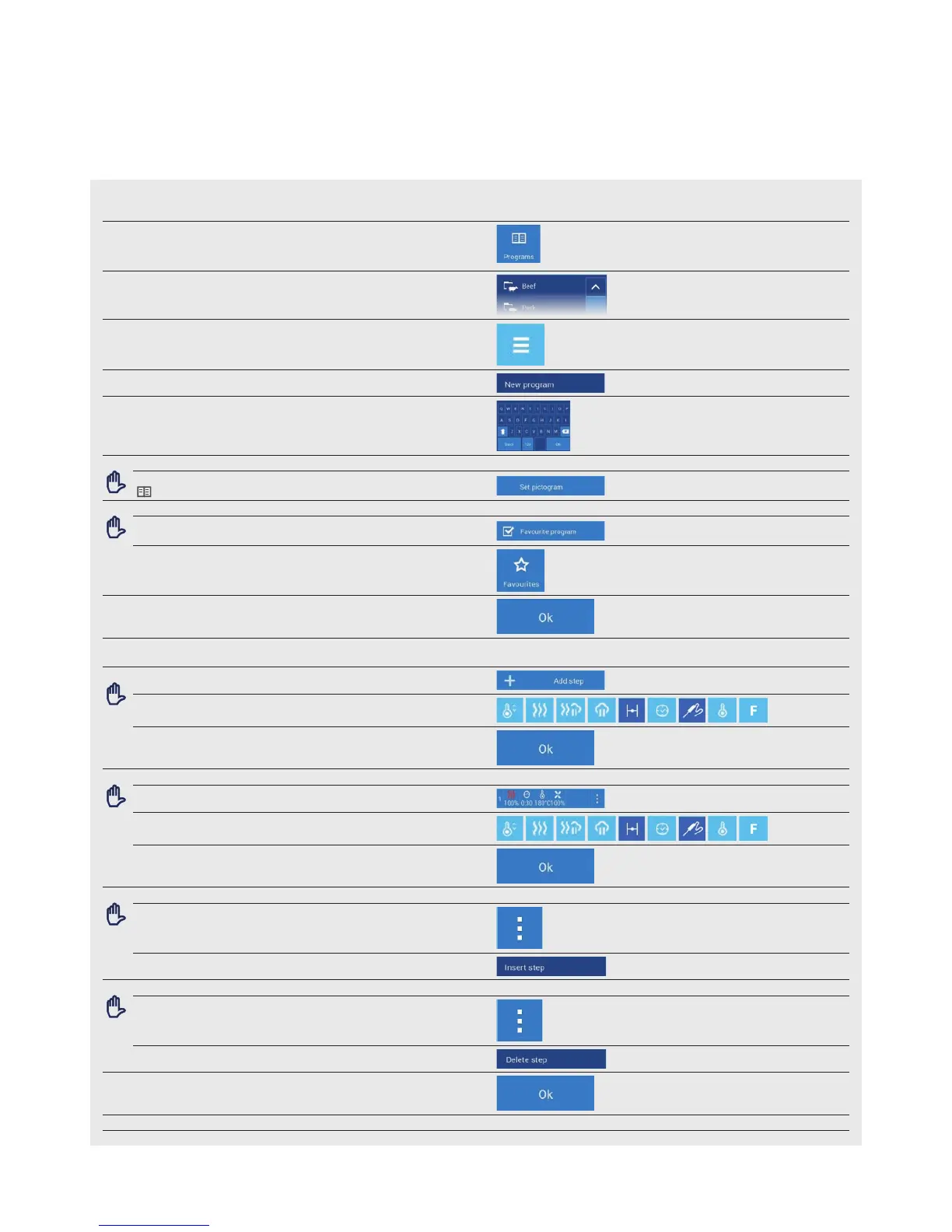
1 ENTER THE PROGRAMS
2 SELECT A PROGRAM CATEGORY IN WHICH YOU WISH TO
CREATE A NEW PROGRAM
3 PRESS
4 PRESS
5 ENTER THE NAME OF THE PROGRAM
5.1
OPTION: CHANGE ICON
You may assign any icon/picture to the program
4/4.2.5, point 4.1
5.2
OPTION: FAVORITE PROGRAM
Tick this option to add the program to the favorite programs
section
You will find programs marked as favorite s under button A5
6 PRESS
7 PROGRAM DETAILS WILL BE SHOWN screen C
7.1
OPTION: ADDING PROGRAM STEPS
Edit the parameters B1 to B10 as required
Press
7.2 OPTION: STEP PARAMETER SETTINGS
Press the step that you wish to edit
Edit the parameters B1 to B10 as required
Press
7.3 OPTION: INSERT A STEP
At the step, above which you wish to insert a new step, press
To insert it, select button
7.4 OPTION: DELETE STEP
At steps that you wish to delete, press
Select button to delete
8 PRESS
9 THE NEW PROGRAM IS SAVED


 To Next Page