13
User’s manual | Vision™ Touch Combi Steamers | 04 COOKING | 4.1 MANUAL SETTINGS
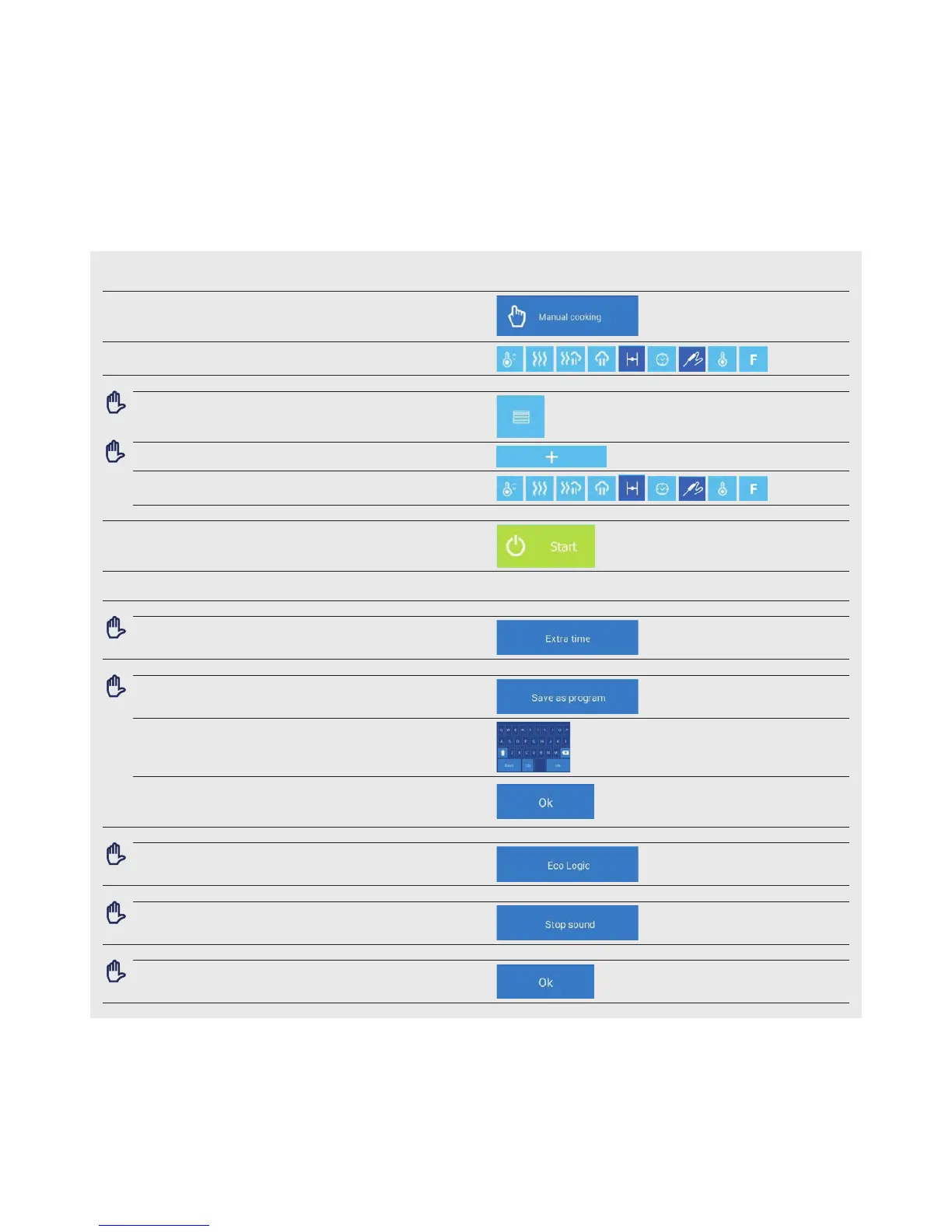
4.1.1 Cooking with manual settings
1 PRESS TO ENTER THE MANUAL COOKING SETTINGS
2 SELECT AND EDIT THE PARAMETERS B1 TO B10 AS REQUIRED.
2.1 OPTION: ADD A STEP
Press
Press
Select and edit the parameters B1 to B10 as required
To add another step, repeat the procedure from point 2.1
3 START THE COOKING PROCESS BY PRESSING
4 AT THE END OF THE COOKING PROCESS, SELECT AN ACTION
WITH WHICH TO CONTINUE screen D
4.1
OPTION: EXTEND THE TIME OF THE LAST COOKING STEP
Press
4.2 OPTION: SAVE THE PROCEDURE TO THE PROGRAMS
Press
Enter the name of the program using the keyboard
Press
4.3 OPTION: OVERVIEW OF THE COOKING PROCESS
Press
4.4
OPTION: TURN OFF THE SOUND SIGNAL
Press
4.5 OPTION: RETURN TO THE MAIN SCREEN
Press
You can use this feature to minimize your
energy consumption for each program


 To Next Page