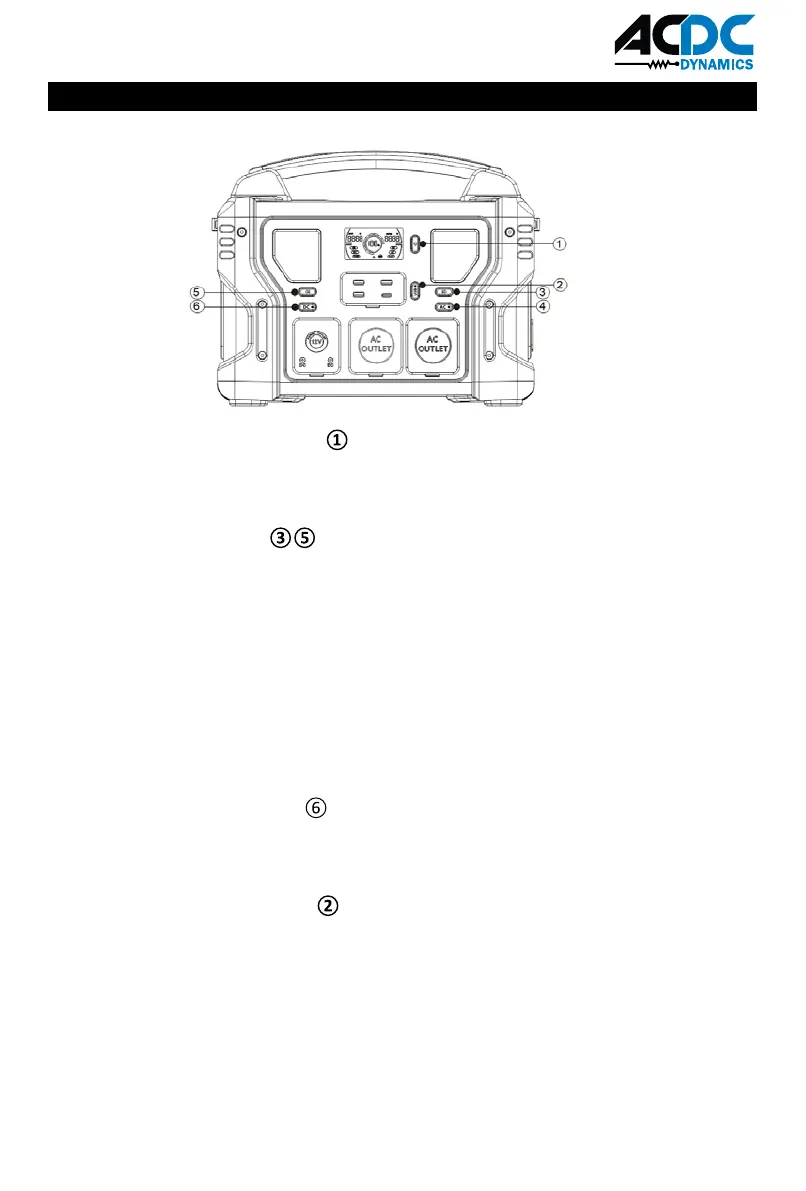
FUNCTION BUTTONS
PBU-PS-P1000 POWER ON/OFF
SOS MODE & LED LIGHT
DC OUTPUT POWER ON/OFF
USB OUTPUT POWER ON/OFF
6
Function available only when the Button ① activate .
Firstly, press Button one time ③ or ⑤ to turn on the LED light and get 3W;
Secondly, press button ③ or ⑤ again to make LED light brighter at 5W
Thirdly, press button ③ or ⑤ thirdly to turn on the SOS mode;
Fourthly, press Button ③ or ⑤ to turn on the sharp-flash, one more time again will
turn off the light.
If both LED lights have been activated, press button ③ or just button ⑤ can control
both LED light at the same time. If you want to power both LED off, needs to press
both buttons ③ and ⑤.
The DC output port will NOT function until the appropriate Button ①&⑥ are both
pressed to activate.Press Button ⑥ to shut down the output(s)When not in use.
The USB output port will NOT function until the appropriate Button ①&② are both
pressed to activate.Press Button ② to shut down the output(s) When not in use.
The USB C output port will NOT function until the appropriate Button ①&② are both
pressed to activate.
The USB C cable of different devices need different endorsements of corresponding
protocols, if the USB C port didn't work, try to use the AC output port.
Button ① is the master switch. Press Button ① to activate all buttons.
Press Button ① to shut down the output(s)When not in use.



 To Next Page