EasyManua.ls Logo

ACDelco AC-G0002 - User Manual

ACDelco AC-G0002
36 pages
Print Icon
To Next Page IconTo Next Page
Loading...
Model # AC-G0002
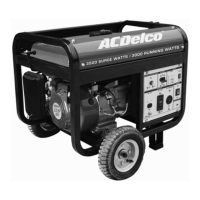
3500 Surge Watts / 3000 Running Watts
PORTABLE GENERATOR
INSTRUCTION MANUAL
Thank you for purchasing this high quality ACDelco Model AC-G0002 3500 Surge Watts / 3000 Running Watts Portable Generator. This manual
provides important information on properly operating and maintaining this ACDelco Model AC-G0002 3500 Surge Watts / 3000 Running Watts
Portable Generator. Every effort has been made to ensure the accuracy of this manual. We reserve the right to change this product at any time
without prior notice.
This manual contains important information regarding safety, operation, maintenance and storage of this product. Before use, read carefully and
understand all warnings, cautions, instructions and labels. Failure to do so could result in serious personal injury, property damage or even death.
SAVE THESE INSTRUCTIONS FOR FUTURE REFERENCE.
STOP!
DO NOT RETURN THIS GENERATOR TO THE RETAILER.
Questions? Problems? CONTACT BUFFALO TOOLS.
If you experience a problem or need to return this generator for repair, please fill out a RGA form by visiting our web site, http://www.buffalotools.com
Or, call our customer help line at 1-866-460-9437, Monday-Friday, 8 AM - 4 PM Central Time. A copy of the sales receipt is required.
c/o
New Buffalo Corporation
1220 North Price Road
St. Louis MO 63132
Phone: 866-460-9437 or
314-373-2740
Fax: 636-537-1055
www.buffalotools.com
Model AC-G0002 3500 Surge Watts / 3000 Running Watts Portable Generator
1

Questions and Answers

  • F
    Frank MartinezJul 29, 2025
    What to do if ACDelco Portable Generator has no electrical output?
    • J
      Jessica LawrenceJul 29, 2025
      If your ACDelco Portable Generator runs but provides no electrical output, check if the circuit breaker is off and flip it to 'on'. Also, ensure the reset button is 'on'. Try a different extension cord to rule out bad connecting wires/cables. Disconnect the device and connect another one to check for a bad electrical device connected to the generator.
  • A
    Ann WashingtonAug 13, 2025
    Why ACDelco Portable Generator does not support all connected devices?
    • J
      Julie WilsonAug 14, 2025
      If your ACDelco Portable Generator runs but doesn't support all connected electrical devices, it might be overloaded. Reduce the load by disconnecting some devices to stay within the generator's rated wattage. Check for shorts in connected devices and disconnect any faulty loads. Also, inspect the air filter and clean or replace it if it's dirty.

Summary

Safety Symbols and Instructions

Understanding Safety Symbols and Levels

Explains the safety alert symbol, DANGER, WARNING, and CAUTION definitions.

Key Safety Instructions and Warnings

Covers critical safety advice on CO, chemicals, fuel, voltage, and temperature.

Preparing the Generator for Use

Initial Setup for First Use

Step-by-step guide for adding oil and gasoline, and grounding for first use.

Operating the Generator

Generator Starting Procedure

Detailed steps for safely starting the generator engine.

Maintenance and Care

Storage and Troubleshooting

Troubleshooting Common Issues

Addresses common problems like engine starting or output issues with solutions.

ACDelco AC-G0002 Specifications

General IconGeneral
BrandACDelco
ModelAC-G0002
CategoryPortable Generator
LanguageEnglish

Related product manuals