1English1
English -7
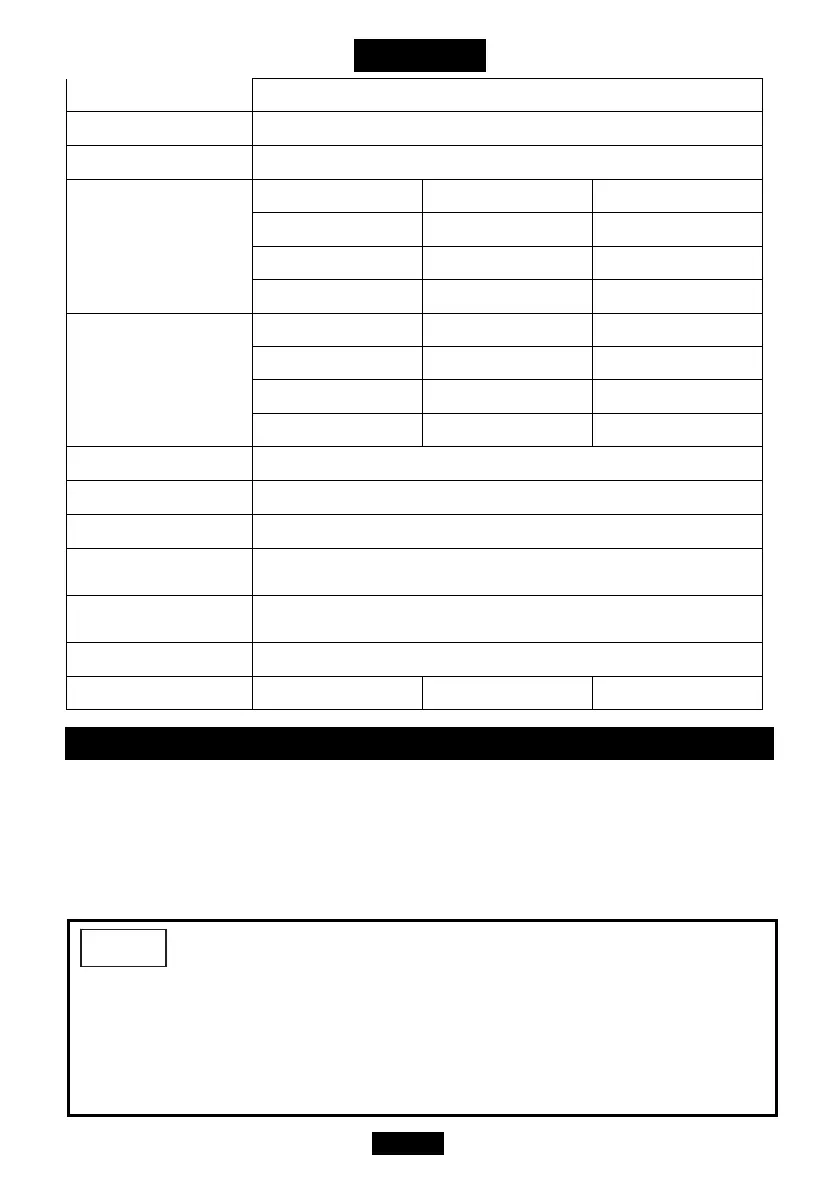
Height
1-29/32"(48mm)
Accuracy ►CW
±2% from 20% to 100% of full scale
Accuracy ►CCW
±3% from 20% to 100% of full scale
Operation Ran
e
59(ft-lb) 147.5(ft-lb) 250.8(ft-lb)
708(in-lb) 1770(in-lb) 3009(in-lb)
80(Nm) 200(Nm) 340(Nm)
816(kg-cm) 2039(kg-cm) 3467(kg-cm)
Setting Ran
e
5.9-59(ft-lb) 14.8-147.5(ft-lb) 25.1-250.8(ft-lb)
71-708(in-lb) 177-1770(in-lb) 301-3009(in-lb)
8-80(Nm) 20-200(Nm) 34-340(Nm)
82-816(kg-cm) 204-2039(kg-cm) 347-3467(kg-cm)
Resolution
0.1 ft-lb, 1 in-lb, 0.1 N-m, 1 kg-cm
Operation Mode
Peak / Trace
Power Saving Mode
After 60 seconds of No Use
Operatin
Temperature
0~50°C (32~122°F)
Stora
e
Temperature
-10~60°C (14~140°F)
Battery
Coin Cell (CR2032) x 2
Tool Weight
0.31 lbs (0.14kg) 0.44 lbs (0.20kg) 0.44 lbs (0.20kg)
ASSEMBLY
BATTERY INSTALL AND REPLACEMENT
1. Prepare 2 new coin cells of “CR2032”.
2. Loosen the 2 screws on the coin cell cover by a screwdriver.
3. Replace the 2 coin cells (with the “+”sign facing upwards).
4. Tighten the screws to fix the cover.
1. When cell capacity is low, the digits on the display will be not clear.
2. Remove the coin cells if stored for a long period of time.
3. Keep spare coin cells on hand when going on a long trip or to cold areas.
4. Do not mix the type of coin cells or combine used coin cells with new ones.
NOTE


 To Next Page