M.2 SSD
Step 1: Ensure the desktop is off, unplugged, and any potential energy is dissipated.
Step 2: Remove the top panel from the chassis as indicated in the “Chassis Cover” section of this
manual.
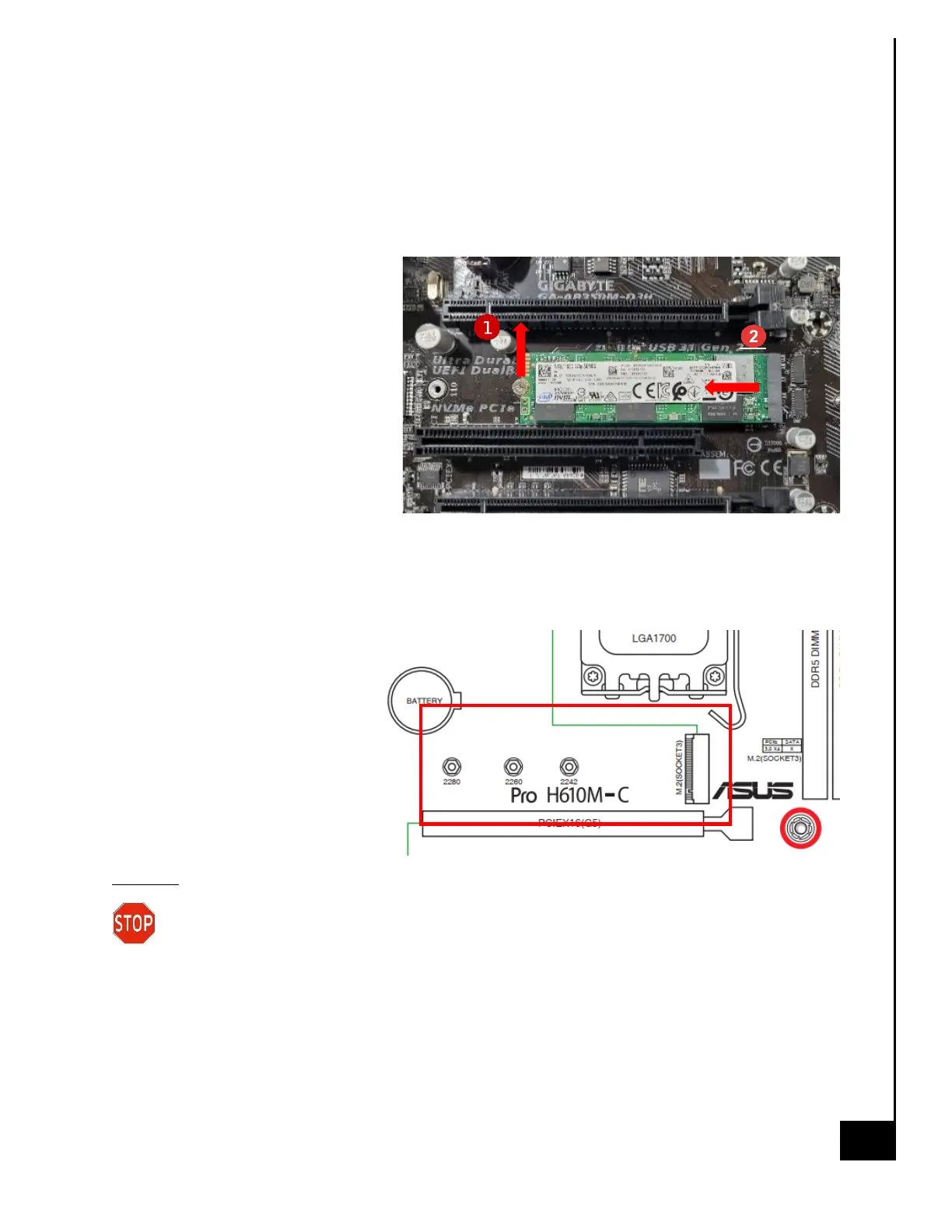
Step 3: Identify the M.2 SSD on the
motherboard, refer to Figure 1 for
additional help.
Step 4: Remove the Philips screw
using the PH1 or smaller bit
screwdriver, then pull straight back in
a parallel position to remove the M.2
SSD from the slot on the
motherboard.
Reinstallation
Step 1: Ensure the desktop is off, unplugged, and any potential energy is dissipated.
Step 2: Remove the top panel from the chassis as indicated in the “Chassis Cover” section of this
manual.
Step 3: Identify the location on the
motherboard for the M.2.
Step 4: Gently slide the M.2 SSD
into the M.2 socket, and secure on
the opposite end with the Phillips
screw, being careful not to over
tighten the screw.
Disposal:
Selective Treatment/Special Handling Per Annex VII, Directive 2012/19/EU: The M.2 SSD
contains a printed circuit board of greater than 10 sq. cm and must be removed from the
device and must be disposed of, or recovered, in compliance with the requirements of Directive
2008/98/EC.



 To Next Page