Battery
Handle used batteries carefully. Do not damage the battery in any way; a damaged battery
may release hazardous materials into the environment. Do not discard a used battery in
the garbage or a public landfill. Please comply with the regulations set up by your local hazardous
waste management agency to dispose of your used battery properly.
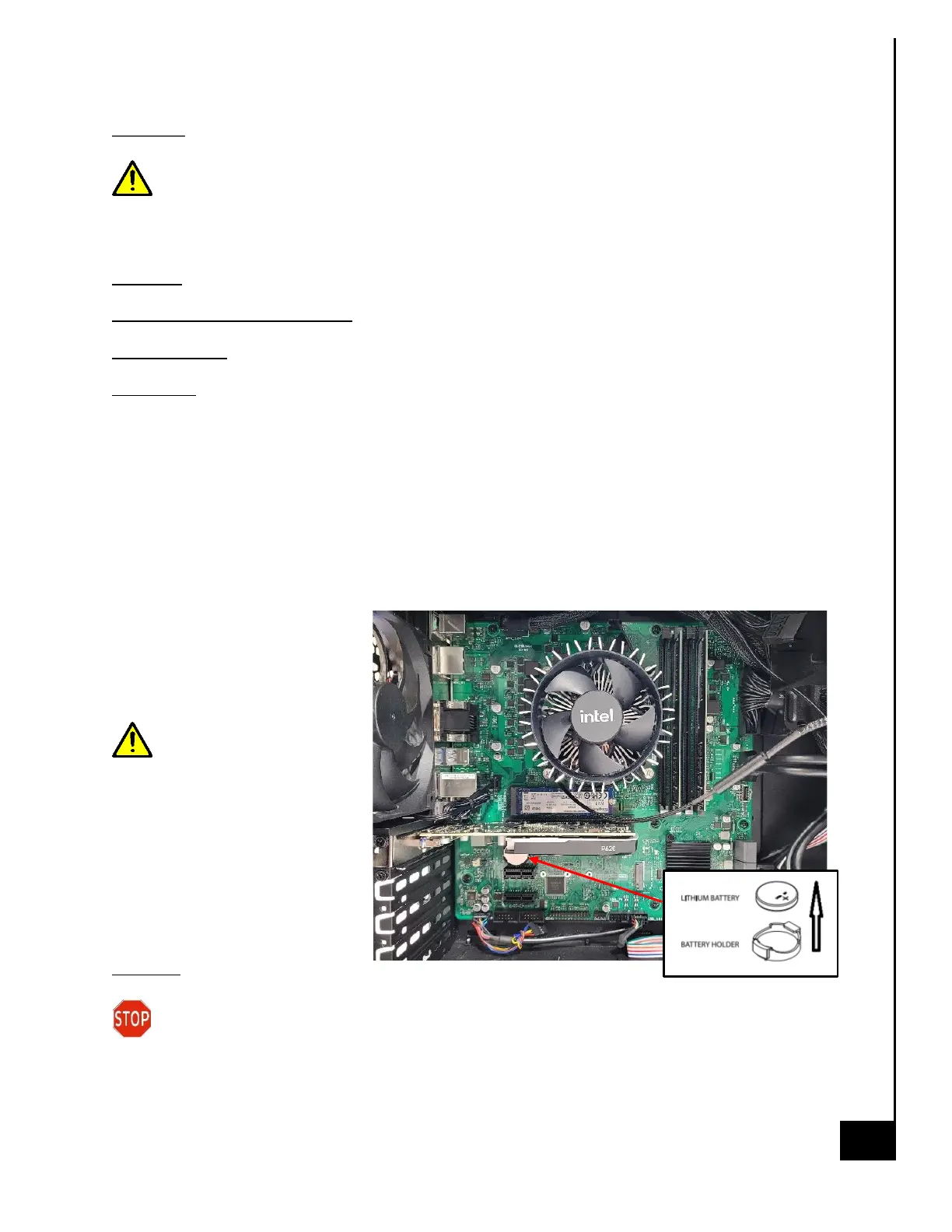
Location: The battery is located on the motherboard, see illustration below.
Type and number of fastenings: Interference snap fit
Tools required: None.
Procedure:
Step 1: Ensure the computer is off, unplugged, and any potential energy is dissipated.
Step 2: Remove the side panel from the chassis as indicated in the “Chassis Cover” section of this
manual.
Step 3: Gently push aside the small clamp that covers the edge of the battery. When the battery
is released, lift it out of the holder.
Reinstallation
Step 4: Using a new CR 2032
battery, gently push aside the
clamp covers and place the
battery into the holder.
Be sure to place the
battery with proper
directionality, the positive
contact should be facing up as
noted in the pictorial diagram
below.
Disposal:
Selective Treatment/ Special Handling Per Annex VII, Directive 2012/19/EU: A lithium
metal battery resides on the motherboard. The battery must be removed separately from
the motherboard and shall be disposed or recovered in compliance with Directive
2008/98/EC.



 To Next Page