EasyManua.ls Logo

Acer Ferrari One 200 - User Manual

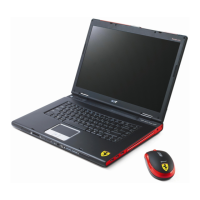
Acer Ferrari One 200
12 pages
Print Icon
To Next Page IconTo Next Page
Loading...
Ferrari one Series
Quick Guide

Other manuals for Acer Ferrari One 200

Questions and Answers

  • M
    martinethanJul 25, 2025
    What to do if my Acer Ferrari One 200 Laptop has no POST or video?
    • M
      Matthew GomezJul 25, 2025
      If your Acer Laptop shows no POST or video, first ensure the internal display is selected and that the computer has power by checking if the fans start or status LEDs light up. Drain any stored power by removing the power cable and battery, then hold the power button for 10 seconds. Connect an external monitor to the computer. Disconnect power and all external devices, including port replicators or docking stations. Reseat the memory modules and remove the drives.
  • A
    Amy SmithJul 30, 2025
    What to do if my Acer Laptop has sound problems?
    • J
      jacksonpamelaJul 30, 2025
      If you are experiencing sound problems with your Acer Laptop, try rebooting the computer. If the issue persists, roll back the audio driver to the previous version if you recently updated it. Alternatively, remove and then reinstall the audio driver.
  • D
    Deanna MccoyAug 3, 2025
    What to do if my Acer Ferrari One 200 has abnormal video display?
    • B
      bturnerAug 3, 2025
      If your Acer Laptop is showing an abnormal video display, try rebooting the computer. If permanent vertical/horizontal lines or dark spots are present in the same location, the LCD is likely faulty. For extensive pixel damage, the LCD should be replaced. Also, adjust the brightness to its highest level, check that the display resolution is correctly configured, roll back the video driver to the previous version if updated, or remove and reinstall the video driver. Finally, check the Device Manager to ensure the device is properly installed.
  • J
    jason47Aug 7, 2025
    What to do if my Acer Ferrari One 200 HDD is not operating correctly?
    • L
      Lisa RobertsAug 7, 2025
      If your Acer Laptop's HDD is not operating correctly, start by disconnecting all external devices. Then, run a complete virus scan using up-to-date software. Next, run the Windows Vista Startup Repair Utility. Restart the computer and check the BIOS settings. Lastly, ensure all cables and jumpers on the HDD and ODD are set correctly.
  • A
    Allen BentleyAug 11, 2025
    How to fix random loss of BIOS settings on Acer Laptop?
    • H
      Heather RamosAug 11, 2025
      If your Acer Laptop experiences random loss of BIOS settings, and the computer is more than one year old, replace the CMOS battery. Also, run a complete virus scan using up-to-date software to ensure the computer is virus-free. Disconnect and reconnect the power and data cables between devices, and if necessary, replace the cables. If HDD information is missing from the BIOS, the drive may be defective and should be replaced. As a last resort, replace the Motherboard.
  • D
    Diana MartinezAug 16, 2025
    What to do if my Acer Laptop's built-in keyboard fails?
    • J
      Jason EscobarAug 16, 2025
      If the built-in keyboard on your Acer Laptop fails, try disconnecting and reconnecting the keyboard. If that doesn't work, you may need to replace the keyboard.
  • N
    Nicholas HillAug 20, 2025
    What to do if the LCD fails on my Acer Ferrari One 200 Laptop?
    • D
      Dawn GardnerAug 20, 2025
      If the LCD on your Acer Laptop fails, check the LCD cable or the LCD module.

Summary

Acer Notebook Tour

Top View Components

Identifies and describes components visible from the top of the notebook, including webcam and keyboard.

Using Hotkeys

Left View Ports and Slots

Right View Ports and Slots

Base View Components

Specifications

Operating System

Specifies the operating system installed on the notebook.

System Memory

Information about the type and capacity of system memory.

I;O Interface

Acer Ferrari One 200 Specifications

General IconGeneral
Processor familyAMD Athlon
Processor frequency1.2 GHz
Processor manufacturerAMD
Internal memory3 GB
Internal memory typeDDR2-SDRAM
Maximum internal memory4 GB
HDD speed5400 RPM
HDD capacity320 GB
Optical drive typeDVD Super Multi DL
Card reader integratedYes
Compatible memory cardsMMC, MS PRO, SD, xD
Display diagonal11.6 \
Display resolution1366 x 768 pixels
Native aspect ratio16:9
Display number of colors16.78 million colors
Bluetooth version2.1+EDR
Networking featuresGigabit Ethernet, WLAN
Mobile network generation3G
Graphics cardRadeon HD 3200
Audio systemHD Audio
Number of built-in speakers2
Operating system installedWindows 7 Home Premium
Cable lock slot typeKensington
Product typeNetbook
Product colorRed
Charging port typeDC-in jack
USB 2.0 ports quantity3
Battery capacity5600 mAh
Battery life (max)4 h
Number of battery cells6
AC adapter frequency50 - 60 Hz
AC adapter input voltage100 - 240 V
Weight and Dimensions IconWeight and Dimensions
Depth204 mm
Width285 mm
Weight1500 g
Height (rear)30 mm
Height (front)24 mm

Related product manuals