Need help?
Do you have a question about the Acer MP-120 1GB and is the answer not in the manual?
Lists key features of the Acer MP120 player, including display, audio formats, and recording capabilities.
Identifies and explains the function of each button on the Acer MP120 player.
Details the items included in the MP120 player's packaging.
Provides step-by-step instructions for installing the USB driver for Windows 98/SE.
Explains how to connect the MP120 player to a PC and safely disconnect it to prevent data loss.
Covers turning the device on/off and selecting modes via basic button presses.
Details how to play music, manage playback, and access music-related settings like EQ and repeat modes.
Explains how to record audio, select recording types, and manage recording status.
Describes how to play recorded voice files, manage playback, and delete files.
Explains how to use the FM radio, save stations, and search for broadcasts.
Covers configuring system time, backlight, language, power-off settings, and repeat modes.
Troubleshooting steps for when the Acer MP120 player fails to power on.
Solutions for when the player's LCD display shows nothing.
Steps to resolve issues with PC recognition, specifically for Windows 98 users.
Indicators for when the battery needs to be changed.
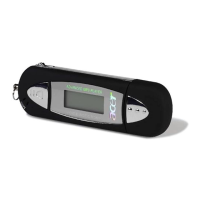
The Acer MP120 is a digital MP3 player designed for a seamless and enjoyable audio experience. It supports a broad range of music formats, including MP1, MP2, MP3, WMA, and WMDR10 WMA files, ensuring compatibility with most audio libraries. The device features an STN LCD display with 7 colorful backlights, providing clear visibility of menus, song names, lyrics, and ID3 information. Its intuitive animation menu, complemented by corresponding texts, makes navigation straightforward and user-friendly.
The MP120 offers multiple operational modes: MUSIC, REC (recording), VOICE, and FM Radio (optional).
In MUSIC Mode, the player excels at playing MP3 and WMA files, with synchronous lyrics display. When a song has an associated LRC file, the system automatically displays the lyrics, synchronizing them with the music's progress. If lyrics are too long for a single screen, they are intelligently broken down for readability. The player supports various repeat modes, including Normal, Repeat One, Folder, Repeat Folder, Repeat All, Random, and Intro (playing the first 10 seconds of each song in a folder). Seven EQ modes (Natural, Rock, Pop, Classic, Soft, Jazz, and DBB) allow users to customize their sound experience. The A-B repeat function enables users to select specific segments of a song for repeated playback, which is particularly useful for learning or transcription. Volume control is easily accessible, and the display shows a corresponding icon when adjustments are made. The MUSIC folder setup allows users to browse by playlist, artists, album, genre, composers, or local folder, and also provides options to delete individual files or all files.
The REC Mode allows users to record external audio sources via the built-in microphone. Recordings can be saved in WAV or ACT formats. The device offers different recording types: Quality REC (WAV, good quality), Long-time REC (ACT, ordinary quality), Quality Sound Control (WAV, recording stops when no sound is detected), and Long-time Sound Control (ACT, recording stops when no sound is detected). Recording can be started, paused, stopped, and saved with simple button presses.
The VOICE Mode is dedicated to playing back recorded audio files. Users can navigate through their recordings, play, pause, and delete files individually or in bulk. Similar to MUSIC mode, it provides volume control and allows access to a REC play folder setup for managing recordings.
The FM Radio Mode (optional) enables users to listen to FM radio broadcasts. It features powerful automatic and manual channel searching. Users can save their favorite stations, and the device supports both Normal Band (87 MHz to 108 MHz) and Japan Band (76 MHz to 90 MHz) frequencies. The display shows the current channel number, total channels, and frequency. It also indicates if a broadcast is in stereo. Recordings can be made directly from the FM radio, saving the current program as a recorded file.
The MP120 is designed for ease of use with a clear button layout.
The device functions as a driver-free U-disk, meaning no special management program is needed for file operations on Windows 2000 and higher. Files can be managed directly through "Removable Disk" in "My Computer." For Windows 98 users, a USB driver installation is required, provided on the accessory CD.
Timed shutdown is a convenient feature, allowing users to set a sleep mode and power-saving mode. The player automatically shuts down after 30 seconds of inactivity in standby mode.
Multi-language support includes simplified Chinese, traditional Chinese, English, French, German, Italian, Dutch, and Spanish, making it accessible to a wide range of users.
 General
| Storage Capacity | 1GB |
|---|---|
| Audio Formats Supported | MP3, WMA |
| Battery Life | Up to 10 hours |
| Display | LCD |
| Connectivity | USB 2.0 |

 To Next Page