Your Acer notebook tour - 17
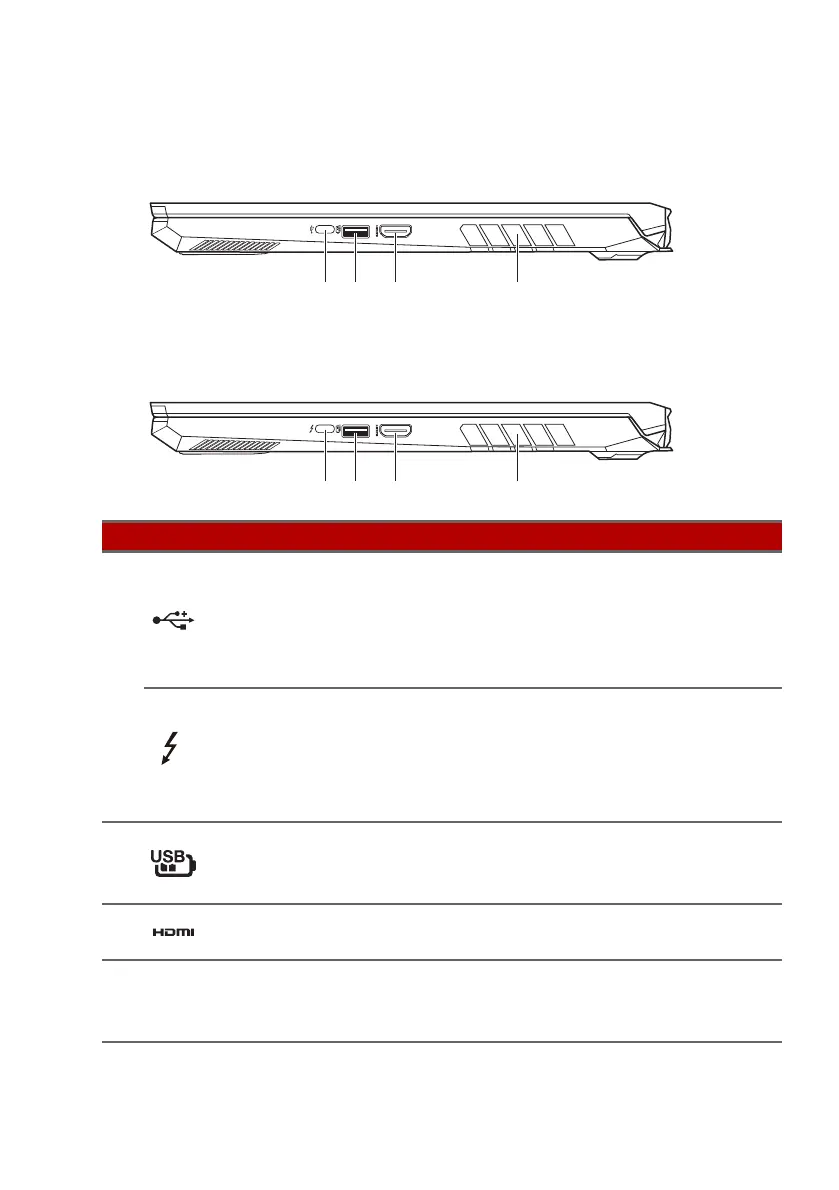
Right view
AN515-45 / AN515-57 / AN517-41 / AN517-54
AN515-56 / AN517-53
# Icon Item Description
1
USB Type-C port
(AN515-45/
AN515-5
7/AN517-
41/AN517-54)
Connects to USB devices with a
USB Type-C
connector.
Supports USB 3.2 Type-C, Gen 2
with
transfer speeds up to
10 Gbps.
USB Type-C /
Thunderbolt
™
4
port
(AN515-56/
AN517-5
3)
Connects to USB devices with a
USB Type-C
connector.
Supports Thunderbolt
™
4 and
displays.
2
USB port with
power-off
charging
Connects to USB devices.
3
HDMI port
Supports high-definition digital
video connections.
4
Ventilation and
cooling fan
Allows the computer to stay cool.
Do not cover or obstruct the
o
penings.










 To Next Page