10 - Your Acer notebook tour
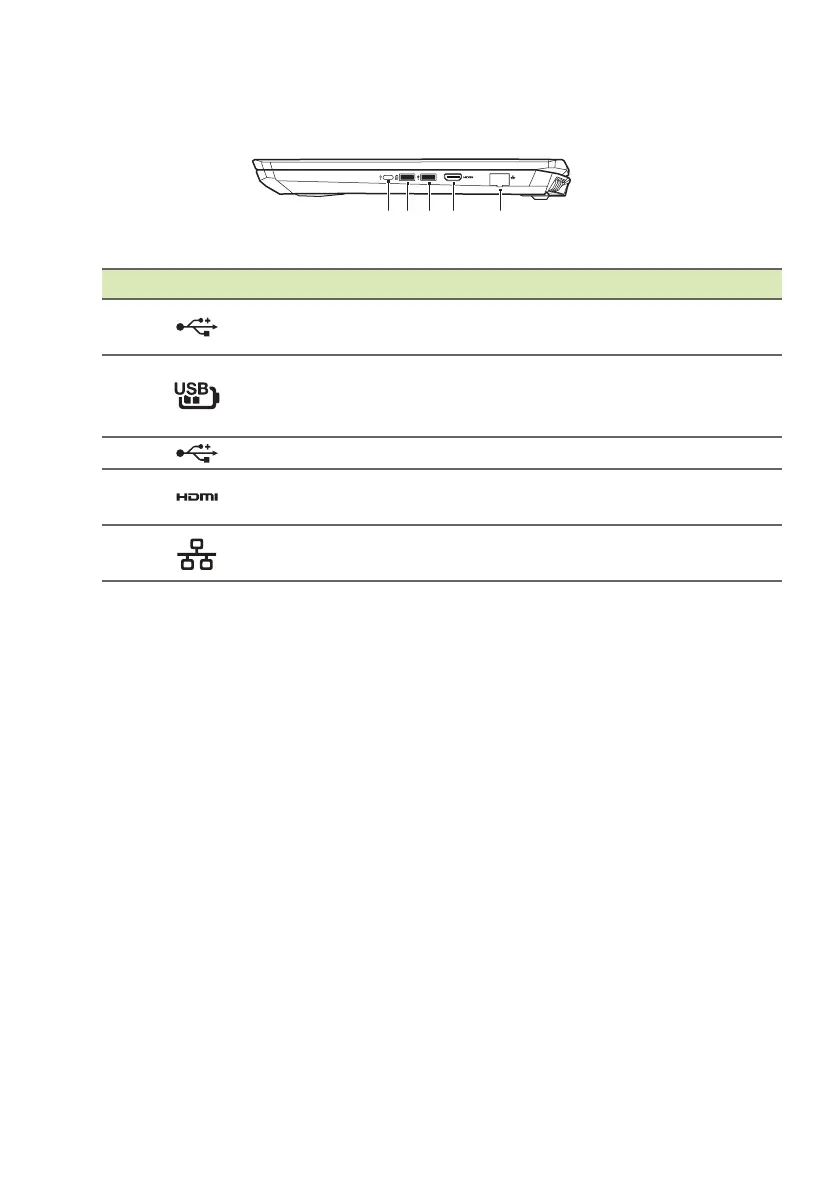
Left view
# Icon Item Description
1
USB Type-C port
Connects to USB devices with a USB
T
ype-C connector.
2
USB port with
power-off
charging
Connects to USB devices.
3
USB port Connects to USB devices.
4
HDMI port
Supports high-definition digital video
conn
ections.
5
Ethernet (RJ-45)
port
Connects to an Ethernet 10/100/
1000-based network.
USB 3.0 information
• USB 3.0 compatible ports are blue.
• Compatible with USB 3.0 and earlier devices.
• For optimal performance, use USB 3.0-certified devices.
• Defined by the USB 3.0 specification (SuperSpeed USB).
USB Type-C information
• USB 3.1 Gen 1 with transfer speeds up to 5 Gps.
• Delivers up to 3 A at 5 V DC for USB charging



 To Next Page