The ACETECH AC6000MKIII Chronograph is a versatile device designed for measuring muzzle velocity, rate of fire (ROF), and energy of BB guns. It comes in three main models: AC6000MKIII, AC6000MKIII BT, and AC6000MKIII BT Exclusive Edition, with varying features such as Bluetooth connectivity, shooting tube material, and inclusion of a chronograph bag.
Function Description:
The chronograph provides quick selection functions for muzzle velocity, ROF, energy, and AMMO parameters. It features a 240x240 pixel LCD color screen for display. Users can access up to 25 latest continuous firing speed and muzzle velocity test data, allowing for performance analysis of BB guns. The device also includes a function setting screen where various parameters can be configured.
Important Technical Specifications:
- Muzzle Velocity Measurement Range: 30.00 ~ 400.0 m/s
- ROF Measurement Range: 100 ~ 5000 rounds/minute
- Shooting Gate Diameter: 36mm, suitable for 4.5mm, 6mm, 9mm, and 8mm B.B. specifications.
- Power Supply: 5V adapter with a current of 0.5A or more (for external power).
- Battery: Uses 18650 lithium battery (included in battery versions, otherwise purchased separately).
- Dimensions: 130 (L) x 108 (W) x 61 (H) mm
- Weight:
- AC6000MKIII BT: 285g (without battery)
- AC6000MKIII BT Exclusive: 317g (without battery)
- Mounting: 1/4" tripod mounting hole.
- Display: 240x240 pixel LCD.
- Connectivity: Bluetooth (AC6000MKIII BT and Exclusive Edition only).
Usage Features:
- Measurement Modes: Measures muzzle velocity (m/s or ft/s), ROF (RPS or RPM), and energy (joule or ft-lb).
- AMMO Parameter Setting: Allows setting up to 5 groups of BB weight (g or grain) and diameter (mm).
- Unit Selection: Users can select preferred units for ROF, speed, weight, and energy.
- Data History (SCR2): Displays the last 25 continuous firing speed and muzzle velocity test data, including MAX, MIN, and AVG values. This data can be viewed using up and down keys and cleared by pressing and holding the up button for 3 seconds.
- Automatic Shut Down (APO): Can be set to automatically shut down after 5 to 60 minutes of inactivity to save power. USB APO function can be turned on/off when using USB power. The device also has a low voltage shutdown protection for the lithium battery.
- LCD Brightness Setting: Adjustable from 0 to 10, with a default value of 6.
- Alarm Function: Allows setting upper limits for energy and muzzle velocity. A red warning will appear on the screen if these limits are exceeded.
- APP Integration (for BT models):
- Download "AceSoft" from the APP store.
- Connect via Bluetooth.
- The APP displays measurement results, allows switching between No/Time, RPS/RPM, m/s/ft/s, and Joule/ft-lb/(J/cm²) units.
- Provides Ammo 1-6 selection for testing.
- Displays highest speed/RPS, average speed, and minimum speed/RPS.
- Allows saving and clearing shooting data, and switching to a data chart.
- The APP's setting page allows:
- Ammunition setting.
- Firmware updates.
- Restoring to default settings.
- Viewing current device version and serial number.
- Accessing device homepage, records (pre-stored shooting data), and ACETECH homepage.
Maintenance Features:
- Battery Charging: For battery versions, charge the battery at least every 2 months to prevent complete discharge. A full charge lasts approximately 24 hours.
- Reset to Factory Settings: The "RESET AC6000" option restores the device to its factory values.
- Firmware Update: The APP allows for device firmware upgrades when new versions are released.
Safety and Precautions:
- Use a 5V adapter with 0.5A or more for external power.
- Avoid hitting the panel and buttons with BBs to prevent LCD or button damage.
- Automatic shutdown and low voltage shutdown protection are built-in.
- Maintain a certain distance from the chronograph when using Gas/CO2 blowback guns & Gel blasters to avoid disturbed readings.
- Warranty does not cover damage from incorrect usage, external force, or liquid intrusion.
- Refer to the Acetech official website for detailed warranty information.
FCC Compliance:
The device complies with Part 15 of the FCC Rules, ensuring it does not cause harmful interference and accepts any interference received. Users are advised to reorient/relocate the receiving antenna, connect to a different circuit, or consult a technician if interference occurs. Any unauthorized modifications could void the user's authority to operate the equipment. The equipment also complies with RF exposure limits for uncontrolled environments, and its antenna(s) must not be co-located or operating with any other antenna or transmitter.

 Need help?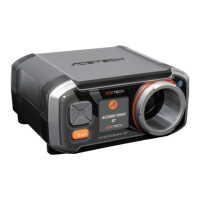

 To Next Page
 General