17-
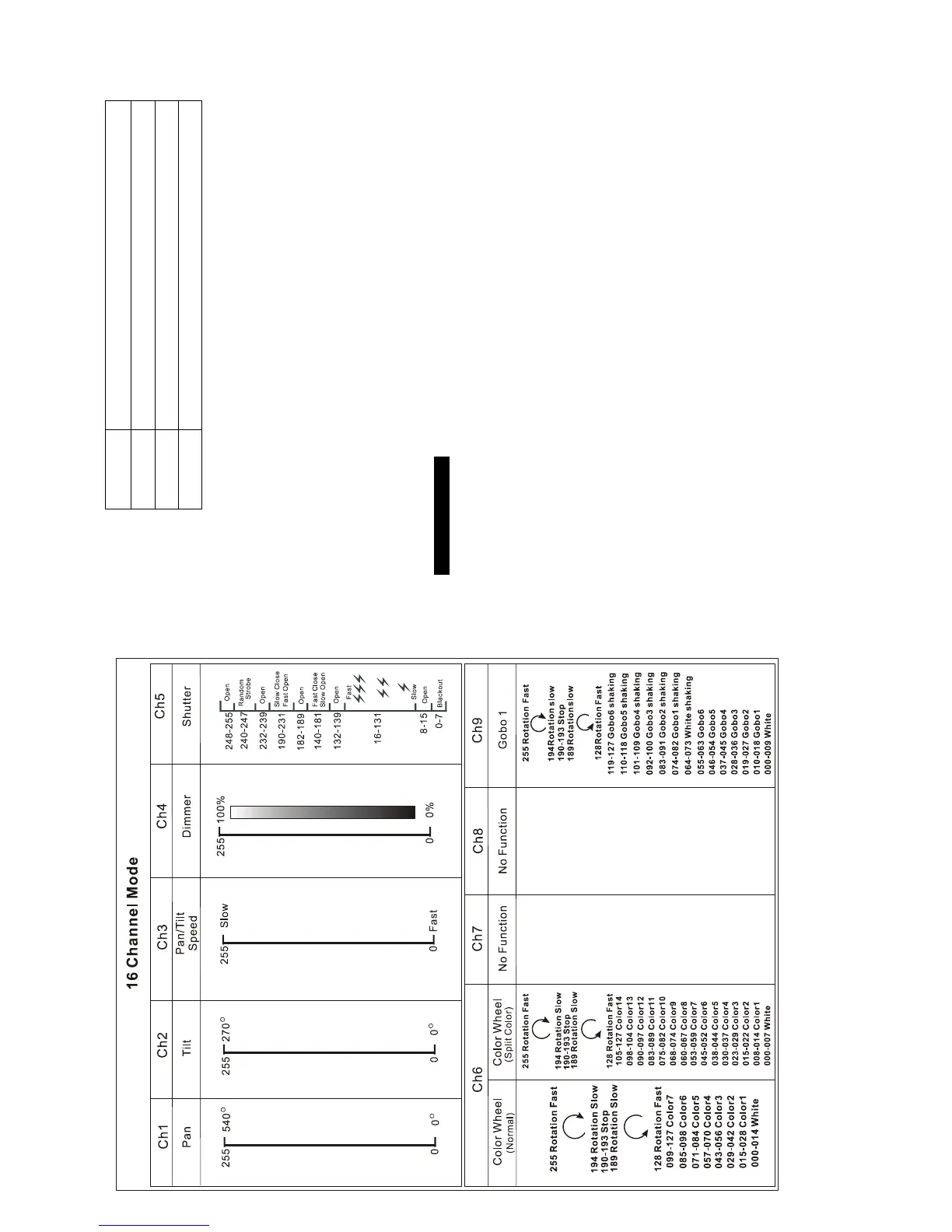
16 channel modes:
6-
Button
MENU To select the programming functions
DOWN To go backward in the selected functions
UP To go forward in the selected functions
ENTER To confirm the selected functions
Only for remote control
Connecting with CA-8/CA-9/CA-9RTX to control the unit for Stand by, Function and Mode
function.
Mains input
Connect to power supply.
Mains output
Connect to supply power for the next unit.
DMX input/output
For DMX512 link, use 3/5-pin XLR cable to link the unit together.
3.2 Main Function
To select any of the given functions, press the MENU button up to when the required one is
showing on the display. Select the function by ENTER button and the display will blink. Use
DOWN and UP button to change the mode. Once the required mode has been selected,
press the ENTER button to setup, to go back to the functions without any change press the
MENU button again.
Hold and press the MENU button about one second or wait for one
minute to exit the menu mode.
The main functions are showing below:


 To Next Page