Need help?
Do you have a question about the ACME STAGE PAR 400 ZOOM IP and is the answer not in the manual?
Provides an overview of the fixture's control panel, including buttons and display functions.
Explains how to access and use the fixture's main functions and navigate through its menu system.
Instructions for connecting and operating the fixture using an external DMX512 controller.
Covers DMX channel modes (5, 7, 9 channels) and the specific functions assigned to each channel.
Provides a guide on establishing DMX connections between fixtures in a chain, including pinouts and termination.
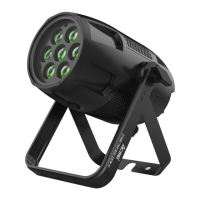
The ACME STAGE PAR 400 ZOOM IP is a versatile lighting fixture designed for professional stage and event applications, offering robust performance and flexible control options. This user manual provides comprehensive instructions for its installation, operation, and maintenance, ensuring optimal performance and longevity.
The STAGE PAR 400 ZOOM IP is a powerful LED par light equipped with 7x40W RGBW LEDs, capable of producing a wide range of colors and effects. Its primary function is to provide dynamic and uniform illumination for various settings, from intimate stages to large outdoor events. The fixture features a zoom range that allows for adjustable beam angles, enabling users to switch between a narrow, focused spot and a wide, diffused wash. This adaptability makes it suitable for diverse lighting requirements, including accent lighting, stage washing, and atmospheric effects.
The unit incorporates smooth dimming from 0% to 100%, ensuring precise control over light intensity without abrupt changes. Additionally, it offers an outstanding strobe effect with variable speed, adding dramatic visual impact to performances. The STAGE PAR 400 ZOOM IP supports DMX512 control, providing seamless integration with existing lighting systems and allowing for intricate programming. It also features RDM (Remote Device Management) functionality, which simplifies setup and monitoring by enabling remote configuration and status checks. Firmware upgrades can be performed via a DMX link, ensuring the fixture remains up-to-date with the latest features and improvements.
Built-in programs offer convenient pre-set lighting sequences, making it easy to achieve professional results even without extensive DMX programming. The fixture's robust construction and IP66 protection rating mean it is designed for outdoor use, capable of withstanding various weather conditions throughout the year. This makes it an ideal choice for outdoor concerts, architectural lighting, and other exterior installations where durability and reliability are paramount.
The STAGE PAR 400 ZOOM IP offers multiple control modes to suit different operational needs. Users can control the unit via a DMX512 controller, utilizing 5, 7, or 9 DMX channels for varying levels of control complexity. The DMX address can be easily set from 001 to 512 through the control panel, ensuring proper communication within a DMX network. The fixture also supports primary/secondary built-in preprogram functions, allowing multiple units to operate in sync without a dedicated DMX controller.
The control panel, featuring a clear OLED display and intuitive buttons (MENU, DOWN, UP, ENTER), provides easy access to all functions. Users can navigate through menus to adjust settings such as DMX address, channel mode, and various light parameters. The control panel allows for selection of different dimmer curves (Optically Linear, Square Law, Inverse Square Law, S-Curve) to fine-tune the dimming response, catering to specific aesthetic preferences. Dimmer speed can also be adjusted between "Smooth" and "Fast" for different transition effects.
Fan mode settings (Auto or Silent) enable users to optimize cooling performance or minimize noise, depending on the application. The PWM frequency can be selected from a wide range (600Hz to 28800Hz) to prevent flickering when recording with cameras, making it suitable for broadcast and video production environments.
The fixture includes a "Show Program" menu with options to set scene totals, edit scene colors, and adjust fade and hold times, allowing for customized automated sequences. An "Auto Test" function runs built-in programs to automatically test the unit, ensuring all functions are operating correctly. For manual control, users can directly adjust parameters like dimmer, strobe, individual RGBW colors, and zoom through the "Manual Mode" menu.
Display settings offer customization such as inverse display, temperature unit selection (°C/°F), and display warning activation. The language of the display can be switched between English and Chinese. "Fixture Information" provides access to critical data like LED temperature, fixture use time, light on time, firmware version, and RDM UID, aiding in monitoring and troubleshooting. Error logs are also accessible, providing valuable diagnostic information. The unit can be reset to factory settings or undergo a warm/cold reset via the RDM functions.
Regular maintenance is crucial for the STAGE PAR 400 ZOOM IP to ensure its optimal performance and extend its lifespan. The manual emphasizes the importance of periodic cleaning of internal and external optical lenses and mirrors to maintain light output quality. The frequency of cleaning depends on the operating environment; damp, smoky, or dirty surroundings will necessitate more frequent cleaning.
For cleaning, users are advised to use a soft cloth and a normal glass cleaning liquid. It is essential to dry all parts carefully after cleaning to prevent moisture damage. The external optics should be cleaned at least every 20 days to prevent dirt accumulation from affecting light quality.
The manual also provides a troubleshooting guide for common issues, such as the unit not working, not responding to a DMX controller, or individual channels malfunctioning. This guide helps users identify and resolve problems efficiently, often without requiring professional assistance. For instance, if the unit is not working, users are instructed to check power connections, mains voltage, and the power-on LED. If the unit is not responding to DMX, checks include DMX connector and cable integrity, address settings, DMX polarity, and potential signal interference from high voltage cables.
In case of serious operating problems or visible damage to the housing, lenses, or ultraviolet filter, the unit should be immediately taken out of service and replaced. The manual strictly advises against opening the unit or attempting repairs by unskilled personnel, as this can lead to further damage or malfunction and voids the warranty. Instead, users should contact the nearest authorized technical assistance center for repairs.
For transportation, it is recommended to use the original packing materials to protect the fixture from damage. The unit should be handled by its base, not its head, to prevent strain on internal components. Safety measures, such as using a safety chain during installation and ensuring adequate ventilation, are highlighted to prevent accidents and overheating. The IP66 rating ensures that the internal components are well-protected from dust and water ingress, reducing the need for frequent internal cleaning and enhancing reliability in harsh environments.
 General
| Type | LED PAR |
|---|---|
| Control Protocol | DMX512 |
| IP Rating | IP65 |
| Color Mixing | RGBW |
| Color Wheel | No |
| Operating Voltage | 100-240V AC, 50/60Hz |
| Weight | 8.5 kg |
| Light Source | LED |
| DMX Channels | 8 |


 To Next Page