2
EN Powered Bluetooth speaker USER MANUAL
Package content
• PS404speaker
• Usermanual
• AC/DCpoweradapter
• Audiocable
• Remotecontrol
Technical specications
Input:DC15V,3AfromAC/DCadapter
Output power:30W
Frequency response: 20–20 000 Hz
S/N ratio: > 40 dB
Battery parameters: Valve-regulated lead-acid (VRLA) battery,
12V,4.5Ah
Battery charging time:3–6hours
Battery life:Upto12hours
Dimensions:525x360x210mm
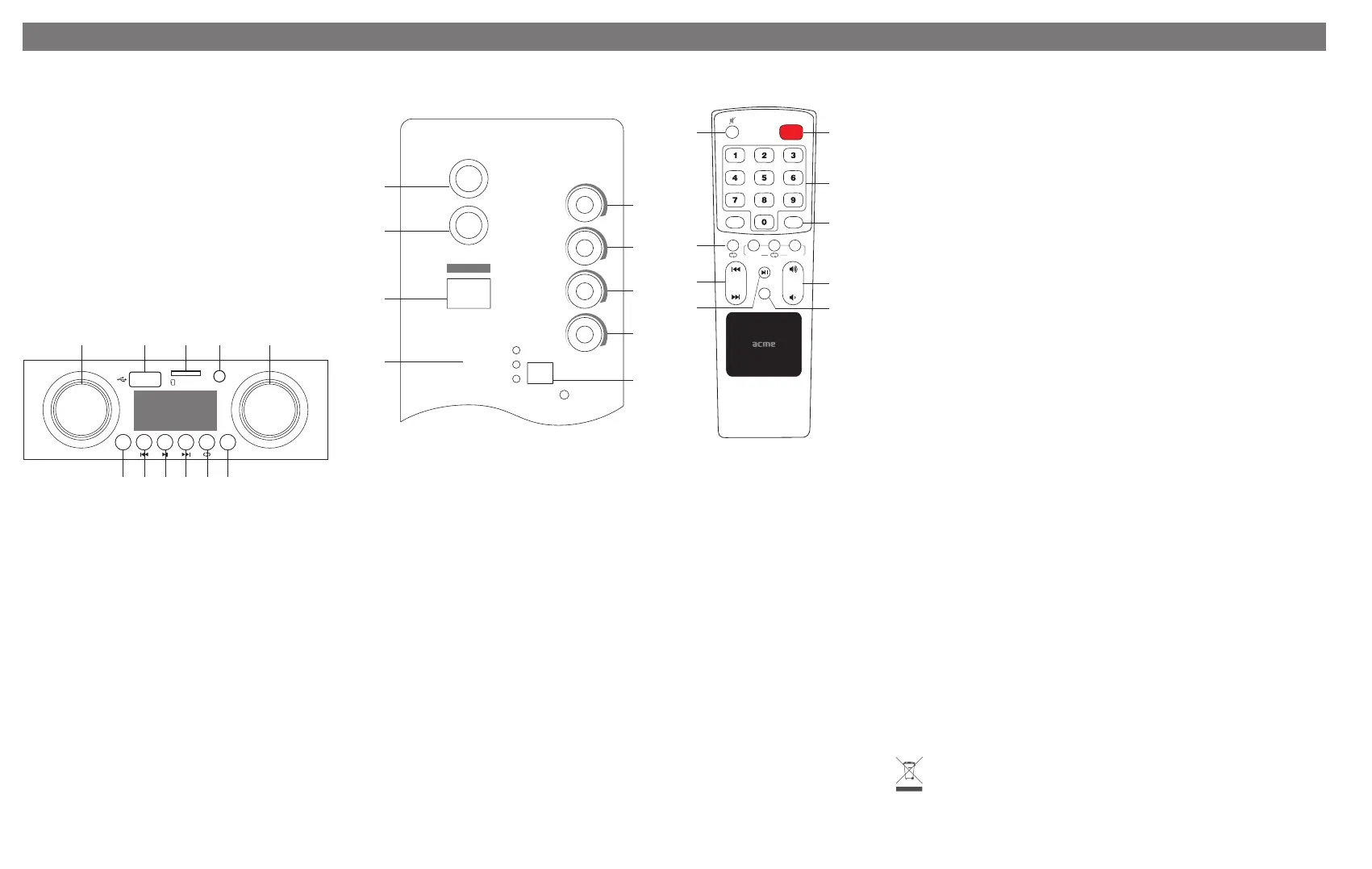
Front panel
MIC VOLUME MASTER VOLUME
Micro SD
AUX
IN
MIN MAX
INPUT EQ
MIN MAX
1 2
11
10 9 8 7 6
3 4 5
1. Microphonevolume
2. USBport(USBashdrivesofupto32GB,FAT32format)
3. MicroSDcardslot(cardsofupto32GB,FAT32format)
4. Auxiliaryinput
5. Mastervolume
6. Equalizerbutton
7. Repeatmodebutton
8. Nexttrackbutton
9. Play/Pausebutton/Radioautopreset
10. Previoustrackbutton
11. Inputbutton
Connecting via Bluetooth (pairing)
• SelectBluetoothmodebypressingtheInputbutton(No.11)
onthefrontpanelortheModebutton(No.4)ontheremote
control.Avoicepromptwillbeheard.
• EnableBluetoothfunctionalityonyourdevice(smartphone,
tabletorlaptopcomputer).
• NowsearchforthePS404Bluetoothspeakerandpress“OK”
Thedefaultpincode,ifaskedfor,is0000(fourzeros).
Back panel Remote control
MIC
BASS
TREBLE
MIC
ECHO
OFF
BATTERY FULL
INPUT
DC 15 V, 3A
CHARGING
BATTERY LO W
DC
15 V
BATTER Y
GUITAR
VOL
GUITAR
POWER
1
2
3
4
5
6
7
8
9
STANDBY
MODE
EQ
PREV
FOLDER
NEXT
1
5
6
8
2
3
4
7
9
1. Microphoneinputsocket(monoTS1/4”)
2. Guitarinputsocket(stereoTRS1/4”)
3. Powerswitch
4. Batterylevelindicator
5. Bassknob
6. Trebleknob
7. Microphoneechoknob
8. Guitarvolumeknob
9. DCinputsocket
1. Mutebutton
2. ON/OFFbutton
3. Numberpad
4. Modebutton
5. Playbackoptions
6. Changetrackbutton
7. Volumeincrease/decreasebutton
8. Play/Pausebutton
9. Equalizerpresetbutton
Playing audio les from a USB device or micro SD card
SelectUSB/microSDmodebypressingtheInputbutton(No.11)onthefrontpanelortheModebutton(No.
4)ontheremotecontrol.AvoicepromptwillbeheardwhenUSB/microSDinputisselected.
*TheaudioformatsthatcanbeplayedbackonthissystemareMP3andWAV.
Playing audio from an Auxiliary input
• SelectAuxiliarymodebypressingtheInputbutton(No.11)onthefrontpanelorthemodebutton(No.4)
ontheremotecontrol.AvoicepromptwillbeheardwhenAuxiliaryinputisselected.
• Connectthecablewiththe3.5mmstereoplugtotheAUXINsocketonthefrontpanel.
• Connectthecablewiththe3.5mmstereoplugtothemusicplayer.
Volume level adjustment
• Volumelevelofthisspeakercanbeadjustedintwoways:usingananaloguevolumeadjustmentknobon
thespeakerorviadigitalsoundleveladjustmentusingtheincludedremotecontrol.
• Some mobileBluetoothdeviceswilladjust digitalvolume levelofthe speakerautomatically without
the need of the remote control, while other mobile devices require separate volume
adjustmentonbothdevices.
• Toachievemaximumloudnessofthespeaker,bothdigitalandanaloguevolumelevels
mustbesettotheirhighestpositions.Thehighestvolumelevelofdigitaladjustmentwill
beindicatedasU15onthedisplayofthespeaker.
• Ifan audiosignal andvolume levelsaretoo high,the playbackof soundcan become
distorted.Thisisnotanindicationofadefectivedevice.
Guitar input
• PlugyourguitarcableintotheGUITARsocket(SocketNo.2onthebackpanel).
• SettheMASTERVOLUMEcontroltozero.
• TurnthespeakerONusingtheON/OFFswitch.
• GraduallyturntheMASTERVOLUMEuptoyourdesiredlevel.
*Useagood-qualityscreened/shieldedguitarcabletohelppreventnoiseinterference.
Microphone input
• PlugyourmicrophonecableintotheMICsocket(SocketNo.1onthebackpanel).
• SettheMICVOLUMEcontroltozero.
• TurnthespeakerONusingtheON/OFFswitch.
• GraduallyturntheMICVOLUMEuptoyourdesiredvolumelevel.
*Useagood-qualityscreened/shieldedmicrophonecabletohelppreventnoiseinterference.
Presetting radio stations
PressthePlay/Pausebutton(No.9)onthefrontpanelforautomaticradiostationpresenting
orthePlay/Pausebutton(No.8)ontheremotecontrol.Radiostationsinrangewillbestored
inthememory.
Battery care
• Beforeusingthedevice,makesurethebatteryisfullycharged.
• Chargeaftereachuse.
• Makesurethebatteryisfullychargedbeforestoringthedevice.
• Pleaseensurethebatteryisfullychargedatleastoncepermonth.
• Avoidfulldischargesasitwillcausepermanentdamagetothebattery.
• Rechargeablebatteriesexhibitagradualdecreaseinperformanceovertheirservicelife,
soareductionintheinitialbatterycapacityandplaybacktimeisnotanindicationofa
faultybatteryordevice.
Important Safety Precautions
• Forthebestresults,placeyourspeakeronasolid,atsurfacewheninuse.
• Donottouchthemetallicpartsofyourconnectorcables.
• Inordertoavoidelectricshocksandothersuchaccidents,donotdismantleortakeapart
thespeaker.
• Do not expose your speaker to excessive amounts of heat or cold. Keep it in a well-
ventilatedareatopreventitfromoverheating.
• Turnoyourspeakerwhenyouarenotusingit.
• Donotspillliquidsoruidsonyourspeaker.
• Whenconnectinganaudiodevicetoyourspeaker,makesurethevolumeontheaudio
deviceisnotsettoohigh,inordertoavoidexcessivesignalinput.
• Thisspeakershouldnotbeplacednearopenames,suchaslitcandles.
.
Waste Electrical and Electronic Equipment (WEEE) Symbol
The use of the WEEE symbol indicates that this product may not be treated as household waste. By
ensuring this product is disposed of correctly, you will help protect the environment. For more detailed
information about the recycling of this product, please contact your local authority, your household
waste disposal service provider or the shop where you purchased the product.


 To Next Page
 Loading...