2
EN SMART SCALES USER MANUAL
PACKAGE CONTENT
1. Acme smart scales
2. Battery: 4 x AAA
3. User manual
TECHNICAL SPECIFICATIONS
Type: Smart scales, Bluetooth 4.0
Model: SC202
Weight range: 5–180 kg
Readability: 50 g
Accuracy: 100 g
Body fat measurement: BIA technology
Power: DC 6 V (4 x AAA)
Dimensions: 284 x 284 x 25 mm
Surface: Toughened glass
WARNING:
• Do not use if you have a pacemaker, an articial
lung,ECGoranyotherinternalmedicaldevice.
• Donotuseifyouarepregnant.
• Thesesmartscalesareintendedforhomeuseonly.
Thedeviceshouldnotbeusedtodiagnoseortreat
anymedicalconditions.
• Alwaysconsultyourphysiciantodeterminewhatis
idealforyou.
• Notintendedforusebychildrenundertheageof10
andaprofessionalbodybuilder.
CAUTION: Body fat scale readings can be
thrownobythefollowingfactors:
• Hydration. If you are dehydrated or drink too
much uid, an electric current ow and your
measurementsmightbeaected.
• Movement.Wigglingaroundorquicklyhopingon
thescalescaninterferewithyourreadings.
• Sports. Yourbodycompositiondatameasurements
may not be accurate when using the scales
immediatelyafterheavyphysicalactivities.
• Foot calluses. Thick calluses on your feet may
preventtheelectriccurrentfromowingaccurately.
• Time. Thetimeofthedayplaysaroleinauctuating
body-fatpercentagereading.Ifyouweighyourself
in the morning one day and in the afternoon the
next,youaremorelikelytogetadierentnumber
thanthedaybefore.Thebody’sdailyweightvaries
withchangeineatingfoodanddrinkingwaterand
theweightchangevalueisfrom0.5to2kg.
For the best measurement results:
1. Beawareofwhataectsyouruidretention.
2. Always stand on the same area of the scales and
standstill.
3. Weigh yourself once a day and at the same time,
wearthesameclothesornoneatall.
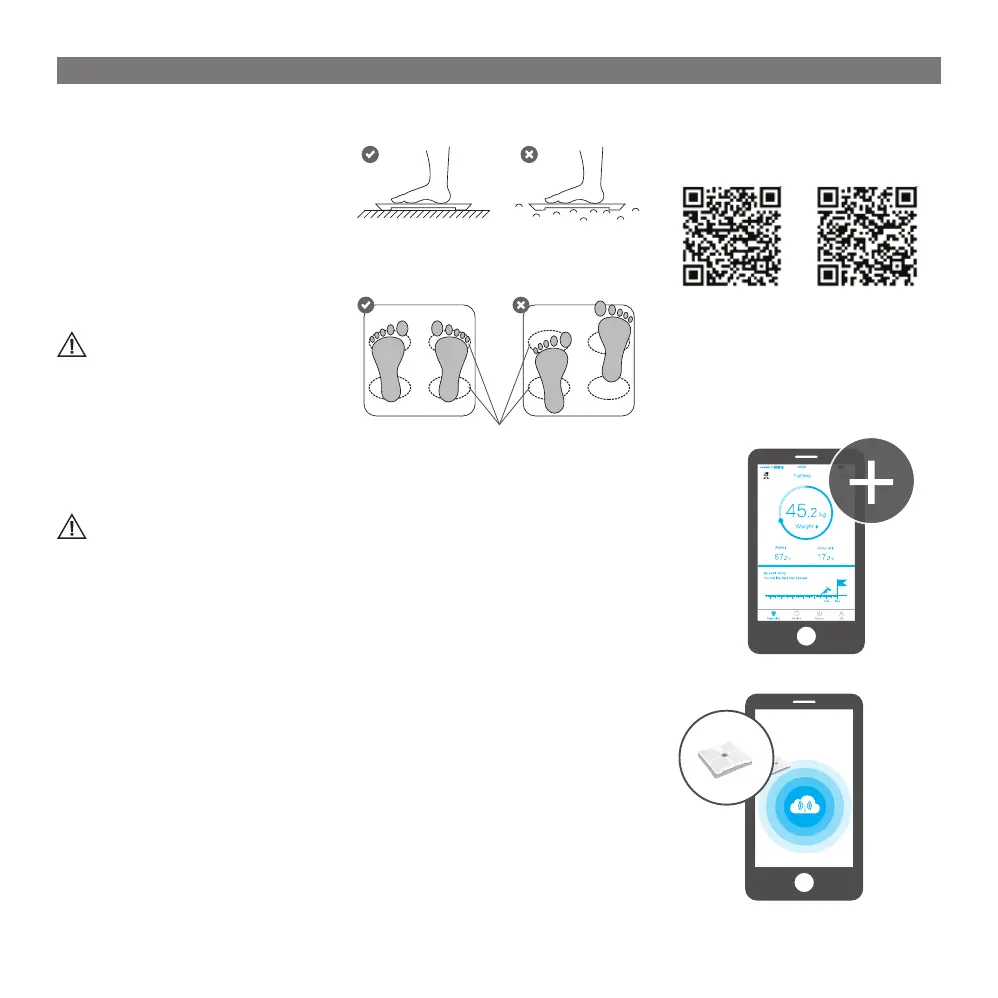
4. Measureweightcorrectly:Placethescalesonaat
andhardoor.TheLEDshoulddisplay“0.0.”before
steppingonthescales.
5. Measure body fat correctly: Stand straight on the
scales and have both feet uniformly touched the
electrodes as shown below. Socks should also be
takeno.
Conductiveareas
POWER ON THE SCALES
Put4*AAAbatteriesintothebatterycompartmentand
poweronyourscalesbytaping.
SYNCHRONIZATION OF MEASUREMENT
DATA
Beforeusingthescalesforthersttime,youhaveto
pairthemwithyoursmartphoneortabletvia“Feelt”
application, otherwise only weight data will be
measured.
Real-time data synchronization:Afterpoweron,the
scaleswilldisplayweightonly.Tomeasureotherbody
composition parameters and to update your data in
real-time,youneedtouse“Feelt”appwhilestanding
on the scales.
Postponed data synchronization: You can weight
yourself without turning on the app every time you
aremeasuringyourself.Youhavetosteponthescales,
and your data will be saved in the internal scales
memory.Afterawhile,thedatawillbedeleted,soyou
needtoturnyour“Feelt”appatleasttwiceaweekto
synchronizeandsaveyourdata.
INSTALLATION OF THE APP AND
MEASUREMENT
This device is designed to work with smartphones
supporting Bluetooth 4.0 or higher versions. Be sure
that your smartphone’s Bluetooth hardware and
softwareareworking properly;otherwise, it maynot
beabletopairwiththesmartscalesortheconnection
maybeunstable.
1. Download “Feelt” application from “App Store”
or “Google Play” to your smartphone. (Accept all
securityrequestsoftheapplication.)
QR CODES FOR QUICK DOWNLOAD:
Androidversion iOsversion
2.EnableBluetoothonyoursmartphone.
3.Opentheapplicationandallowallsecurityrequests
bytheapplication.
4. Go to the application and create your personal
prole.
5.Press“+”andenter“Device management”.
6. Step on the scales and complete pairing through
theapp.


 To Next Page