– 12 – – 13 –
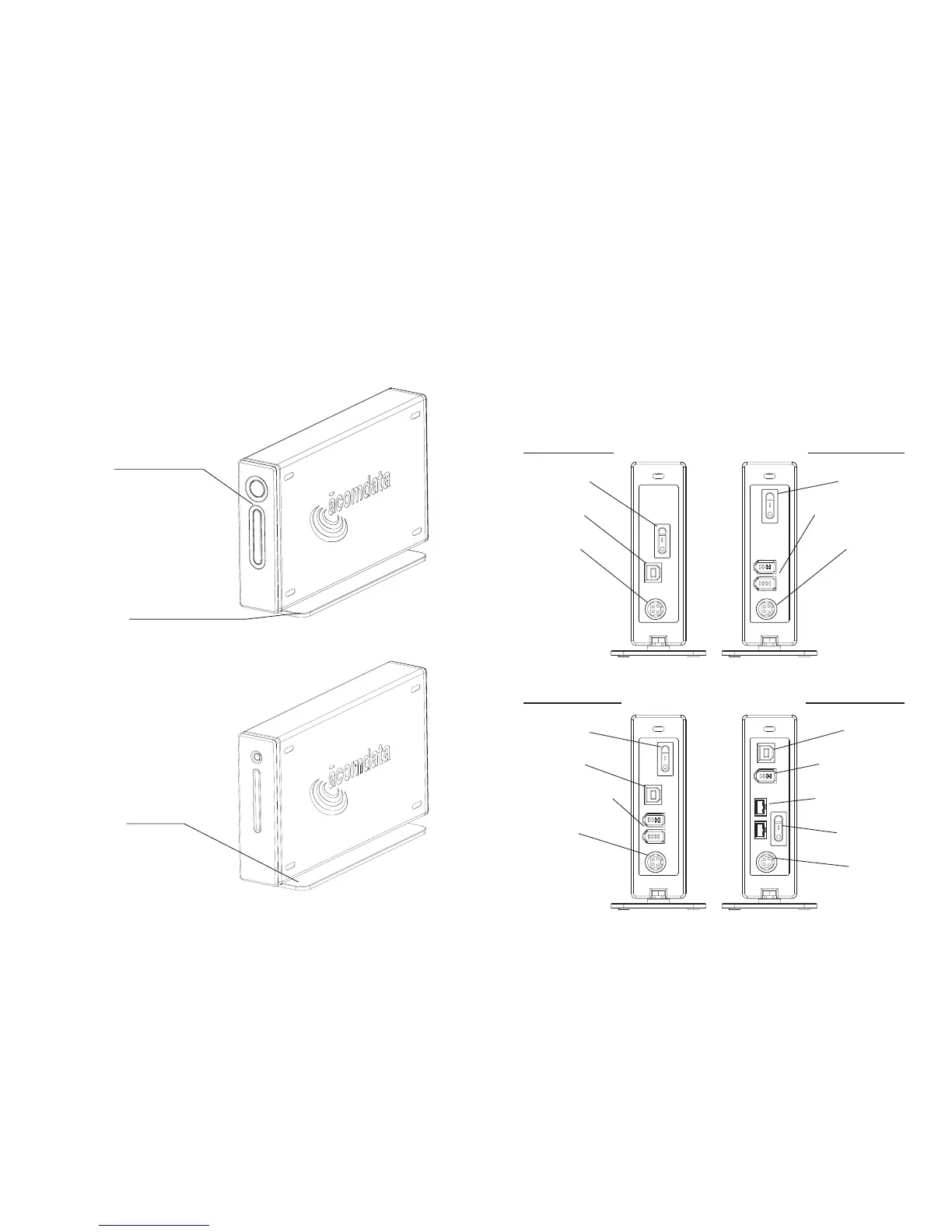
AcomData E5 Drives at a Glance
(Back Panel)
Actual layout may not be exactly as shown.
Combo A Drives
Power Switch
USB 2.0 Port
FireWire 400 Ports
Power Port
Combo B Drives
USB 2.0 Port
FireWire 400 Port
FireWire 800 Ports
Power Switch
Power Port
USB 2.0 Drives
Power Switch
USB 2.0 Port
Power Port
FireWire Drives
Power Switch
FireWire 400 Ports
Power Port
AcomData E5 Drives
at a Glance (Front View)
Non-PushButton Drives
Power-Data Light
Lights up blue when
the Drive is powered on. Flashes red
when reading or writing data.
Zinc Alloy Stand
Can be removed for horizontal place-
ment or stacking of Drives.
PushButton Drives
PushButton
Lights up blue when the Drive is pow-
ered on. Flashes red when reading or
writing data. Press to run a PushButton
Backup (Requires installation of the
PushButton Backup software. See the
PushButton Backup User’s Guide for
details.)
Zinc Alloy Stand
Can be removed for horizontal place-
ment or stacking of Drives.



 To Next Page