EasyManua.ls Logo

Acorto 2000s - Page 165

Acorto 2000s
237 pages
Print Icon
To Next Page IconTo Next Page
To Previous Page IconTo Previous Page
Loading...
Section
1
8:
Troubleshootrng
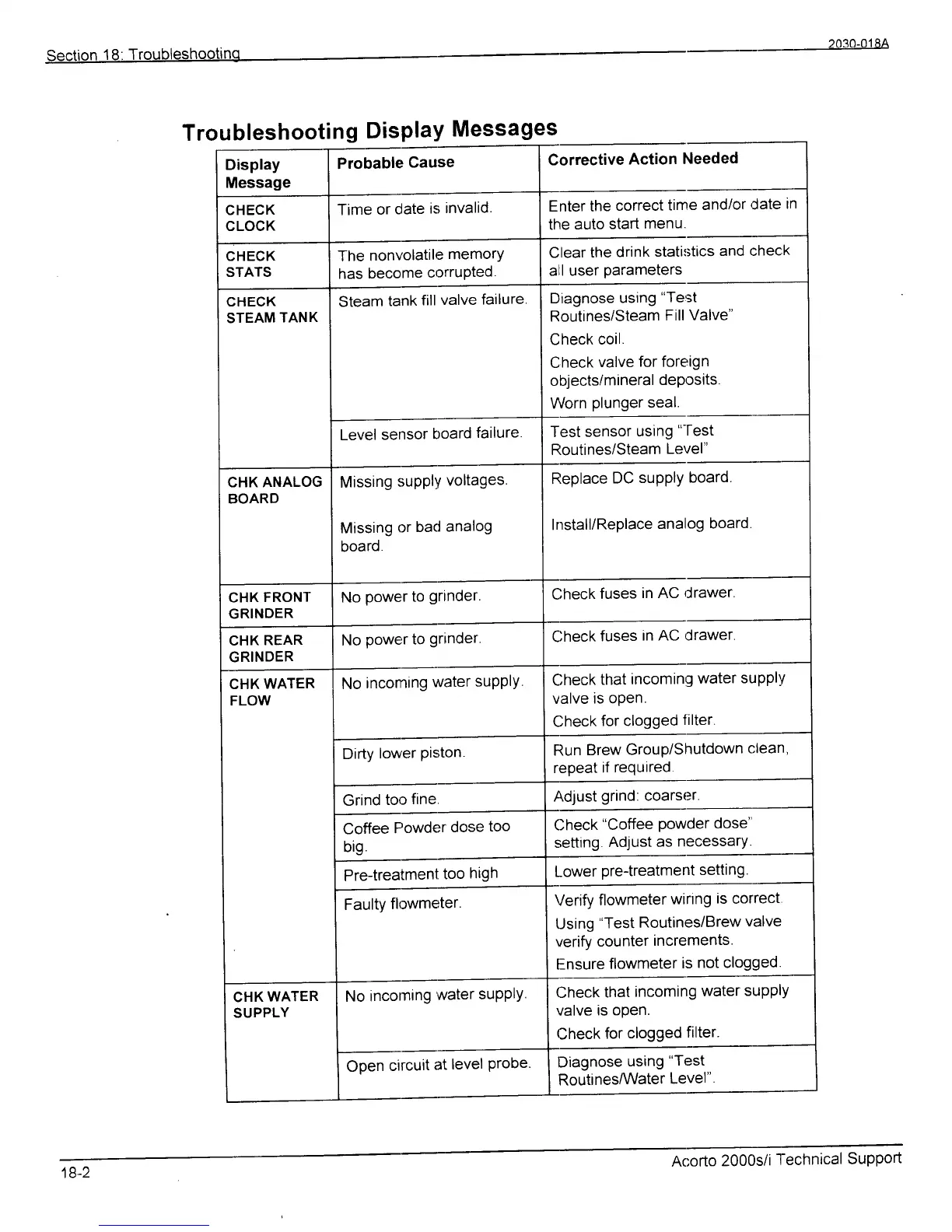
Troubleshooting
Display
Messages
Display
Message
Probable
Cause
Corrective
Action
Needed
CHECK
CLOCK
Time
or
clate
is
invalid.
Enter the
correct
time
and/or,Jate
tn
the
auto
start
menu.
CHECK
STATS
The
nonv'olatile
memorY
has
become
crrrruPted-
Clear
the
drink
stati:;tics
and check
all user
parameters
CHECK
STEAM
TANK
Steam
tank
fill
valve
failure
Diagnose
using
"Test
Routines/Steam
Fill
Valve"
Check
coil.
Check
valve
for foreign
objectsi
mineral
deposits
Worn
plunger
seal.
Level
sensor
board
failure
Test sensor
using
"-fest
Routines/Steam
Level"
CHK ANALOG
BOARD
Missing
suPP|Y
voltages
Missing
or
bad
analog
board
Replace
DC
supply
board.
Install/Replace
analog
board
CHK
FRONT
GRINDER
No
power
to
grlnder.
Check
fuses
in AC
rlrawer.
CHK
REAR
GRINDER
No
powe,r
to
grlnder
Check
fuses
in AC drawer.
CHK
WATER
FLOW
No
incoming
water
suPPlY.
Check
that
incoming
water
suPPlv
valve
is open.
Check
for clogged
filter.
Dirty
lower
Piston.
Run
Brew
Group/Shutdown
clean,
repeat
if
required
Grind
too
fine.
Ad;ust
grind:
coarser.
Coffee
Powder
dose
too
big
Check
"Coffee
powder
dose"
setting
Adjust
as
necessary.
Pre{reatment
too
high
Lower
pre-treatment
setti
ng
Faultv
flowmeter
Verify
flowmeter
wirtng
is
correct
Using
"Test
Routines/Brew
valve
verify
counter
increments.
Ensure
flowmeter
is
not clogged.
CHK
WATER
SUPPLY
No
incoming
water
suPPtY.
Check
that
incoming
water
suPP|Y
valve
is open.
Check
for
clogged
filter.
Open
circuit
at
level
Probe
Diagnose
using
"Test
RoutinesMater
Level"
18-2
Acorto
2000s/i
l-echnical
Support