EasyManua.ls Logo

Acorto 2000s - Page 177

Acorto 2000s
237 pages
Print Icon
To Next Page IconTo Next Page
To Previous Page IconTo Previous Page
Loading...
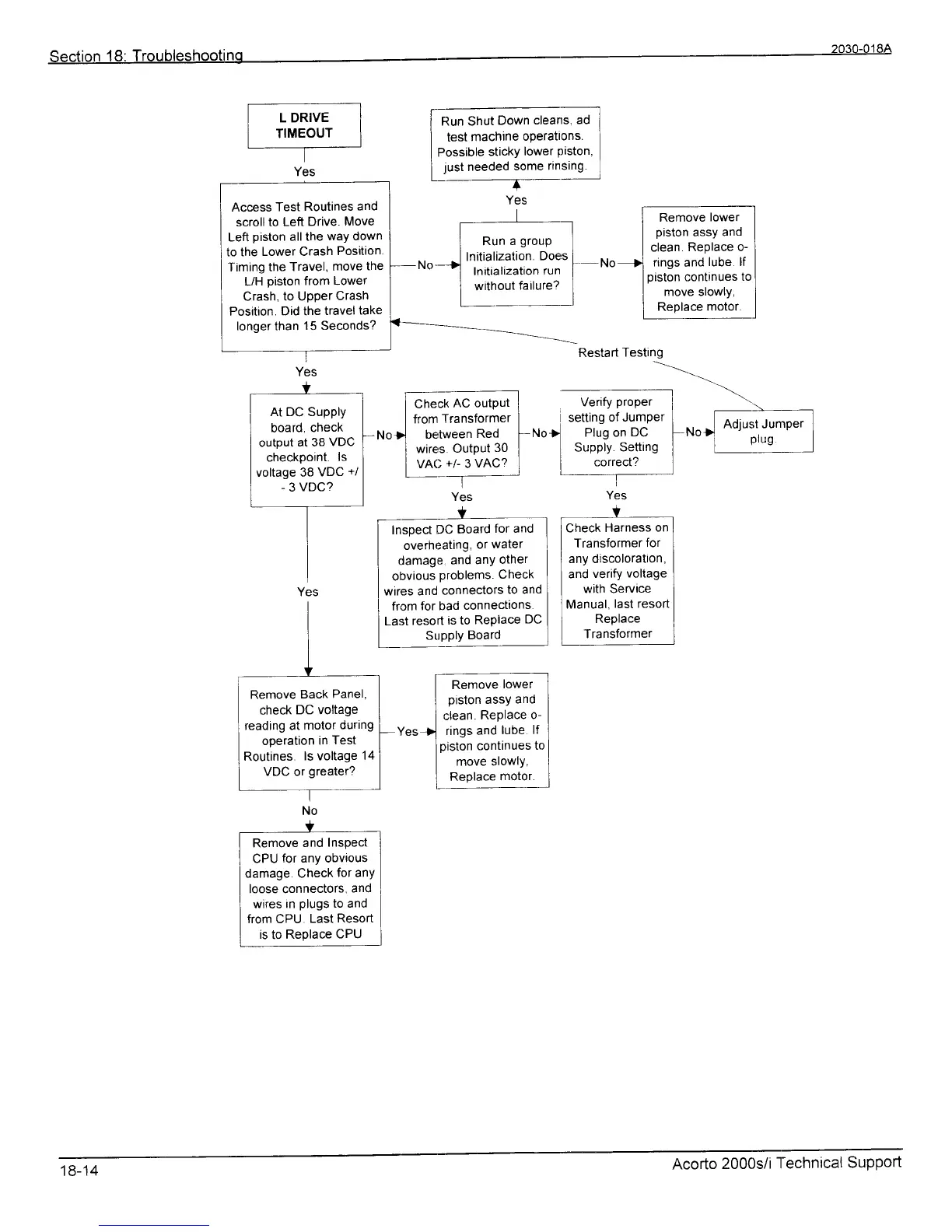
Run Shut
Down
cleans,
ad
test
machine
operatlons.
Possible
sticky
lower
Piston,
just
needed
some
rinsing.
+
Remove
lower
piston
assy
and
clean.
Replace o-
rings
and
lube lf
piston
continues
to
move slowly,
Replace
motor.
Check
AC outPut
from
Transformer
beMeen
Red
wires
OutPut
30
VAC
+l
3
VAC?
Restart
Tesl
Verify
proper
setting
of Jumper
No|
Plug on
DC
I
Supply.
Setting
I
conect?
Adjust Junrper
plug
lnsoect
DC
Board
for and
overheating,
or
water
damage.
and
anY
other
obvious
problems.
Check
wires and
connectors
to and
from
for bad
connecttons.
Last
resort
is to
Replace
DC
SupPly
Board
Yes
Y
Check
Harness
on
Transformer
for
any discoloratton,
and
verify
voltage
with Service
Manual,
last resort
Replace
Transformer
Remove
lower
piston
assy
and
clean.
Replace
o-
rings and
lube
lf
piston
continues
to
move slowlY,
Replace
motor.
Access
Test
Routines
and
scroll to
Left
Drive.
Move
Left
piston
all
the
way down
to the
Lower Crash
Position.
Timing the
Travel,
move
the
L/H
piston
from Lower
Crash,
to Upper
Crash
Position.
Did the
travel
take
longer
than
15 Seconds?
Run
a
group
lnitialization.
Does
lnitialization
run
without
failure?
At DC Supply
board,
check
output
at 38
VDC
checkpoint.
ls
voltage 38
VDC
+/
-
3
VDC?
Remove
Back
Panel,
check
DC voltage
reading at
motor
durtng
operation
in
Test
Routines.
ls voltage
14
VDC or
greater?
t
Remove
and
Inspect
CPU
for any obvious
damage Check
for any
loose connectors,
ancl
wires in
plugs
to and
from CPU
Last
Resort
is
to
Replace
CPU
18-14
Acorto
2000s/i
ltechnical
Support