EasyManua.ls Logo

Acorto 2000s - Page 178

Acorto 2000s
237 pages
Print Icon
To Next Page IconTo Next Page
To Previous Page IconTo Previous Page
Loading...
2030-0184 Section
18:
Troubleshooting
]
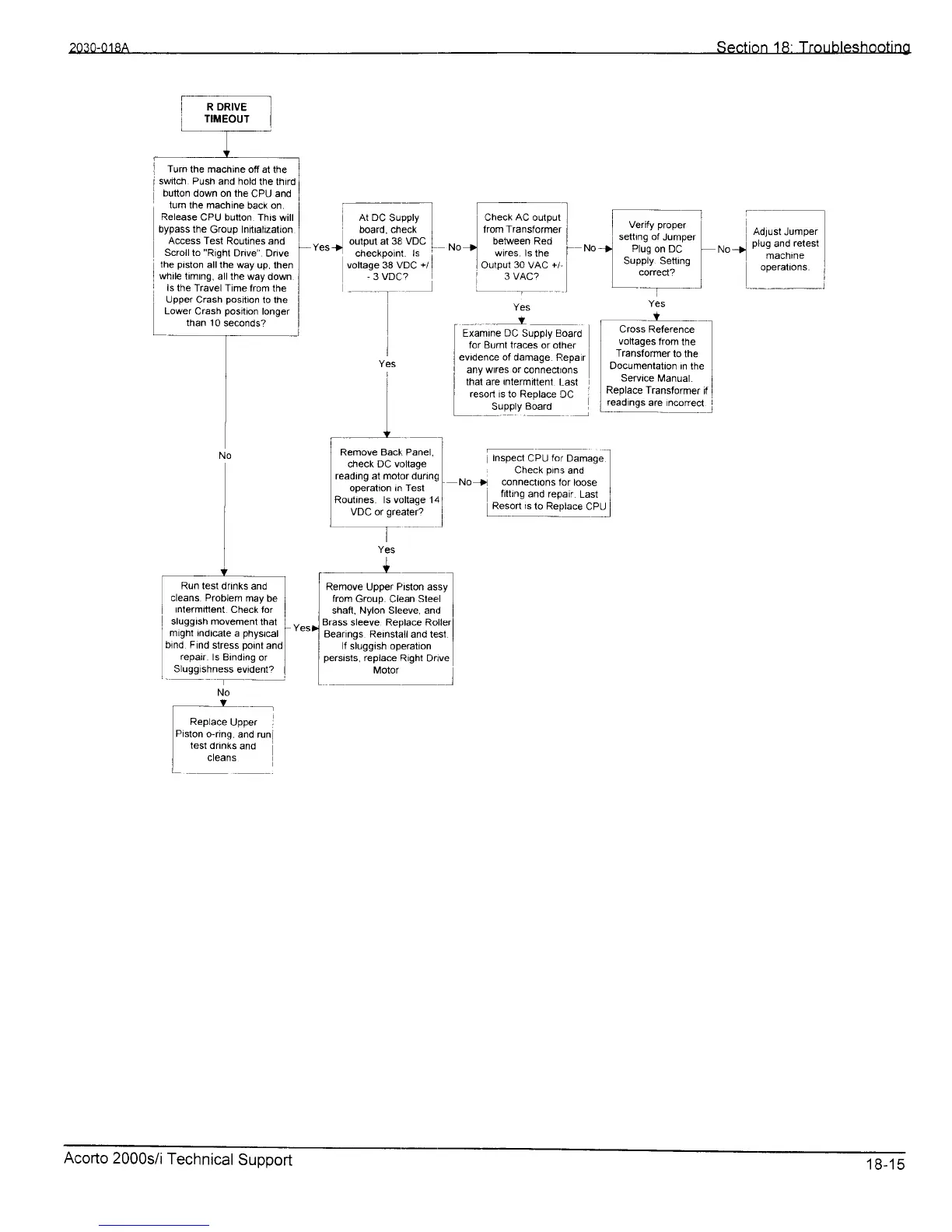
Turn
the machine
off at the
I
swilch Push
and hold
the third
i
button
down on the
CPU and
turn the machine
back on.
Release
CPU button
This will
bypass the
Group Inittalization
Access Test
Routines and
Scroll
to
"Righl
Drive".
Drive
the
piston
all the
way up, then
i
while
timrng, all
the way down
I
ls the
Travel Time from
the
Upper
Crash
position
to the
Lower
Crash
position
longer
than
'1
0 seconds?
L-
i^;*;;;l
n,o-j
nlus
and
retest
:r'"t* ]
Yes
r
--
'-
f
r
Examine
DC
Supply Eoard
]
for Buml traces
or olher
I
evidence of damage.
Flepair
I
any
wrres or
conned ons
I
that are Intermittent.
l_ast
I
resort is to Replace
DC
:
L
.rll,y.ojro
Y
___
Cross Reference
voltaqes
from
the
Transiormer
to
the
Documentatton
tn the
Service
Manuat.
I
]
Replace
Transformer
if
I
[":glg:"'1T9r9ll
I
Inspect
CPU
for
Oa."g"
l
,
Check
pins
and
No
)l
connecttons
lor loose
filting
and reprair.
Last
I
E"-:"n
,.
t" R"pk""
CIU
I
Yes
+
l
Remove Upper Pislon assy
from
Group. Clean Sleel
l
shafi, Nylon Sleeve, and
I
Brass
sleeve. Replace Rollerl
Bearings Reinstall
and test.
I
lf sluggish
operation
persists.
replace
Right Drive
_
Motor
l
_Y__-,
Replace
Upper
i
Pislon
o-ring.
and runi
test
dranks
and
cteans
Acorto
2000s/i
Technical
Support
18-15