SUBWOOFER CONNECTION
Connecting to Receivers with a SUBWOOFER or LFE Output Jack
To connect your subwoofer to your audio receiver or controller you will need a mono interconnect cable with a male RCA jack on both
ends. This can be purchased at the majority of electronics and audio stores. Make sure the length of your cable is long enough to
reach from your receiver to your subwoofer location. The cable should lie flat with a little bit of slack to give some placement flexibility.
WIRELESS HOOKUP – If you prefer a wireless connection rather than using a subwoofer cable, you can connect your PL-300
wirelessly to your digital receiver with a wireless BIC WTR-SYS kit. You can also extend your bass and add more wireless PL-300
or BIC subwoofers to your system with the purchase of wireless BIC W-Receivers. Set your additional W-Receiver(s) to the same
wireless WTR-SYS channel that your first PL-300 subwoofer is set on. Enjoy 5.2 sound from a 5.1 receiver, 7.3 sound from a 7.1
receiver or 9.4 sound from a 9.1 receiver! Or, play what’s running in your living room, basement or great room in any other area
of your home. Please contact BIC sales at 877-558-4242, ext. #1 for more information.
HOOKUP STEPS
Please Note: The PL-300 is not compatible with audio
receivers that do not have a low level subwoofer or LFE
output. If your receiver or controller does not have a
“SUB OUT”, please refer to BIC subwoofers that have
HIGH-LEVEL INPUTS.
1. IMPORTANT: Make sure that ALL stereo system
components including the subwoofer are turned OFF
before proceeding.
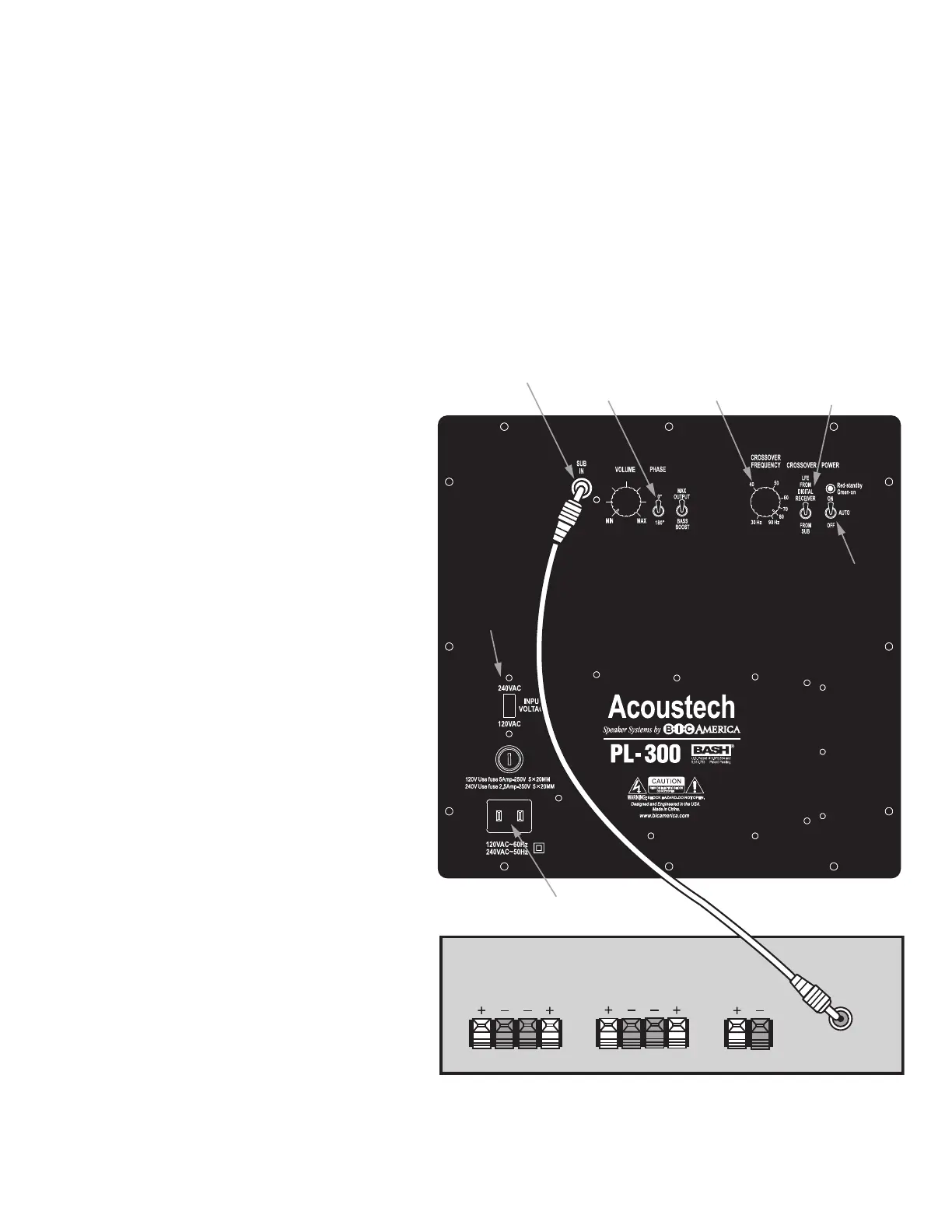
2. Locate the SUBWOOFER or LFE output connector on
the rear of your receiver or controller and connect one
end of the RCA subwoofer cable to it.
3. Route the cable to the subwoofer location (trying to
minimize areas where it may be stepped on). Connect
the other end of the cable directly to the “SUB IN”
(#1).
4. Connect the included power cord to the POWER
INPUT (#6) on the back of your PL-300. Then connect
its plug to an AC outlet ONLY. Since your PL-300
draws a moderately high amount of current, we do not
recommend plugging it into a “convenience” outlet
(switched or unswitched) found on the back of re-
ceivers and other stereo components. If your country
uses a different power cord for 240VAC, get one locally.
If using 240VAC, you will also need to set the VOLT-
AGE SWITCH (#7) to 240VAC.
5. Set the CROSSOVER FREQUENCY SWITCH (#4)
to the “FROM DIGITAL RECEIVER” position when using
Dolby Digital, DTS, THX and Bass Management equipped
receivers. This will enable you to set the crossover from
your receiver, not through the CROSSOVER FRE-
QUENCY CONTROL (#2) on the back of the sub-
woofer. Refer to your receiver’s owner manual for
instructions on how to set your crossover. Make sure the
“SUBWOOFER ON” setting is set in your receiver. Other-
wise, the receiver will not send signals to the subwoofer
resulting in no sound.
If your receiver is not DIGITAL (Ex: older Dolby Pro Logic
receiver), set the CROSSOVER FREQUENCY SWITCH
(#4) to “FROM SUB” to adjust your crossover through
your sub. See Page 5, #5 for more instructions.
6. Set the PHASE SWITCH (#2) to 0°. You will later
need to follow instructions on Page 5, #3 for room settings.
7. You are now ready to turn your POWER SWITCH(#5) on and enjoy the deep bass you have been waiting for. You can learn
more about the “AUTO” feature on this switch on Page 5, #7.
8. See Page 8 for “Initial Listening Test”.
FRONT
SPEAKERS
RIGHT LEFT
REAR
SPEAKERS
RIGHT LEFT
CENTER
SPEAKERS
RIGHT LEFT
SUBWOOFER
OR LFE
OUT
6) Power
Input
Back of Audio Receiver
3) Crossover
Frequency
Control
2) Phase
Switch
5) Power
Switch
4) Crossover
Frequency
Switch
7) Voltage
Switch
1) SUB IN
PL-300 Connection with a Sub or LFE Output Jack
7


 To Next Page
 Loading...