3.4 Adjust the volume control knob to a suitable sound level. The volume
control may be adjusted with the thumb of the same hand holding the
megaphone.*
3.5 When not in use, carry the megaphone by the neck strap, attached to top of
unit.
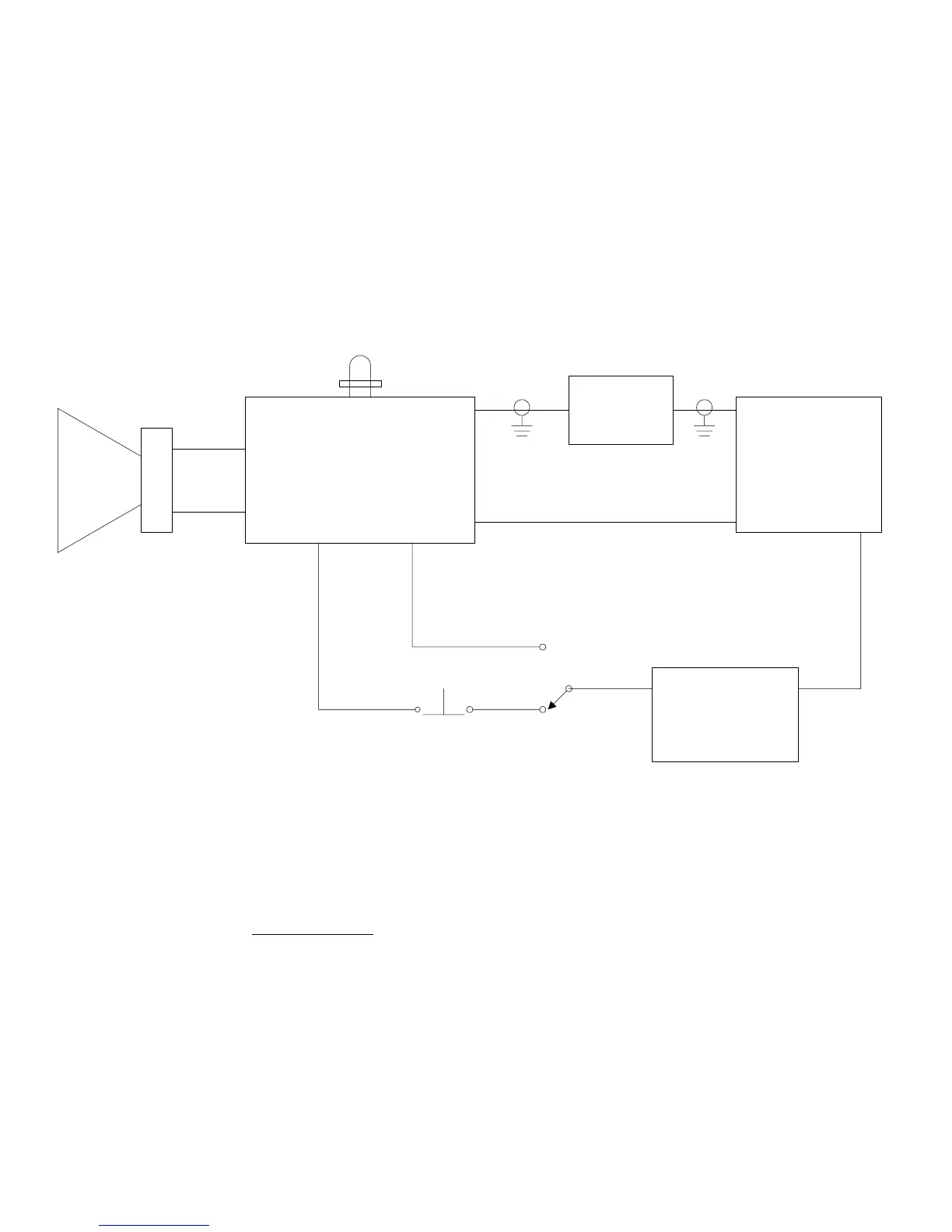
VOLUME
CONTROL
MICROPHONE
ASSEMBLY
AUDIO AMPLIFIER
SIREN CIRCUIT &
BATTERY MONITOR
MEGAPHONE
SUB-ASSEMBLY
BATTERY
PACK
(6 x AA)
LED
VISUAL
BATTERY
CHECK
SPEAKER
ASSEMBLY
N.O.
N.C.
HANDLE
SWITCH
ALARM
PLUG PIN
++
+-
-
-
*
FIGURE 1
BLOCK DIAGRAM
ACR/EM-1A, EM-1D PORTABLE SAFETY MEGAPHONE
3.6
Battery Monitor
Two types of battery monitor are available on the EM-1 series
megaphones.*
Visual - when megaphone is activated by squeezing the handle, a green
LED indication means the remaining battery capacity is greater than 50%
of initial capacity. If the green LED is out, replace batteries.
Y1-03-0014 Rev. R
4


 To Next Page