USER MANUAL 750000992/16
8-5
MTS
e
Filename
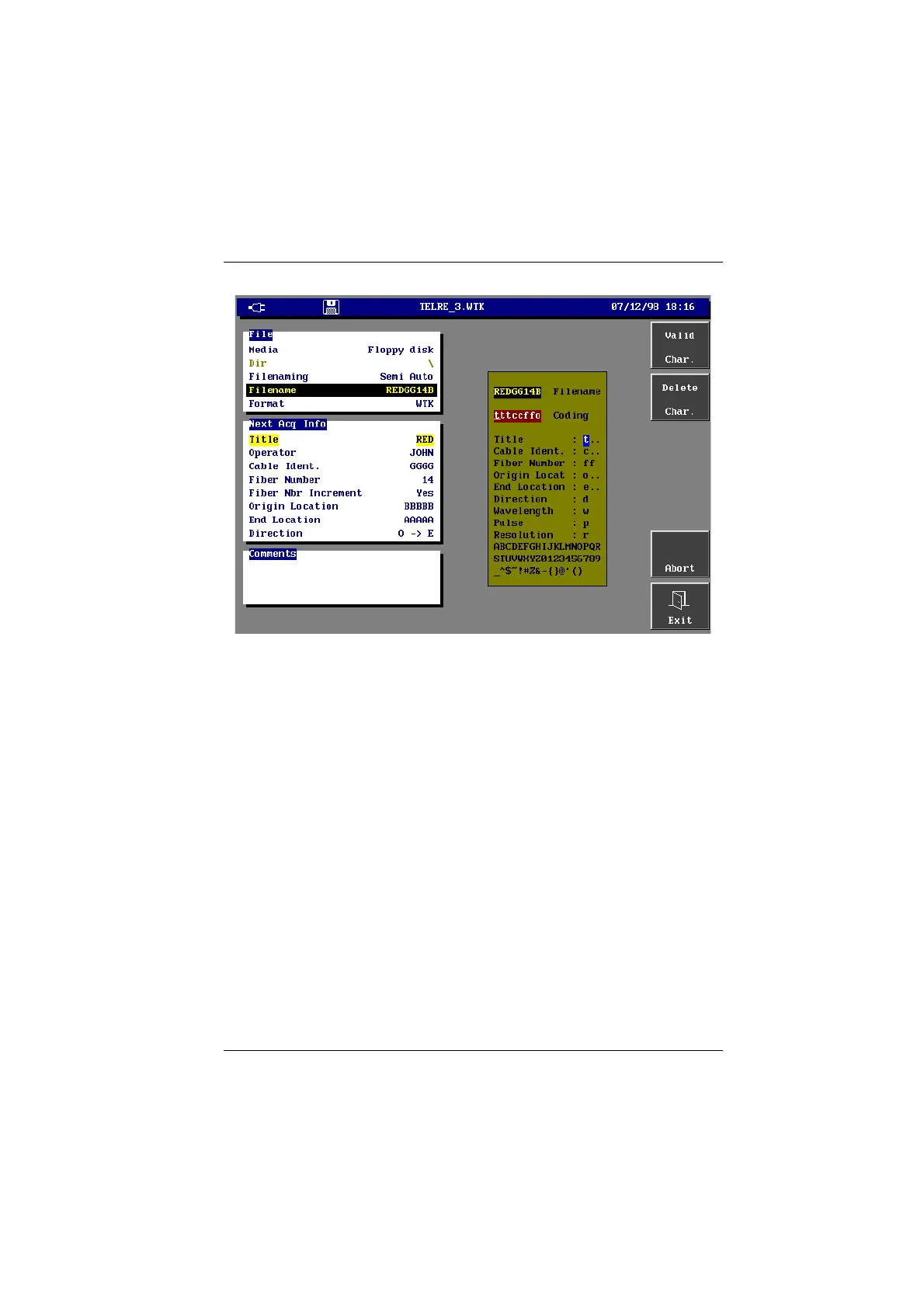
Semi-auto file naming edition
• On the Coding line of the editing menu, define the filename code. For that,
move the cursor on the different line of the menu (in the order you wish for
the coding) and enter the corresponding characters pressing the <Valid
Char.> key.
• On the Title line, enter as much «t» as you want of characters of the title in the
filename. In the above example, 3 «t» has been entered to start the coding,
then the 3 first letters of the title began the filename.
• On the Cabl. Ident., Origin and Extremity lines enter as «c», «o» or «e» as you
want of characters of the concerned identification in the filename.
• On the Fiber Number line, the 2 ff are imperative for the fiber number is
always coded on two characters (see table below). If, after the coding, a f is
remove in the coding, only the last figure of the fiber number will be in the
filename.
• To code Direction, Lambda, Pulse and Resolution only one character is
necessary: see the following table.
• The semi-automatic coding can also include fixed characters, different from
coding parameter characters and selected, as in Manual Filenaming, in the
list located on the 3 last lines of the editing menu.
Artisan Technology Group - Quality Instrumentation ... Guaranteed | (888) 88-SOURCE | www.artisantg.com


 To Next Page
 Loading...

