5
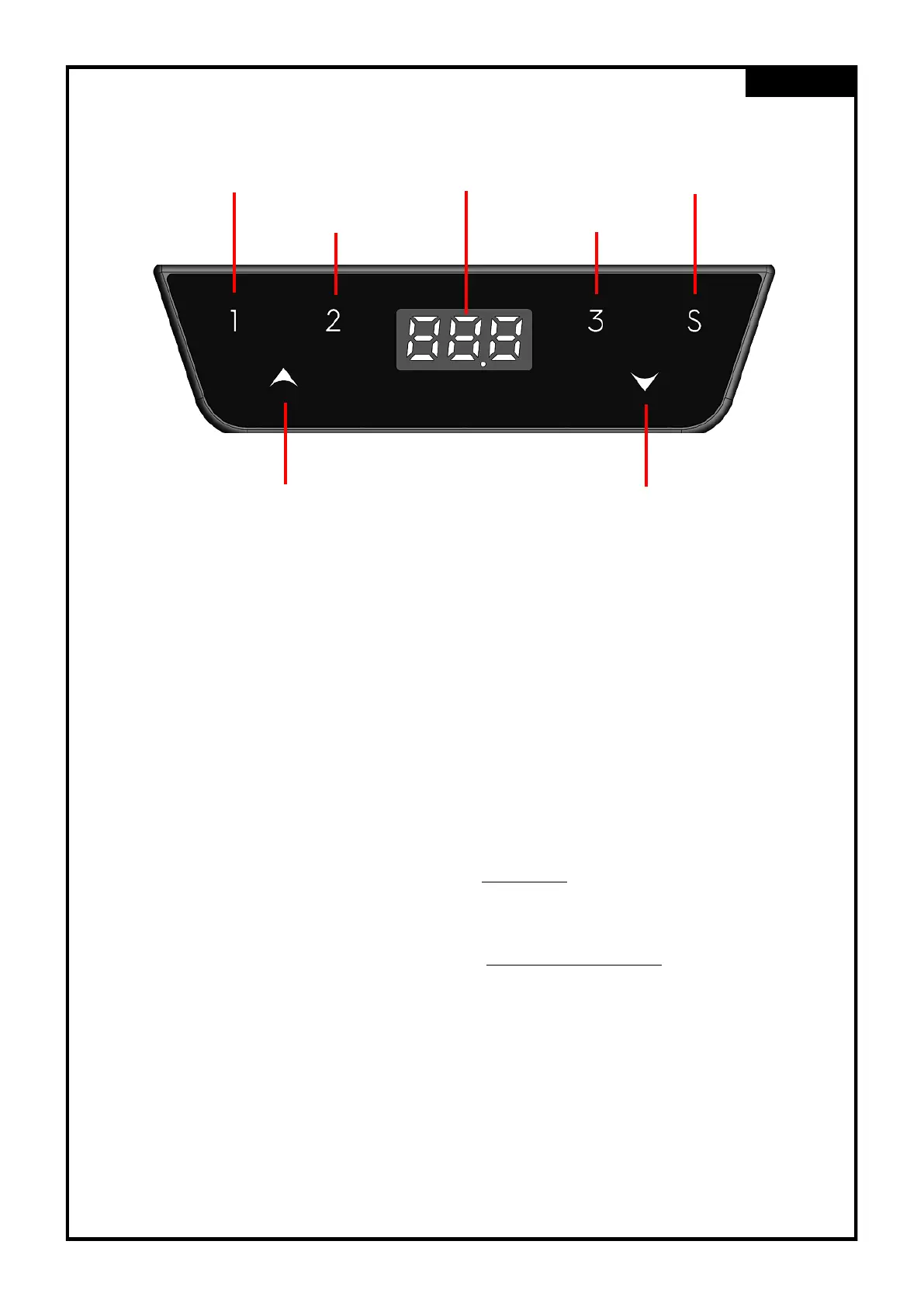
Key Overview
Elaboration of functions and features
Saving Memory Positions
• The desk shall be driven to the desired position.
• To save a memory position, Press the “S” Button.
• The 7-Segment display shows now “S– “.
• To save the current position, button 1, 2 or 3 can be chosen as a memory storage.
• The display shows the saved slot on the display.
• For example for a saved memory position on button 1: “S-1”
Retrieving Memory Positions with “double tap – Auto Adjustment” (Optional)
• To retrieve a memory position of storage 1, 2 or 3, double tap on one of the buttons within 1 sec-
ond.
Retrieving Memory Positions thru “Hold Key”
• To retrieve a memory position of storage 1, 2 or 3 , press and keep holding one of the mentioned
buttons, until the frame reached the desired position.
English
Memory Key 1
Memory Key 2
Display Save Key
Memory Key 3
Up Down


 To Next Page